Why Rtorrent 16 does not slow down: its start, measured
We restarted Rtorrent 16 with 500, 2,000 and 10,000 torrents and counted every connection attempt it made in the first ten minutes.
The start of Rtorrent 16 is a burst of connection attempts, and it comes from the client. Every torrent announces as soon as rtorrent starts it and dials the addresses its tracker returns at once. If your provider does not take that burst, three settings make the start smaller on your NAS.
- 41,000connection attempts in the first 10 seconds after a restart with 500 public torrents, the public tracker list off, when no peer answers.
- 60,672connection attempts in the busiest 10 seconds with 2,000 or 10,000 public torrents: as many sockets as rtorrent may open for peers.
- 3,076connection attempts in the first minute after adding 16 real public torrents, the list off. The first bytes arrived after 3 seconds.
Is it on our side? Yes. The burst comes from the client: libtorrent dials the addresses it gets at once, and Rtorrent 16's limit of 65,536 open files lets up to 60,672 connections wait for an answer. The same rtorrent with QTS's default limit of 1,024 files peaks at about 670 waiting connections.
What happens when Rtorrent 16 starts
Rtorrent 16 runs rtorrent and libtorrent 0.16.27. Four steps decide what your router sees after a restart.
Every torrent announces as soon as it starts
rtorrent reads its session and starts every torrent that was running. Each one sends its first announce to its first usable tracker at once. When that tracker has not answered after 3 seconds and the torrent has other usable trackers, rtorrent asks one tracker in each of its other groups.
It dials the addresses it gets at once
Rtorrent 16 asks each tracker for 100 peer addresses for a public torrent and 50 for a private one. While a torrent holds fewer connections than its minimum, rtorrent dials the addresses at once, up to its maximum of 200 (public) or 100 (private), dials still waiting included. It does not pace new connections; across all torrents only the socket ceiling below limits how many wait for an answer.
An unanswered attempt gets 60 seconds
rtorrent gives a peer 60 seconds to complete the connection. In that minute the NAS sends the same SYN packet again and again: on our test NAS with Linux 6.6, ten packets, the first included, for one address that is not there.
The ceiling is the number of open sockets
Rtorrent 16 raises rtorrent's open-files limit to 65,536. On our test NAS that left up to 60,672 sockets for peers. Apart from each torrent's own maximum, that is the only limit on how many connections wait for an answer at the same moment.
The measurement
We restarted Rtorrent 16 with 500, 2,000 and 10,000 seeding torrents on a QNAP NAS with an Intel Core i5-1235U, 16 GB of RAM and QTS 6.1. It ran the rtorrent of 16.27-14E with the default settings of the next release, alone in a network namespace with no way out: nothing it sent reached the internet. Counters stood in for the hook scripts.
A tracker of our own answered every announce with up to 200 peer addresses. Four in five never answered, one in five refused. No peer completed a connection, so every torrent kept dialling every address it got. A seeding torrent on a real tracker often gets far fewer addresses, and real peers answer.
A sampler counted, about once a second: connection attempts, connections waiting for an answer (half-open), SYN packets, announces and UDP packets. The public tracker list was off in these runs unless a chart says otherwise.
- 500 torrents
- 2,000 torrents
- 10,000 torrents
| Torrents | All announced by (s) | Busiest 10 s from (s) | Attempts, busiest 10 s | Attempts, busiest second | Most waiting at once | Attempts in 10 min |
|---|---|---|---|---|---|---|
| 500 torrents | 1.7 | 1 | 41,000 | 14,979 | 33,000 | 41,000 |
| 2,000 torrents | 2.7 | 1 | 60,672 | 14,570 | 58,362 | 164,000 |
| 10,000 torrents | 17 | 15 | 60,672 | 20,725 | 59,930 | 601,323 |
- Rtorrent 16, public torrents, with the public tracker list (default)
- Rtorrent 16, public torrents, list off
- Rtorrent 16, private torrents
- rtorrent, its own config, QTS's limit of 1,024 files
| Setup | 500 torrents | 2,000 torrents | 10,000 torrents |
|---|---|---|---|
| Rtorrent 16, public torrents, with the public tracker list (default) | 41,000 | 60,672 | 60,672 |
| Rtorrent 16, public torrents, list off | 41,000 | 60,672 | 60,672 |
| Rtorrent 16, private torrents | 25,000 | 60,672 | 55,773 |
| rtorrent, its own config, QTS's limit of 1,024 files | 805 | 809 | 672 |
- Rtorrent 16, public torrents, with the public tracker list (default)
- Rtorrent 16, public torrents, list off
- Rtorrent 16, private torrents
- rtorrent, its own config, QTS's limit of 1,024 files
| Setup | 500 torrents | 2,000 torrents | 10,000 torrents |
|---|---|---|---|
| Rtorrent 16, public torrents, with the public tracker list (default) | 1.7 | 2.8 | 18.9 |
| Rtorrent 16, public torrents, list off | 1.7 | 2.7 | 17 |
| Rtorrent 16, private torrents | 1.7 | 2.9 | 36.8 |
| rtorrent, its own config, QTS's limit of 1,024 files | 1.6 | 1.9 | 10.7 |
rtorrent dials no peer while it loads its session. With 10,000 torrents the attempts began 15 seconds after the start and filled the ceiling of 60,672 within 10 seconds; every torrent had announced after 17 seconds. The attempts come back every minute as unanswered ones time out: 601,323 in 10 minutes.
What a router and a provider see
A router that tracks connections keeps an entry for every attempt until it is answered or expires. In the lab one silent address got its SYN packet ten times in a minute, and in the busiest 10 seconds of the 2,000-torrent restart the NAS sent over 300,000 SYN packets to silent addresses.
Real peers answer, and the numbers are much smaller. With 16 public Linux torrents over a real line and the list off, Rtorrent 16 made 3,076 connection attempts in the first minute, 947 in its busiest second, with 1,449 waiting for an answer at the peak. The burst grows with the number of torrents and with the addresses each tracker returns.
A user on our forum reported that their provider cut the line while Rtorrent 16 ran, and that it came back only after the router got a new MAC address. We cannot change a provider's rules.
Why we do not slow it down
Speed, strong seeding and private trackers weigh most in Rtorrent 16. Weak networks and public torrents weigh less. A queue at start delays every torrent behind it, every time the NAS starts.
A pace costs time at every start. At 500 attempts a second, the 60,672 attempts of the busiest 10 seconds with 2,000 torrents would take 2 minutes, and the 601,323 of the first 10 minutes with 10,000 torrents 20 minutes.
So the defaults stay, and the settings below change the start only on the NAS that needs it.
What to change when your provider does not take it
Three settings make the start smaller on your NAS. We measured each one with 2,000 public torrents; with the default settings and the list on, the busiest 10 seconds held 60,672 connection attempts.
Turn off the public tracker list
Settings → Connection, with Advanced on: set Add public trackers to new public torrents to Off and save. It applies to the torrents you add from then on. The busiest 10 seconds stay the same, because the first answers already fill the ceiling; the attempts in 10 minutes drop from 423,190 to 164,000. With 16 real torrents the list made little difference: 3,282 attempts in the first minute with it, 3,076 without.

Settings → Connection with Advanced on: Add public trackers to new public torrents set to Off, waiting for Review & save. Ask for fewer peers on public torrents
Settings → Connection profiles, with Advanced on: press Custom and lower Public: peers each tracker is asked for and the max of Public profile: peers per torrent, for example to 30 and 50. Each torrent then asks for 30 addresses instead of 100. With 2,000 torrents and the list off that was still 60,000 attempts in the busiest 10 seconds, but 60,000 instead of 164,000 in 10 minutes.
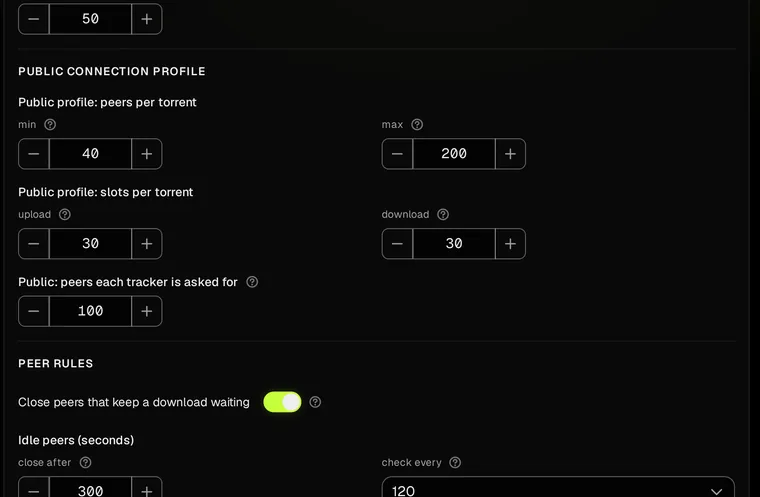
Settings → Connection profiles with Advanced on, the defaults: public torrents 40 to 200 peers, 100 asked from each tracker. Cap the open sockets
With Advanced on, add this line in Settings → Advanced → Extra rtorrent.rc lines, then press Review & save and confirm. rtorrent reads it at its next start.
network.max_open_sockets.set = 4096
With the list off and 4,096 sockets, the busiest 10 seconds held 4,475 connection attempts instead of 60,672, and at most 3,715 waited for an answer. With 1,024 they held 803. The cap counts every connection, so it also limits how many peers your torrents use at once: choose it on a NAS whose line needs it, not on a seeding archive.
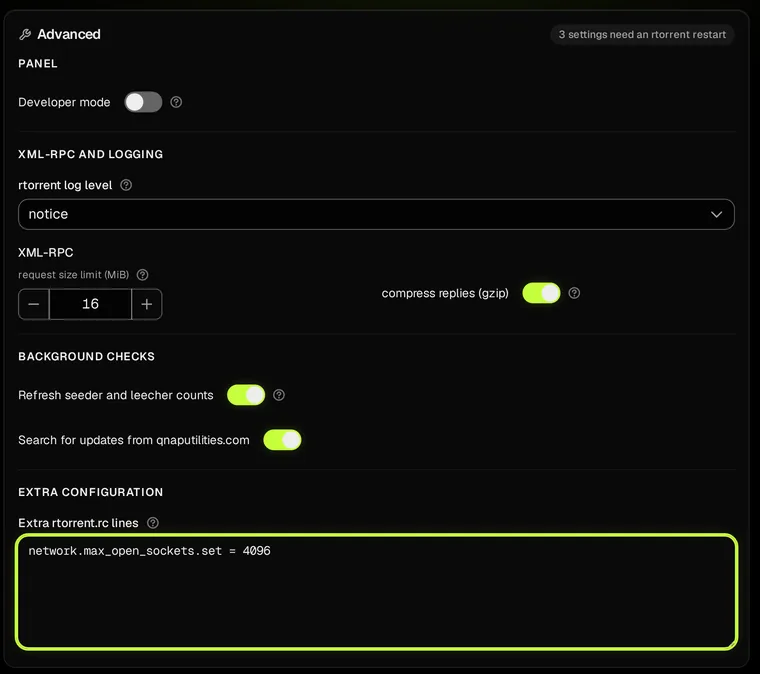
Settings → Advanced → Extra rtorrent.rc lines, with the line that caps the open sockets.
- default (list on)
- list off
- list off, 30 asked, max 50
- list off, 4,096 sockets
- list off, 1,024 sockets
| Setup | Attempts, busiest 10 s | Most waiting at once | SYN to silent addresses, busiest 10 s | Attempts in 10 min |
|---|---|---|---|---|
| default (list on) | 60,672 | 60,181 | 311,546 | 423,190 |
| list off | 60,672 | 58,362 | 309,256 | 164,000 |
| list off, 30 asked, max 50 | 60,000 | 48,000 | 306,116 | 60,000 |
| list off, 4,096 sockets | 4,475 | 3,715 | 25,221 | 37,421 |
| list off, 1,024 sockets | 803 | 666 | 4,536 | 6,453 |
In the lab the cap on sockets cut the burst most.
Repeat it on your own NAS
The archive holds every published lab run: one row about every second, every announce the lab's tracker logged, and one summary line per run. It also holds the lab's source code.
start-lab/README.md in the archive gives the setup and the commands; you bring the rtorrent binary of the package you test. The runs make tens of thousands of connection attempts: run them as root on a test NAS, never on one that serves your home.