Your QNAP needs no Entware
Packages compiled from Bucket & Code's recipes: current software for QTS and QuTS hero, installed from App Center.
Entware and Optware add a second package manager to the NAS, and it downloads programs from a feed of its own. Our packages work differently: Bucket & Code compiles each program from its source, tests it and packs it as a QPKG. App Center installs and updates the package like any other app.
TurboShell, TurboStat and TurboX contain the commands that people installed Entware for. For other programs, the same recipes build a package of your own.
{
  "name": "rsync",
  "version": "latest",
  "category": "network",
  "license": "GPL-3.0-or-later",
  "source": {
    "url": "https://github.com/RsyncProject/rsync/releases/download/v{version}/rsync-{version}.tar.gz"
  },
  "watch": {
    "kind": "github-release",
    "repo": "RsyncProject/rsync"
  },
  "deps": ["openssl", "zstd", "lz4", "xxhash", "zlib"],
  "static": true,
  "check": "bin/rsync --version | first && bin/rsync --version | has xxh128 && …"
}latest as the version and {version} in the address. Each build downloads the newest release and then runs the recipe's test.Find your command
Type a command you used from Entware. The answer names the package that contains it and says which copy runs when you type the name.
Ours when you type the name
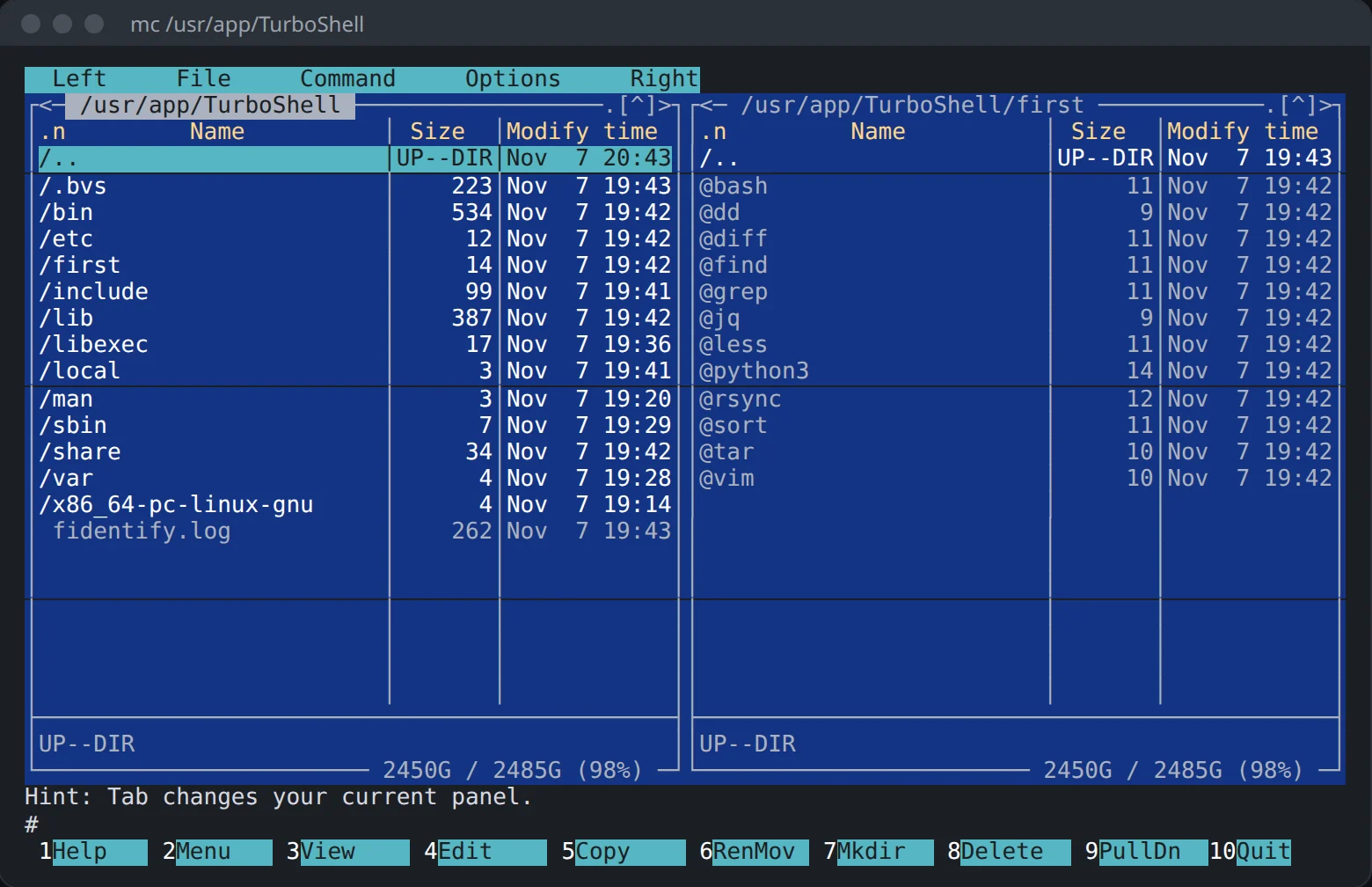
bashTurboShell
If you type bash in an SSH login, TurboShell's copy runs. In a shell you type into, the package puts its copy ahead of QTS's. Scripts, cron and a command sent directly over ssh use QTS's bash.
ddTurboShell
If you type dd in an SSH login, TurboShell's copy runs. In a shell you type into, the package puts its copy ahead of QTS's. Scripts, cron and a command sent directly over ssh use QTS's dd.
diffTurboShell
If you type diff in an SSH login, TurboShell's copy runs. In a shell you type into, the package puts its copy ahead of QTS's. Scripts, cron and a command sent directly over ssh use QTS's diff.
findTurboShell
If you type find in an SSH login, TurboShell's copy runs. In a shell you type into, the package puts its copy ahead of QTS's. Scripts, cron and a command sent directly over ssh use QTS's find.
freeTurboStat
If you type free in an SSH login, TurboStat's copy runs. In a shell you type into, the package puts its copy ahead of QTS's. Scripts, cron and a command sent directly over ssh use QTS's free.
grepTurboShell
If you type grep in an SSH login, TurboShell's copy runs. In a shell you type into, the package puts its copy ahead of QTS's. Scripts, cron and a command sent directly over ssh use QTS's grep.
hdparmTurboStat
If you type hdparm in an SSH login, TurboStat's copy runs. In a shell you type into, the package puts its copy ahead of QTS's. Scripts, cron and a command sent directly over ssh use QTS's hdparm.
iostatTurboStat
If you type iostat in an SSH login, TurboStat's copy runs. In a shell you type into, the package puts its copy ahead of QTS's. Scripts, cron and a command sent directly over ssh use QTS's iostat.
jqTurboShell
If you type jq in an SSH login, TurboShell's copy runs. In a shell you type into, the package puts its copy ahead of QTS's. Scripts, cron and a command sent directly over ssh use QTS's jq.
lessTurboShell
If you type less in an SSH login, TurboShell's copy runs. In a shell you type into, the package puts its copy ahead of QTS's. Scripts, cron and a command sent directly over ssh use QTS's less.
lspciTurboStat
If you type lspci in an SSH login, TurboStat's copy runs. In a shell you type into, the package puts its copy ahead of QTS's. Scripts, cron and a command sent directly over ssh use QTS's lspci.
python3TurboShell
If you type python3 in an SSH login, TurboShell's copy runs. In a shell you type into, the package puts its copy ahead of QTS's. Scripts, cron and a command sent directly over ssh use QTS's python3.
rsyncTurboShell
If you type rsync in an SSH login, TurboShell's copy runs. In a shell you type into, the package puts its copy ahead of QTS's. Scripts, cron and a command sent directly over ssh use QTS's rsync.
sortTurboShell
If you type sort in an SSH login, TurboShell's copy runs. In a shell you type into, the package puts its copy ahead of QTS's. Scripts, cron and a command sent directly over ssh use QTS's sort.
tarTurboShell
If you type tar in an SSH login, TurboShell's copy runs. In a shell you type into, the package puts its copy ahead of QTS's. Scripts, cron and a command sent directly over ssh use QTS's tar.
vimTurboShell
If you type vim in an SSH login, TurboShell's copy runs. In a shell you type into, the package puts its copy ahead of QTS's. Scripts, cron and a command sent directly over ssh use QTS's vim.
In our packages
7zzTurboShell
TurboShell contains 7zz, and typing the name in an SSH login runs it. If QTS has a program of the same name, QTS's copy runs, and TurboShell's copy is in /usr/app/TurboShell.
arp-scanTurboStat
TurboStat contains arp-scan, and typing the name in an SSH login runs it. If QTS has a program of the same name, QTS's copy runs, and TurboStat's copy is in /usr/app/TurboStat.
atopTurboStat
TurboStat contains atop, and typing the name in an SSH login runs it. If QTS has a program of the same name, QTS's copy runs, and TurboStat's copy is in /usr/app/TurboStat.
autosshTurboShell
TurboShell contains autossh, and typing the name in an SSH login runs it. If QTS has a program of the same name, QTS's copy runs, and TurboShell's copy is in /usr/app/TurboShell.
BitchXTurboX
TurboX contains BitchX, and typing the name in an SSH login runs it. If QTS has a program of the same name, QTS's copy runs, and TurboX's copy is in /usr/app/TurboX.
bmonTurboStat
TurboStat contains bmon, and typing the name in an SSH login runs it. If QTS has a program of the same name, QTS's copy runs, and TurboStat's copy is in /usr/app/TurboStat.
bsdtarTurboShell
TurboShell contains bsdtar, and typing the name in an SSH login runs it. If QTS has a program of the same name, QTS's copy runs, and TurboShell's copy is in /usr/app/TurboShell.
btopTurboStat
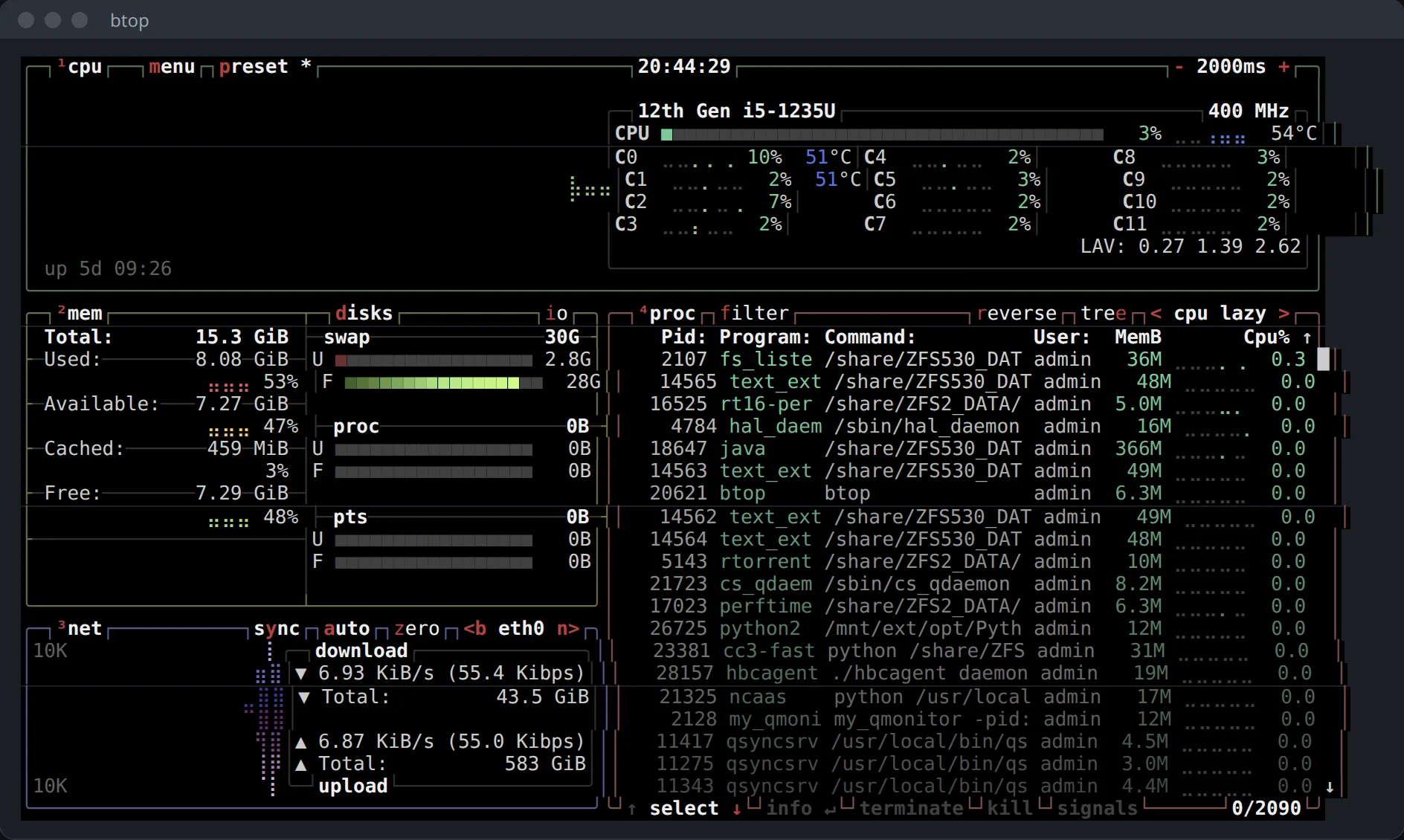
TurboStat contains btop. QTS has no program of that name, so typing btop in an SSH login runs it.
ddrescueTurboShell
TurboShell contains ddrescue, and typing the name in an SSH login runs it. If QTS has a program of the same name, QTS's copy runs, and TurboShell's copy is in /usr/app/TurboShell.
dufTurboStat
TurboStat contains duf, and typing the name in an SSH login runs it. If QTS has a program of the same name, QTS's copy runs, and TurboStat's copy is in /usr/app/TurboStat.
eggdropTurboX
TurboX contains eggdrop, and typing the name in an SSH login runs it. If QTS has a program of the same name, QTS's copy runs, and TurboX's copy is in /usr/app/TurboX. It refuses to run as root: start it as an ordinary user.
fdTurboShell
TurboShell contains fd, and typing the name in an SSH login runs it. If QTS has a program of the same name, QTS's copy runs, and TurboShell's copy is in /usr/app/TurboShell.
fishTurboShell
TurboShell contains fish, and typing the name in an SSH login runs it. If QTS has a program of the same name, QTS's copy runs, and TurboShell's copy is in /usr/app/TurboShell.
fpcTurboShell
TurboShell contains fpc, and typing the name in an SSH login runs it. If QTS has a program of the same name, QTS's copy runs, and TurboShell's copy is in /usr/app/TurboShell.
fpingTurboStat
TurboStat contains fping, and typing the name in an SSH login runs it. If QTS has a program of the same name, QTS's copy runs, and TurboStat's copy is in /usr/app/TurboStat.
fzfTurboShell
TurboShell contains fzf, and typing the name in an SSH login runs it. If QTS has a program of the same name, QTS's copy runs, and TurboShell's copy is in /usr/app/TurboShell.
gitTurboShell
TurboShell contains git. QTS has no program of that name, so typing git in an SSH login runs it.
glancesTurboStat
TurboStat contains glances, and typing the name in an SSH login runs it. If QTS has a program of the same name, QTS's copy runs, and TurboStat's copy is in /usr/app/TurboStat.
hexeditTurboShell
TurboShell contains hexedit, and typing the name in an SSH login runs it. If QTS has a program of the same name, QTS's copy runs, and TurboShell's copy is in /usr/app/TurboShell.
htopTurboStat
TurboStat contains htop. QTS has no program of that name, so typing htop in an SSH login runs it.
iftopTurboStat
TurboStat contains iftop, and typing the name in an SSH login runs it. If QTS has a program of the same name, QTS's copy runs, and TurboStat's copy is in /usr/app/TurboStat.
inxiTurboShell
TurboShell contains inxi, and typing the name in an SSH login runs it. If QTS has a program of the same name, QTS's copy runs, and TurboShell's copy is in /usr/app/TurboShell.
iopingTurboStat
TurboStat contains ioping, and typing the name in an SSH login runs it. If QTS has a program of the same name, QTS's copy runs, and TurboStat's copy is in /usr/app/TurboStat.
iotopTurboStat
TurboStat contains iotop, and typing the name in an SSH login runs it. If QTS has a program of the same name, QTS's copy runs, and TurboStat's copy is in /usr/app/TurboStat.
iperf3TurboStat
TurboStat contains iperf3. QTS has no program of that name, so typing iperf3 in an SSH login runs it.
ipmitoolTurboStat
TurboStat contains ipmitool, and typing the name in an SSH login runs it. If QTS has a program of the same name, QTS's copy runs, and TurboStat's copy is in /usr/app/TurboStat.
iptraf-ngTurboStat
TurboStat contains iptraf-ng, and typing the name in an SSH login runs it. If QTS has a program of the same name, QTS's copy runs, and TurboStat's copy is in /usr/app/TurboStat.
irssiTurboX
TurboX contains irssi, and typing the name in an SSH login runs it. If QTS has a program of the same name, QTS's copy runs, and TurboX's copy is in /usr/app/TurboX.
lftpTurboShell
TurboShell contains lftp, and typing the name in an SSH login runs it. If QTS has a program of the same name, QTS's copy runs, and TurboShell's copy is in /usr/app/TurboShell.
lsblkTurboShell
TurboShell contains lsblk, and typing the name in an SSH login runs it. If QTS has a program of the same name, QTS's copy runs, and TurboShell's copy is in /usr/app/TurboShell.
lscpuTurboShell
TurboShell contains lscpu, and typing the name in an SSH login runs it. If QTS has a program of the same name, QTS's copy runs, and TurboShell's copy is in /usr/app/TurboShell.
lsusbTurboStat
TurboStat contains lsusb, and typing the name in an SSH login runs it. If QTS has a program of the same name, QTS's copy runs, and TurboStat's copy is in /usr/app/TurboStat.
luaTurboShell
TurboShell contains lua, and typing the name in an SSH login runs it. If QTS has a program of the same name, QTS's copy runs, and TurboShell's copy is in /usr/app/TurboShell.
manTurboShell
TurboShell contains man, and typing the name in an SSH login runs it. If QTS has a program of the same name, QTS's copy runs, and TurboShell's copy is in /usr/app/TurboShell.
mcTurboShell
TurboShell contains mc. QTS has no program of that name, so typing mc in an SSH login runs it.
microTurboShell
TurboShell contains micro, and typing the name in an SSH login runs it. If QTS has a program of the same name, QTS's copy runs, and TurboShell's copy is in /usr/app/TurboShell.
mtrTurboStat
TurboStat contains mtr, and typing the name in an SSH login runs it. If QTS has a program of the same name, QTS's copy runs, and TurboStat's copy is in /usr/app/TurboStat.
nanoTurboShell
TurboShell contains nano, and typing the name in an SSH login runs it. If QTS has a program of the same name, QTS's copy runs, and TurboShell's copy is in /usr/app/TurboShell.
ncatTurboStat
TurboStat contains ncat, and typing the name in an SSH login runs it. If QTS has a program of the same name, QTS's copy runs, and TurboStat's copy is in /usr/app/TurboStat.
ncduTurboStat
TurboStat contains ncdu, and typing the name in an SSH login runs it. If QTS has a program of the same name, QTS's copy runs, and TurboStat's copy is in /usr/app/TurboStat.
nethogsTurboStat
TurboStat contains nethogs, and typing the name in an SSH login runs it. If QTS has a program of the same name, QTS's copy runs, and TurboStat's copy is in /usr/app/TurboStat.
nloadTurboStat
TurboStat contains nload, and typing the name in an SSH login runs it. If QTS has a program of the same name, QTS's copy runs, and TurboStat's copy is in /usr/app/TurboStat.
nmapTurboStat
TurboStat contains nmap. QTS has no program of that name, so typing nmap in an SSH login runs it.
nmonTurboStat
TurboStat contains nmon, and typing the name in an SSH login runs it. If QTS has a program of the same name, QTS's copy runs, and TurboStat's copy is in /usr/app/TurboStat.
parallelTurboShell
TurboShell contains parallel, and typing the name in an SSH login runs it. If QTS has a program of the same name, QTS's copy runs, and TurboShell's copy is in /usr/app/TurboShell.
perlTurboShell
TurboShell contains perl, and typing the name in an SSH login runs it. If QTS has a program of the same name, QTS's copy runs, and TurboShell's copy is in /usr/app/TurboShell.
pigzTurboShell
TurboShell contains pigz, and typing the name in an SSH login runs it. If QTS has a program of the same name, QTS's copy runs, and TurboShell's copy is in /usr/app/TurboShell.
pip3TurboShell
TurboShell contains pip3, and typing the name in an SSH login runs it. If QTS has a program of the same name, QTS's copy runs, and TurboShell's copy is in /usr/app/TurboShell.
pure-ftpdTurboX
TurboX contains pure-ftpd, and typing the name in an SSH login runs it. If QTS has a program of the same name, QTS's copy runs, and TurboX's copy is in /usr/app/TurboX.
resticTurboShell
TurboShell contains restic, and typing the name in an SSH login runs it. If QTS has a program of the same name, QTS's copy runs, and TurboShell's copy is in /usr/app/TurboShell.
rgTurboShell
TurboShell contains rg, and typing the name in an SSH login runs it. If QTS has a program of the same name, QTS's copy runs, and TurboShell's copy is in /usr/app/TurboShell.
sensorsTurboStat
TurboStat contains sensors, and typing the name in an SSH login runs it. If QTS has a program of the same name, QTS's copy runs, and TurboStat's copy is in /usr/app/TurboStat.
smartctlTurboStat
TurboStat contains smartctl, and typing the name in an SSH login runs it. If QTS has a program of the same name, QTS's copy runs, and TurboStat's copy is in /usr/app/TurboStat.
socatTurboShell
TurboShell contains socat, and typing the name in an SSH login runs it. If QTS has a program of the same name, QTS's copy runs, and TurboShell's copy is in /usr/app/TurboShell.
ssh-copy-idTurboShell
TurboShell contains ssh-copy-id, and typing the name in an SSH login runs it. If QTS has a program of the same name, QTS's copy runs, and TurboShell's copy is in /usr/app/TurboShell.
sshfsTurboShell
TurboShell contains sshfs, and typing the name in an SSH login runs it. If QTS has a program of the same name, QTS's copy runs, and TurboShell's copy is in /usr/app/TurboShell.
sshpassTurboShell
TurboShell contains sshpass, and typing the name in an SSH login runs it. If QTS has a program of the same name, QTS's copy runs, and TurboShell's copy is in /usr/app/TurboShell.
straceTurboStat
TurboStat contains strace, and typing the name in an SSH login runs it. If QTS has a program of the same name, QTS's copy runs, and TurboStat's copy is in /usr/app/TurboStat.
tclshTurboX
TurboX contains tclsh, and typing the name in an SSH login runs it. If QTS has a program of the same name, QTS's copy runs, and TurboX's copy is in /usr/app/TurboX.
tcpdumpTurboStat
TurboStat contains tcpdump, and typing the name in an SSH login runs it. If QTS has a program of the same name, QTS's copy runs, and TurboStat's copy is in /usr/app/TurboStat.
testdiskTurboShell
TurboShell contains testdisk, and typing the name in an SSH login runs it. If QTS has a program of the same name, QTS's copy runs, and TurboShell's copy is in /usr/app/TurboShell.
tmuxTurboShell
TurboShell contains tmux. QTS has no program of that name, so typing tmux in an SSH login runs it.
unrealircdTurboX
TurboX contains unrealircd, and typing the name in an SSH login runs it. If QTS has a program of the same name, QTS's copy runs, and TurboX's copy is in /usr/app/TurboX. It refuses to run as root: start it as an ordinary user.
vnstatTurboStat
TurboStat contains vnstat, and typing the name in an SSH login runs it. If QTS has a program of the same name, QTS's copy runs, and TurboStat's copy is in /usr/app/TurboStat.
zncTurboX
TurboX contains znc, and typing the name in an SSH login runs it. If QTS has a program of the same name, QTS's copy runs, and TurboX's copy is in /usr/app/TurboX. It refuses to run as root: start it as an ordinary user.
zshTurboShell
TurboShell contains zsh, and typing the name in an SSH login runs it. If QTS has a program of the same name, QTS's copy runs, and TurboShell's copy is in /usr/app/TurboShell.
zstdTurboShell
TurboShell contains zstd, and typing the name in an SSH login runs it. If QTS has a program of the same name, QTS's copy runs, and TurboShell's copy is in /usr/app/TurboShell.
QTS's copy by name, ours by full path
7zTurboShell
QTS has its own 7z, and typing the name runs QTS's copy. TurboShell also contains 7z, in /usr/app/TurboShell: run it by its full path.
awkTurboShell
QTS has its own awk, and typing the name runs QTS's copy. TurboShell also contains awk, in /usr/app/TurboShell: run it by its full path.
bzip2TurboShell
QTS has its own bzip2, and typing the name runs QTS's copy. TurboShell also contains bzip2, in /usr/app/TurboShell: run it by its full path.
curlTurboShell
QTS has its own curl, and typing the name runs QTS's copy. TurboShell also contains curl, in /usr/app/TurboShell: run it by its full path.
dmidecodeTurboStat
QTS has its own dmidecode, and typing the name runs QTS's copy. TurboStat also contains dmidecode, in /usr/app/TurboStat: run it by its full path.
ethtoolTurboStat
QTS has its own ethtool, and typing the name runs QTS's copy. TurboStat also contains ethtool, in /usr/app/TurboStat: run it by its full path.
fioTurboStat
QTS has its own fio, and typing the name runs QTS's copy. TurboStat also contains fio, in /usr/app/TurboStat: run it by its full path.
gzipTurboShell
QTS has its own gzip, and typing the name runs QTS's copy. TurboShell also contains gzip, in /usr/app/TurboShell: run it by its full path.
ipTurboStat
QTS has its own ip, and typing the name runs QTS's copy. TurboStat also contains ip, in /usr/app/TurboStat: run it by its full path.
lsofTurboStat
QTS has its own lsof, and typing the name runs QTS's copy. TurboStat also contains lsof, in /usr/app/TurboStat: run it by its full path.
nvmeTurboStat
QTS has its own nvme, and typing the name runs QTS's copy. TurboStat also contains nvme, in /usr/app/TurboStat: run it by its full path.
psTurboStat
QTS has its own ps, and typing the name runs QTS's copy. TurboStat also contains ps, in /usr/app/TurboStat: run it by its full path.
pvTurboStat
QTS has its own pv, and typing the name runs QTS's copy. TurboStat also contains pv, in /usr/app/TurboStat: run it by its full path.
scpTurboShell
QTS has its own scp, and typing the name runs QTS's copy. TurboShell also contains scp, in /usr/app/TurboShell: run it by its full path.
screenTurboShell
QTS has its own screen, and typing the name runs QTS's copy. TurboShell also contains screen, in /usr/app/TurboShell: run it by its full path.
sedTurboShell
QTS has its own sed, and typing the name runs QTS's copy. TurboShell also contains sed, in /usr/app/TurboShell: run it by its full path.
sshTurboShell
QTS has its own ssh, and typing the name runs QTS's copy. TurboShell also contains ssh, in /usr/app/TurboShell: run it by its full path.
topTurboStat
QTS has its own top, and typing the name runs QTS's copy. TurboStat also contains top, in /usr/app/TurboStat: run it by its full path.
tracerouteTurboStat
QTS has its own traceroute, and typing the name runs QTS's copy. TurboStat also contains traceroute, in /usr/app/TurboStat: run it by its full path.
unrarTurboShell
QTS has its own unrar, and typing the name runs QTS's copy. TurboShell also contains unrar, in /usr/app/TurboShell: run it by its full path.
wgetTurboShell
QTS has its own wget, and typing the name runs QTS's copy. TurboShell also contains wget, in /usr/app/TurboShell: run it by its full path.
xzTurboShell
QTS has its own xz, and typing the name runs QTS's copy. TurboShell also contains xz, in /usr/app/TurboShell: run it by its full path.
Has a recipe, not in the three packages
borg
None of the three packages contains borg. Bucket & Code has a recipe for it: add the recipe to a package of your own in the App Builder.
emacs
None of the three packages contains emacs. Bucket & Code has a recipe for it: add the recipe to a package of your own in the App Builder.
gdb
None of the three packages contains gdb. Bucket & Code has a recipe for it: add the recipe to a package of your own in the App Builder.
gpg
None of the three packages contains gpg. Bucket & Code has a recipe for it: add the recipe to a package of your own in the App Builder.
ltrace
None of the three packages contains ltrace. Bucket & Code has a recipe for it: add the recipe to a package of your own in the App Builder.
mosh
None of the three packages contains mosh. Bucket & Code has a recipe for it: add the recipe to a package of your own in the App Builder.
node
None of the three packages contains node. Bucket & Code has a recipe for it: add the recipe to a package of your own in the App Builder.
rclone
None of the three packages contains rclone. Bucket & Code has a recipe for it: add the recipe to a package of your own in the App Builder.
ruby
None of the three packages contains ruby. Bucket & Code has a recipe for it: add the recipe to a package of your own in the App Builder.
tshark
None of the three packages contains tshark. Bucket & Code has a recipe for it: add the recipe to a package of your own in the App Builder.
What we did not add, and why
cmake
Compilers stay in Bucket & Code's builder environments. A package you install on the NAS contains programs and no toolchain.
crontab
QTS ships crontab itself, so no package of ours adds a second copy.
dstat
The dstat project has ended. TurboStat's vmstat, iostat, atop and glances show the same figures.
gcc
Compilers stay in Bucket & Code's builder environments. A package you install on the NAS contains programs and no toolchain.
iconv
TurboShell's Perl includes piconv, which accepts the same -f and -t options.
nc
On a QNAP NAS the name nc belongs to QNAP's Notification Center tool. TurboStat's ncat and TurboShell's socat do what netcat does.
opkg
There is no opkg, because you do not add programs one by one. A program comes with a package, or you add one line to a recipe list and build again in Bucket & Code.
sudo
QTS ships sudo itself, so no package of ours adds a second copy.
unzip
QTS ships unzip itself, so no package of ours adds a second copy.
zip
QTS ships zip itself, so no package of ours adds a second copy.
From recipe to App Center
Every package goes through the same five steps. If a recipe fails its audit or its check, the build stops and nothing is packed.
Recipe
The recipe names a source address over https, the recipes it depends on, and a test. Give a version number or latest; the App Builder records each download and rejects a file that changes under the same version.
a version or latestBuilder
An Ubuntu 24.04 environment on the NAS compiles the recipe into the app's folder. Its glibc 2.39 is the lowest that QTS 6.0 and QuTS hero 6.0 ship, so the programs run on both.
glibc 2.39Audit
The App Builder checks every program and library it built. A program can load only glibc and the libraries of its own recipe or of the recipes it depends on; an undeclared library stops the build.
ELF rulesCheck
The recipe's own test runs in a clean environment: rsync copies a file, a server answers on a free port, a full-screen program draws its screen.
a test per recipeQPKG
Export as QPKG packs the app with its licences. App Center installs it, links it at /usr/app/<name> and adds one line to the login profile.
App Center
Three packages
Each package is an App Builder app, built from a recipe list that you can read and change.
 TurboShell77 recipesShells, the GNU tools, 16 archivers and compressors, tmux, Midnight Commander, editors, git, Perl, Python and Free Pascal.
 TurboStat43 recipesWhat the NAS is doing: htop, btop, atop, glances, iotop, iftop, nethogs, vnstat, mtr, tcpdump, iperf3, nmap, smartctl and sensors.
 TurboX10 recipesIRC on the NAS: irssi and BitchX, the Eggdrop bot, the UnrealIRCd server with Anope services, the ZNC bouncer and Pure-FTPd.
Which copy runs
QTS has its own copies of many commands, and its scripts call them by name. The packages do not change those scripts.
In a shell you type into, a short list of our commands goes first: TurboShell's rsync, bash, tar, jq, python3, vim, less, grep, find, sort, dd and diff, and TurboStat's hdparm, iostat, lspci and free. QTS's copies do not accept options that people use every day: rsync --info=progress2 on QuTS hero 6.0, tar --zstd, sort -h, hdparm -I.
Scripts, cron and a command sent directly over ssh use QTS's commands. To use our rsync from another computer, give its full path:
rsync --rsync-path=/usr/app/TurboShell/bin/rsync ...
To put a whole package first in the shell you are in:
export PATH=/usr/app/TurboStat/bin:/usr/app/TurboStat/sbin:$PATH
command -v rsync
/usr/app/TurboShell/first/rsync
rsync --version | head -1
rsync version 3.5.1 protocol version 33
tar --version | head -1
tar (GNU tar) 1.35
Build your own package
Bucket & Code ships the recipe lists of the three packages as Editor projects, and its App Builder library contains 548 recipes. Pick the ones you need, build them on your NAS and export a QPKG.
- 220 libraries
- 160 tools
- 70 network
- 33 servers
- 28 core
- 19 languages
- 9 editors
- 9 shells
- Install Bucket & Code Server IDE from App Center.
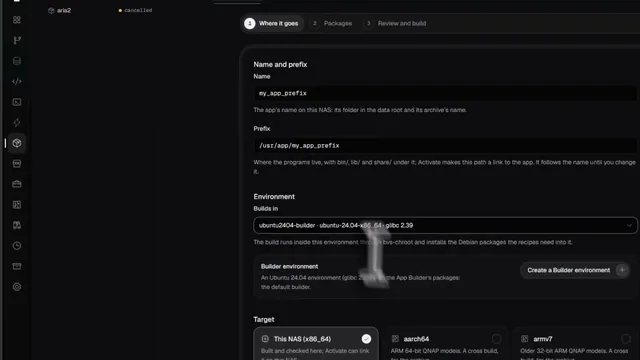
- In the App Builder make a new app, pick its recipes and press Build. The first build compiles every recipe; a later one rebuilds only the recipes whose sources or build scripts changed.
- Export makes a QPKG once the QDK toolchain is installed. Install the file, or offer it from an App Center repository of your own.
 See it done in Bucket & Code
Compile Any App You Need Without Linux Skills: Build QPKG & Deploy Easily (Freeware)
8 min on YouTube
Limits
- The three packages are built for Intel and AMD processors (x86_64) and need QTS 6.0 or QuTS hero 6.0 or newer.
- No opkg and no package feed run on the NAS. If a program is missing, it comes with a new package version, or you add a recipe line and build a package of your own.
- A command sent directly over ssh reads no login profile, so it gets QTS's copy. Give our program's full path.
- Installing a package downloads one QPKG file from our App Center repository and nothing else.