 WebPortico


One website is only the beginning
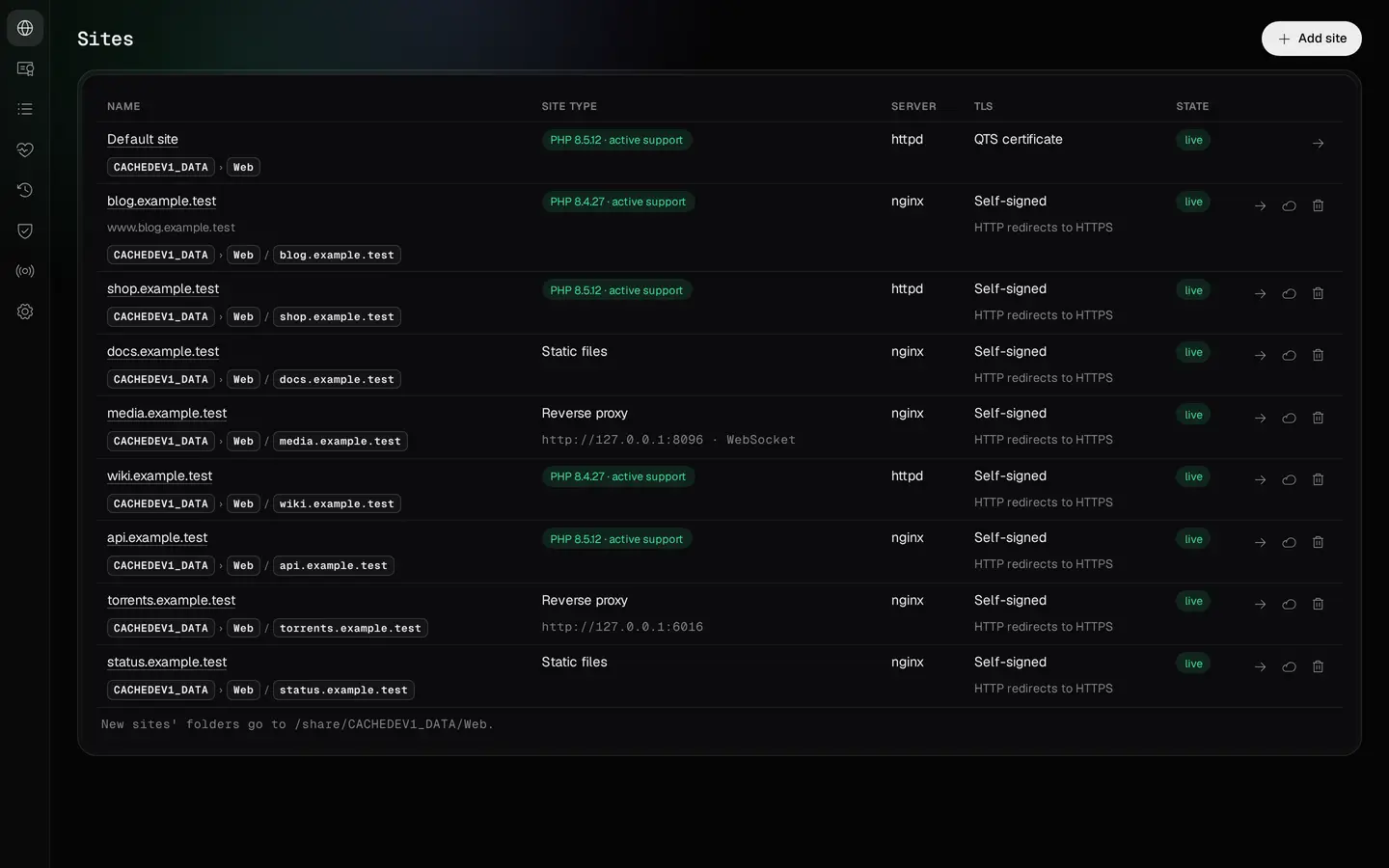
A single NAS can host several separate websites. One may be a plain HTML site, another a PHP application, and a third an address that forwards to a service running in a container or on another device on your network.
WebPortico organises settings around each website. Its domains, site type, PHP configuration, database, certificate, scheduled tasks and logs are kept together. You do not have to hunt through server configuration files every time you add a project.

Static websites
A company site, portfolio, documentation or custom landing page does not need PHP or a database. Create a static site and place its HTML, CSS, JavaScript and image files in its public/ directory.

PHP applications
A blog, RSS reader, service dashboard or file-management application may need PHP, a database or additional extensions. WebPortico lets you choose the PHP version and web server for the application. The FreshRSS, Heimdall and FileRise examples show what a deployment looks like in practice.

Services under your own domain
An application can keep running on the NAS, in a container or on another device on your local network. A reverse-proxy site forwards requests from the selected domain to that service. It does not move the application or its data; it gives the service a web address and routes requests through the front-end server.
Choose PHP to suit the application
Two websites on the same NAS can use different PHP versions. WebPortico runs a separate PHP-FPM master, with its own configuration and worker pool, for each PHP site. Changing one site's settings does not require switching PHP across the other projects.
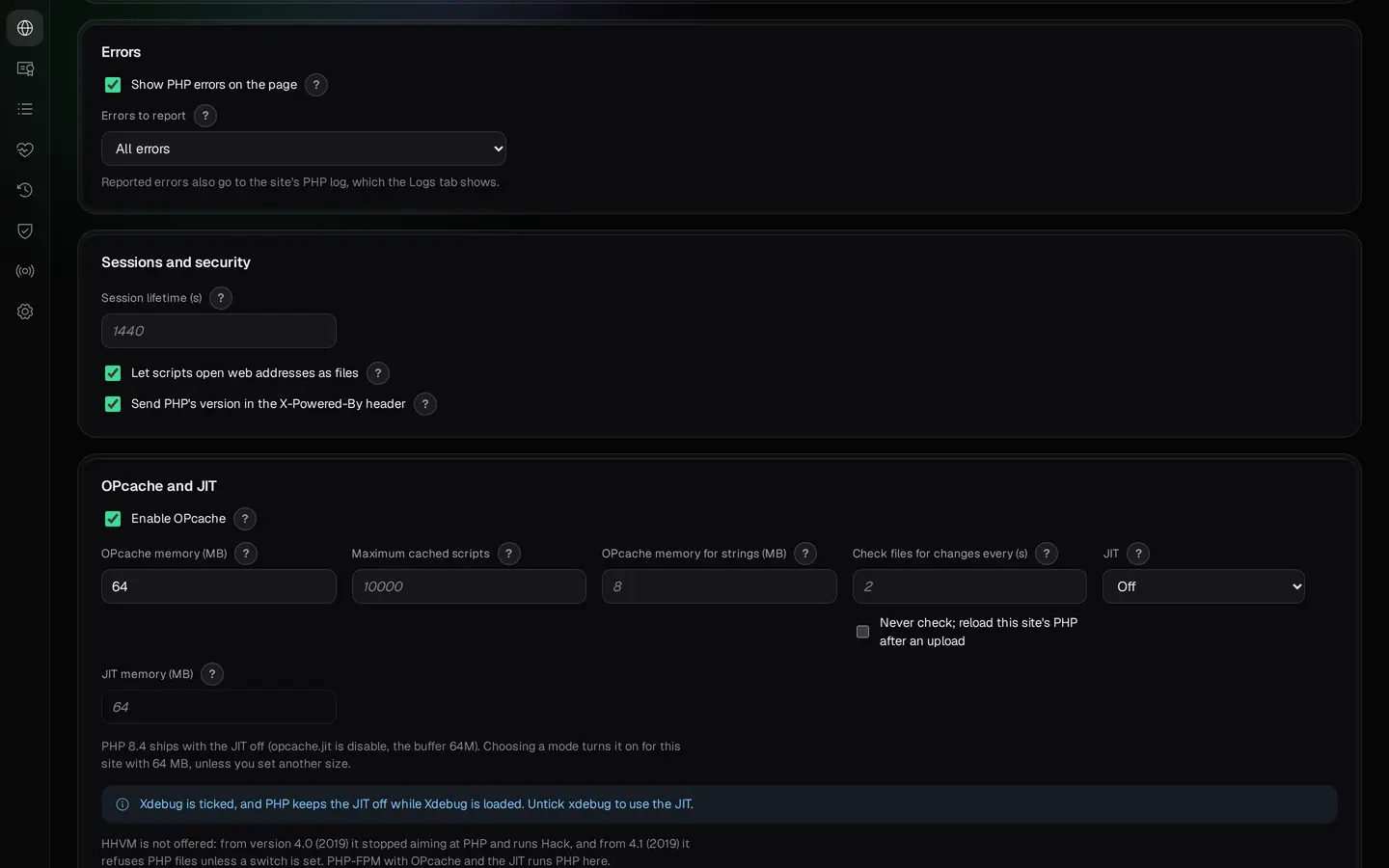
For each site, you can set memory and upload limits, maximum script execution time, time zone, error reporting, extensions and PHP-FPM pool parameters. OPcache, JIT and APCu settings are also available. The panel shows the support status of the selected PHP branch.
If an application relies on .htaccess rules, choose Apache httpd. Otherwise, nginx is available. Select the web server to match the application's requirements.
Separate PHP-FPM processes do not mean separate machines. Websites still share the NAS processor, RAM and storage. Separate accounts and worker pools make administration easier, but they cannot shield other services from an overloaded NAS.

Worker processes of one site: the process manager, their number and their limits.
Panel detail. Enlarge the image to see the full view.
Database engines for different applications
WebPortico supports MariaDB, Percona Server and PostgreSQL. The panel lists the database engines included in the installed package build. You can create a database and a separate user account for a website.
Applications compatible with MySQL can use a compatible engine such as MariaDB or Percona Server. PostgreSQL is a separate database engine and requires application-level PostgreSQL support.
Not every website needs a SQL server. A static site does not need a database. An application that uses SQLite manages its own file-based database; SQLite is not a database server managed by the WebPortico panel.
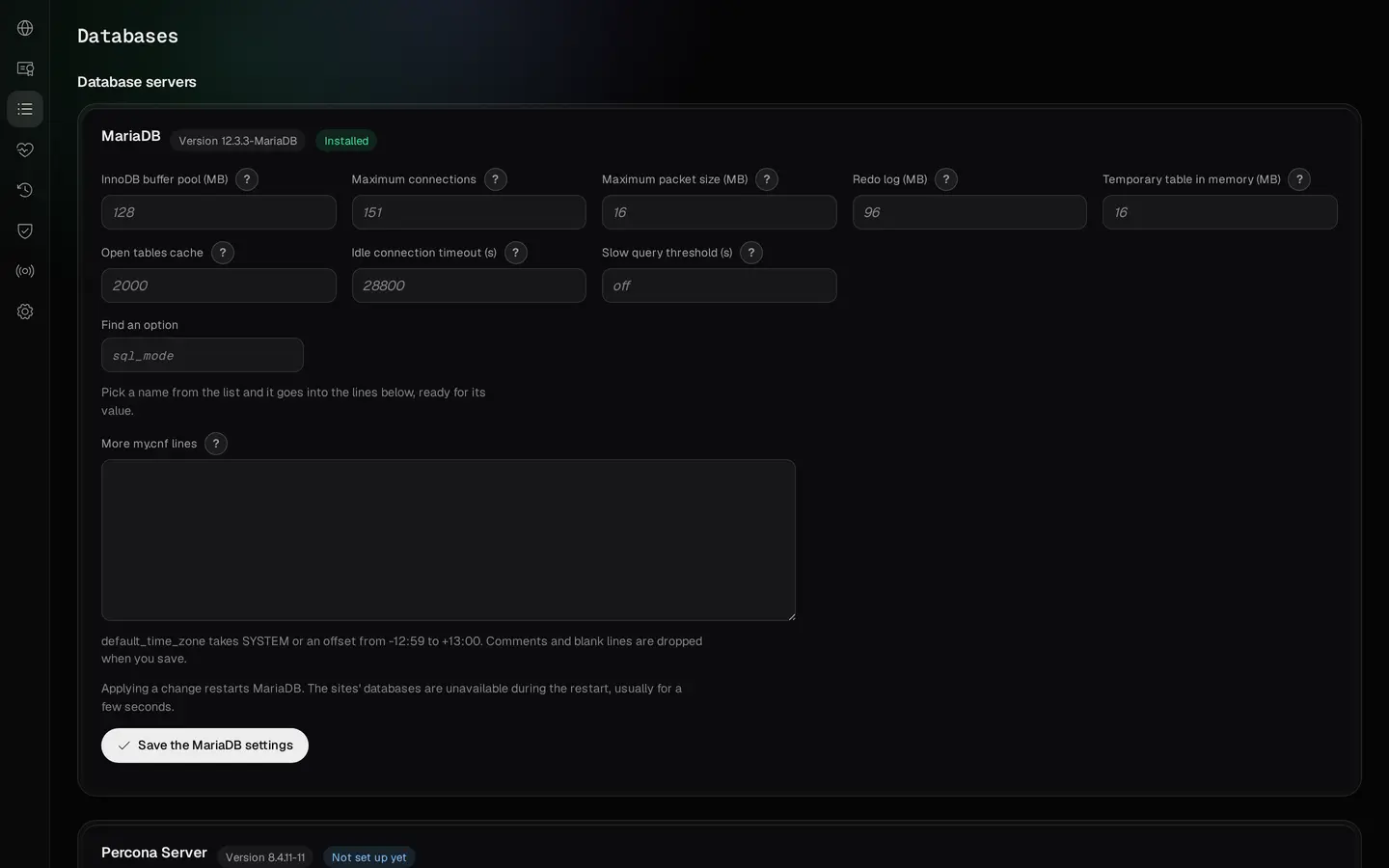
MariaDB and Percona Server have server settings such as the buffer pool, the connection limit and the slow-query log. They apply to the whole database server, not to one website. Applying a change restarts that server, and applications cannot connect to its databases while it restarts.

Settings of the shared MariaDB server, not of a single site.
Panel detail. Enlarge the image to see the full view.
From a domain name to a working website
The Add site wizard covers the domain, DNS, the registrar records, the website (type, web server, PHP version), an optional database for a PHP site, and the certificate. The Review step lists your choices, and Preview changes shows what will change in the server configuration.

The site's name and any further names.
Panel detail. Enlarge the image to see the full view.

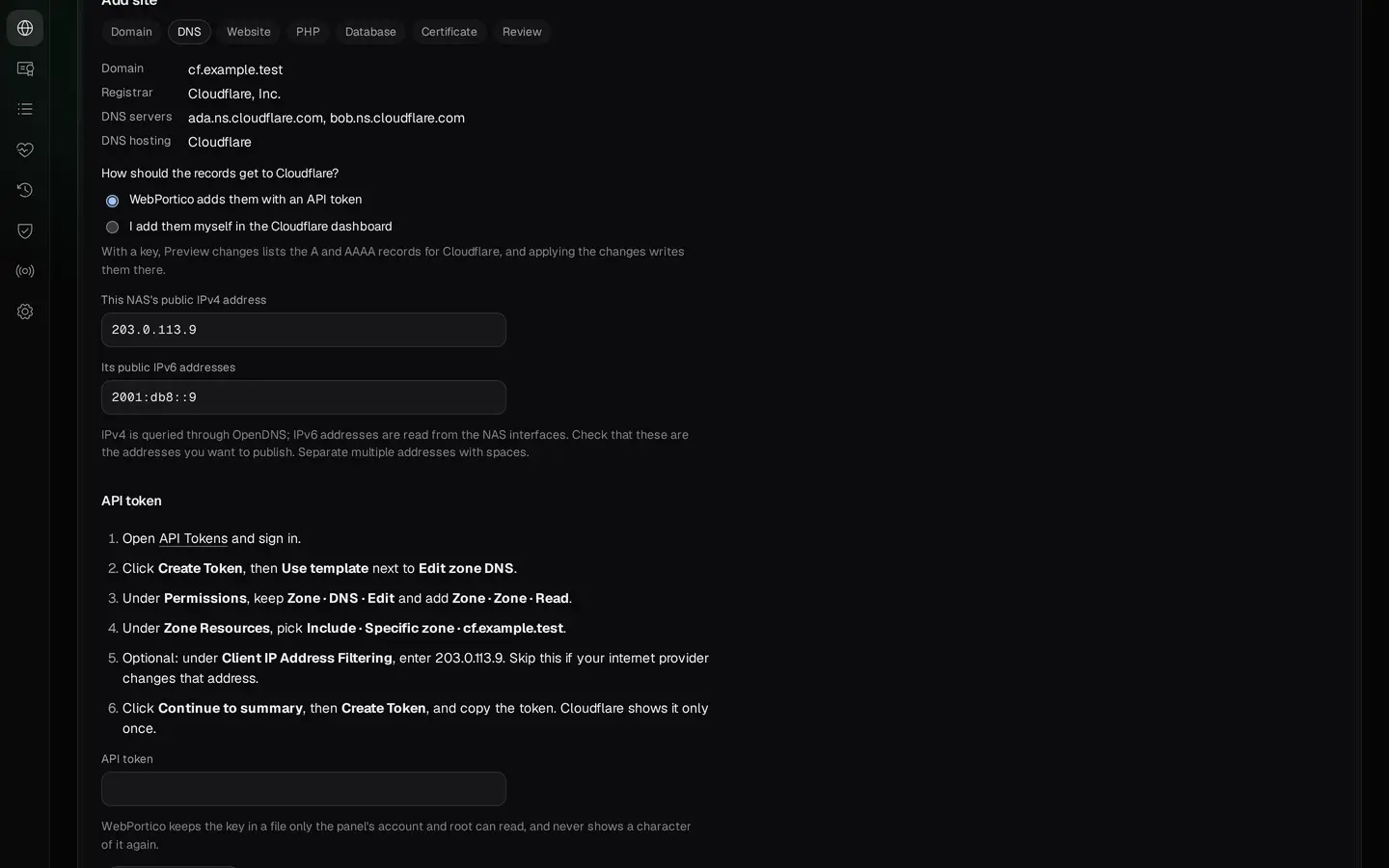
The wizard takes you through the domain, DNS and new site settings.
Panel detail. Enlarge the image to see the full view.

An overview of the prepared settings before the preview of changes.
Panel detail. Enlarge the image to see the full view.
You can keep DNS with your existing provider or connect WebPortico to TurboDNS running on the NAS. If Cloudflare or OVHcloud serves the public zone, WebPortico sends the records to TurboDNS, and you push them to the provider from the zone's Cloudflare and OVH tab in TurboDNS.
After you apply the changes, a checklist on the site's Overview tab shows what is left: the records at your registrar, the domain check and the Let’s Encrypt request. The panel helps organise the deployment; it does not automatically change settings at every domain registrar or router.

The checklist on the site's Overview, before the registrar and DNS steps are done.
Panel detail. Enlarge the image to see the full view.
HTTPS for your domains

WebPortico supports Let’s Encrypt certificates and automatic renewal. Domain validation can use HTTP-01, or DNS-01 when the required DNS integration is configured. You can also use your own certificate, the NAS certificate or a self-signed certificate.
Entering a domain name is not enough to obtain a certificate. Let’s Encrypt must verify control of the name: through publicly reachable port 80 for HTTP-01, or the correct TXT record for DNS-01. A self-signed certificate is not automatically trusted by browsers.
Set up your domain step by step →
Review the plan before applying configuration
WebPortico prepares a plan for website-configuration changes. The preview lists files that will be added, changed or removed, together with configuration-check results from nginx, Apache and PHP-FPM. Apply changes publishes the prepared configuration.
The current configuration files are copied before replacement. If applying the plan fails, the deployment mechanism can restore the previous configuration. This is not a backup of website files or databases.
Not every operation is part of the configuration plan. Creating or deleting a database and changing scheduled tasks take effect at once. In the Add site wizard, Preview changes also creates the selected database and makes or stores the selected certificate; a Let’s Encrypt certificate is requested after you apply the changes. Read the operation details before confirming it.

Review files and configuration-check results before applying the changes.
Panel detail. Enlarge the image to see the full view.

After Apply changes: the snapshot's name and the services started and reloaded.
Panel detail. Enlarge the image to see the full view.
Give your applications their own addresses
Instead of remembering a separate port for every service, assign selected services names under your domain. A reverse-proxy site forwards traffic to an application running on the NAS or elsewhere on your local network. WebSocket connections are supported as well.
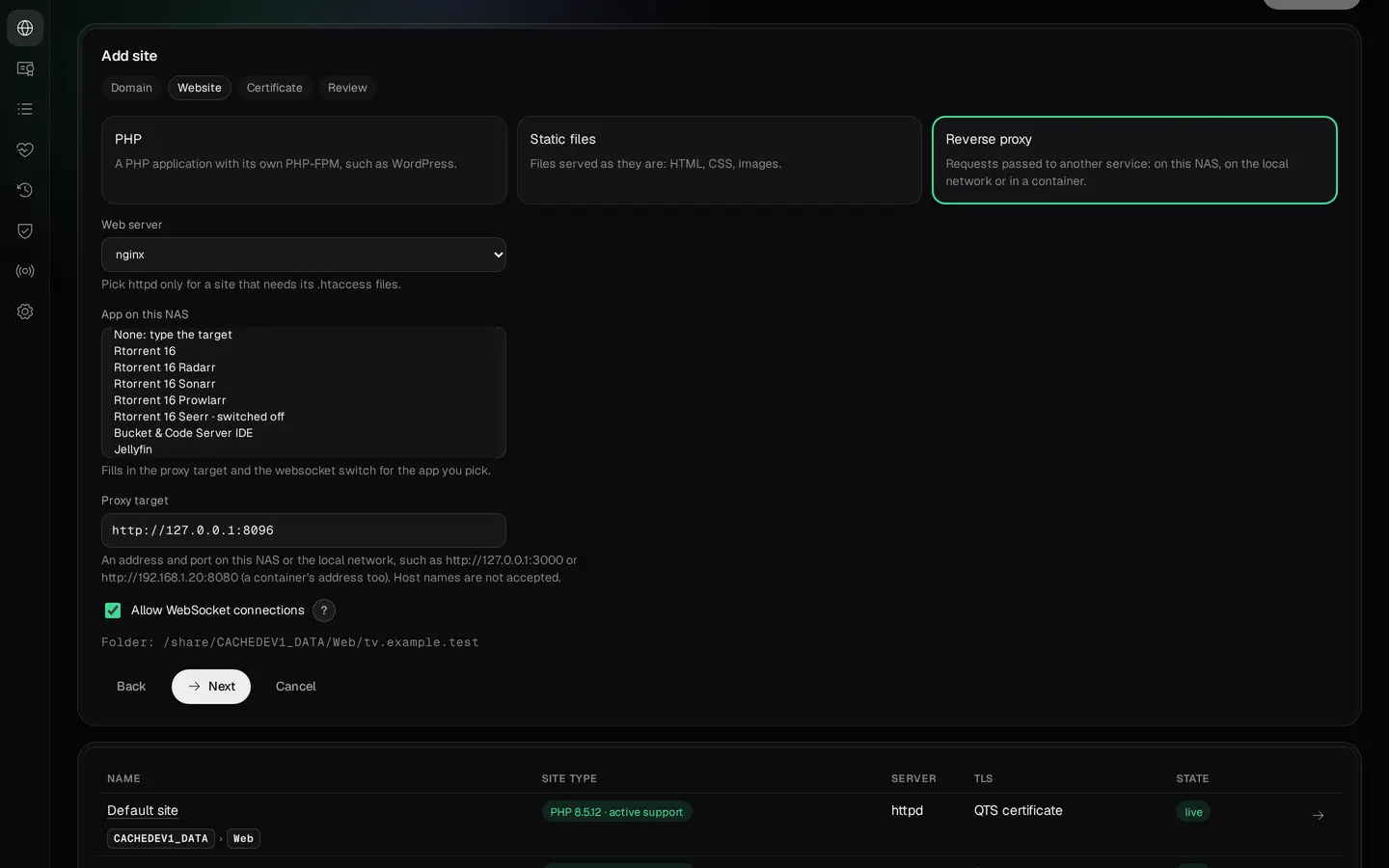
For recognised applications, WebPortico can fill in the service address, WebSocket setting, and the headers and timeouts the application needs. Available templates include Rtorrent 16, Jellyfin, Plex Media Server, qBittorrent and applications in the *arr family. The list depends on installed packages and the applications supported by WebPortico.
Some applications also need their own public URL or reverse-proxy settings changed. WebPortico points out these steps, but it does not automatically change every application's internal configuration.

The App on this NAS list of the demonstration NAS: only supported apps that are installed there.
Panel detail. Enlarge the image to see the full view.
A domain name and HTTPS do not replace authentication or access control. Check a service's security before exposing it. Keep QTS and the WebPortico administration panel on a trusted network or make them available through appropriately secured remote access.
Make WebPortico your NAS's main web server
WebPortico can use its own ports or serve websites on standard ports 80 and 443. The administration panel runs separately, by default at https://<NAS>:9541/.
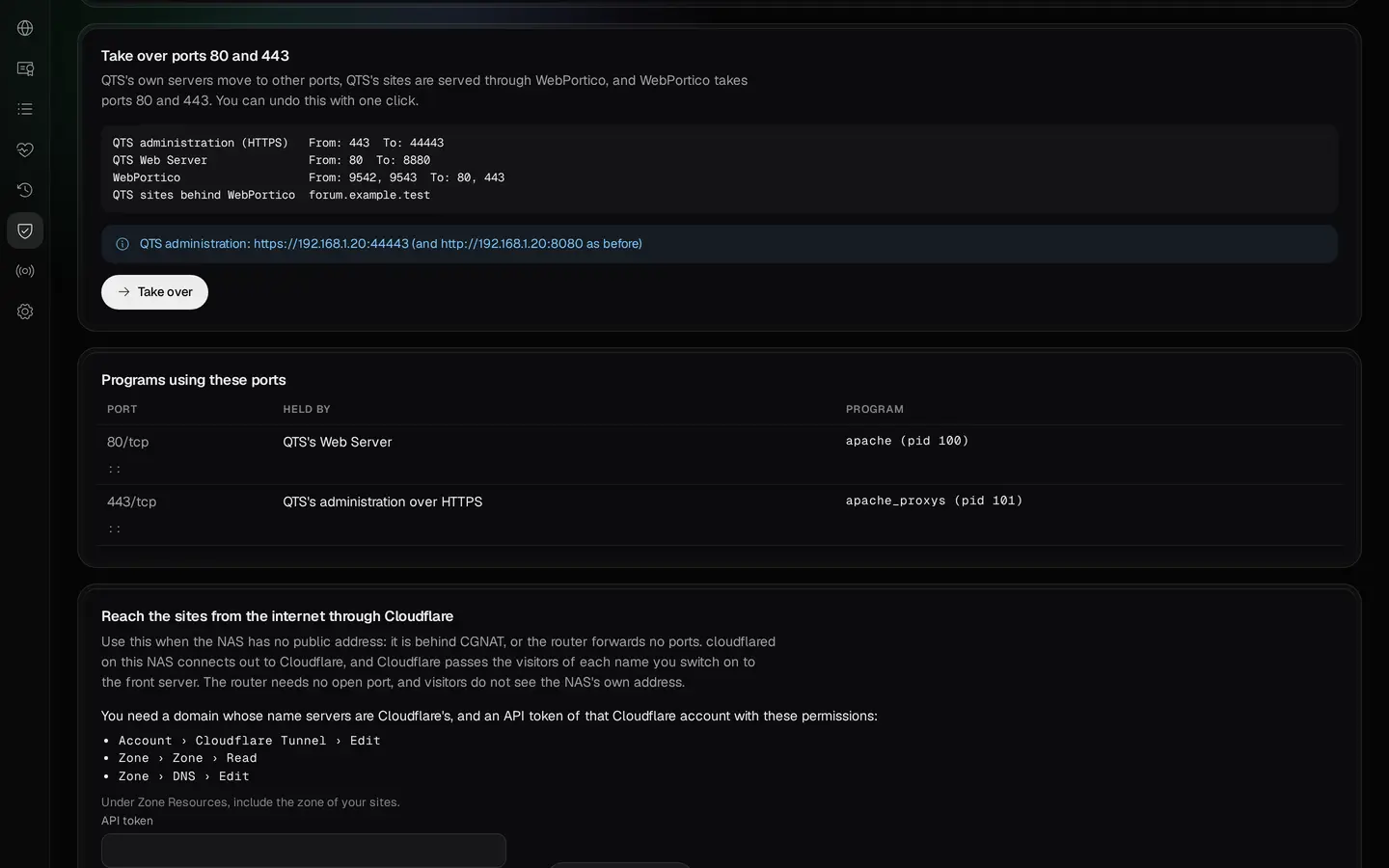
The application supports a controlled takeover of ports used by selected QTS services. Review the change plan before starting. After confirmation, WebPortico moves the QTS services that hold ports 80 and 443 (the QTS Web Server and QTS administration) to other ports, checks each stage and makes supported QTS websites available behind its front-end server. The result shows the new administration address and the actions performed. You can reverse the takeover from the panel.

The port-takeover plan shows what will change in WebPortico and QTS services.
Panel detail. Enlarge the image to see the full view.

The result of a takeover on the demonstration NAS: each step checked and the new administration address.
Panel detail. Enlarge the image to see the full view.
This is not a migration tool for every application or database. The takeover moves QTS's own servers only; another program that holds a port is not moved. Review the plan before the operation, then check QTS access, website availability and router rules afterwards.
Keep using the existing Web folder

The default website can serve the existing QTS Web folder. Requests sent to the NAS address, or to a name not assigned to another site, can be directed to its contents. Apache handles this site, including PHP and supported .htaccess rules.
This lets you continue using existing files; it does not guarantee that every application will work without changes. Permissions, PHP requirements and application-specific configuration still matter.
Keep your websites running
Caching and compression
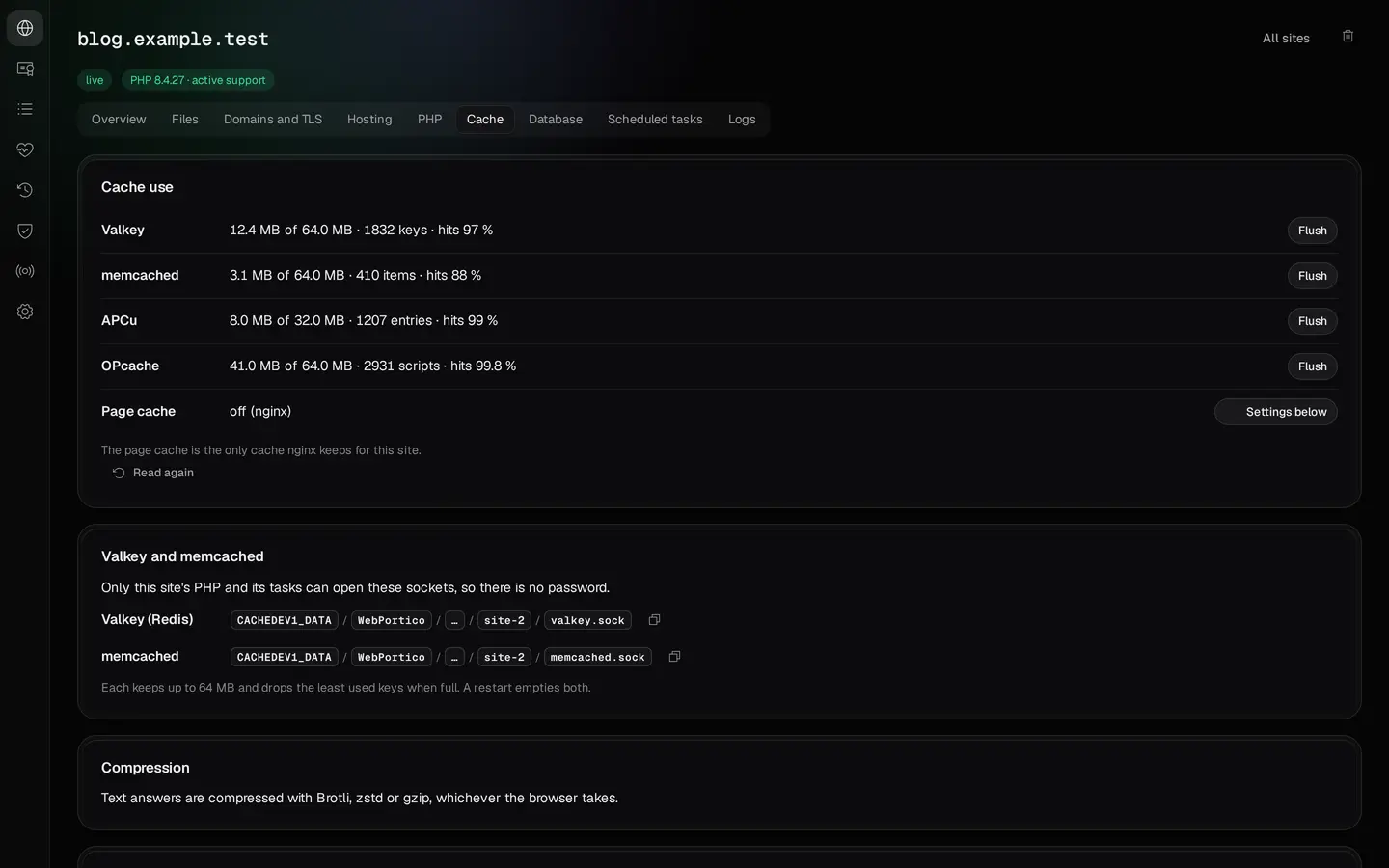
nginx can compress text responses with Brotli, zstd or gzip. For nginx sites, the Cache tab can enable PHP page caching and set how long browsers keep static files. PHP sites can also use their own Valkey and memcached instances through local sockets.
Configure caching to match the application. Logged-in pages, shopping carts and user-specific data need suitable exclusions. A cache is not permanent data storage and does not replace a database.

Page caching and local caches configured for the selected site.
Panel detail. Enlarge the image to see the full view.
Scheduled tasks
Scheduled tasks run on a timetable. Each website has its own: a PHP file, a shell command or a request to one of the site's addresses. Every task runs as the site's system account, and PHP runs with the site's PHP version and settings. The panel shows the schedule, the last result and the output of the last run.

The task schedule and execution result are available directly within the site settings.
Panel detail. Enlarge the image to see the full view.

The result and output of the last run of a harmless demonstration script.
Panel detail. Enlarge the image to see the full view.
Logs and troubleshooting

The Logs tab shows events related to a website. The Services page lets you check the state of server components. When something goes wrong, start with the application's, PHP's or web server's logs instead of changing settings at random.
Custom PHP extensions

In addition to the extensions shipped with the package, you can build custom PECL extensions for a selected website. This requires Bucket & Code Server IDE and a prepared build environment. The extension must be compiled for the PHP version used by that site. It is not automatically enabled for other websites.
Hosting without a public IP address
If your ISP uses CGNAT or you cannot forward ports on your router, you can publish selected websites through Cloudflare Tunnel. Once configured, the NAS initiates the connection to Cloudflare and traffic to the selected websites travels through the tunnel.
This method requires a Cloudflare account and a domain managed through Cloudflare DNS. No inbound port forwarding is required on your router.
Traffic does pass through an external provider. Check its limits and terms before publishing, especially for large files, long-running requests and media streams.

The optional tunnel lets you publish a site without forwarding ports on the router.
Panel detail. Enlarge the image to see the full view.
Ready-to-install package and build project
Install WebPortico as a QPKG application from the QNAP Utilities repository. You do not need to compile the web servers or install a development environment to use the hosting features.
If you want to inspect how the package is built, the web-server project is available in Bucket & Code Server IDE. It contains the panel code, scripts, build recipes, tests and packaging configuration. Individual components may use different licences, so check the terms for each component before modifying or redistributing it.

The site directory and the link to the Bucket & Code Server IDE editor.
Panel detail. Enlarge the image to see the full view.
Explore Bucket & Code Server IDE → Browse the WebPortico project →
 Bucket & Code Server IDE · example project
Build WebPortico yourself, with the versions you choose
WebPortico is one of the example QPKG projects of Bucket & Code Server IDE. Use the example and the package’s build becomes a project of your own on the NAS: the list of recipes the servers are built from, the panel’s Go source, the tests and the packer. Build a new package whenever you want; your NAS units install it from the App Center repository that Bucket & Code runs.

Use the example
On the Examples page, Use this example on “web server stack with a vhost panel” creates the
web-serverproject for the Editor. Its builds need the Debian 12 builder environment and the Go 1.27 runtime, andmake qpkgneeds QDK.
Choose the versions
Each recipe of the library pins a version. Bucket & Code fetches newer recipes from its signed recipe catalog once a day, and the next build takes a newer PHP or nginx release when the catalog brings one. For a version of your own, put a recipe of the same name in the project’s
recipes/folder: this project’s app builds it instead of the library’s. Another PHP release takes a copy of the library’s recipe with that release in itsversion,sourceandcheck, then a new build; WebPortico’s panel switches only between the PHP branches the package carries.Your first own recipe → A custom app from your own recipes →

Build and publish
In the Editor’s terminal,
make app build activatebuilds the servers andmake qpkgpacks WebPortico. Publish on the project’s page puts the package into the App Center repository of this NAS. An admin’s publish lists the version at once, and App Center on each NAS that added the repository’s address offers it as an update.
make app build activate
make qpkg
The repository takes only signed packages by default, and make qpkg signs WebPortico only with the code-signing files you give it.
Set up your first website

1. Add the repository
In QTS or QuTS hero, open App Center → ⚙ Settings → App Repository → Add. Enter QNAP Utilities as the name and use this address:
https://www.qnaputilities.com/repo.xml
2. Install WebPortico
Select the QNAP Utilities repository and the WebPortico package. After installation, click Open to access the panel.
3. Set your password and choose how to run it
On first launch, set your own administrator password of at least 10 characters from a computer on the NAS's local network. The form is available for 60 minutes after the panel starts. If that window has expired, restart WebPortico in App Center.
Next, decide whether hosting should stay on separate ports or take over the standard web ports. A fresh install asks this once, and the Front server and ports page keeps the choice for later. The panel's guided tour points you to the relevant settings, but does not perform the actions for you.

The guided tour points to the next settings. Decisions and confirmations remain with the administrator.
Panel detail. Enlarge the image to see the full view.
4. Add a site
Enter its name, choose static files, PHP or reverse proxy, and prepare the remaining settings. Review the plan, apply the configuration and, for a static or PHP site, place the application files in its directory. A public domain also needs the correct DNS, a working access method and a certificate.
The panel guides you through the setup and lists the remaining tasks. Changes at your domain registrar, router and external services must be made according to your own network configuration.
Open the full hosting guide
Run FreshRSS, Heimdall and FileRise
Buy a domain and connect it
Move a Plesk server to WebPortico
Requirements
- NAS
- QNAP with an Intel or AMD processor, x86_64 architecture
- Operating system
- QTS 6.0 or QuTS hero 6.0 or later, subject to the requirements of the package build
- Installation
- QPKG package from the QNAP Utilities repository in App Center
- Administration panel
- Default address:
https://<NAS>:9541/ - Website ports
- 9542/HTTP and 9543/HTTPS by default; operation on 80 and 443 is supported
- Local access
- Sites can remain available only on the local network
- Public access
- DNS and access to the web server, or a configured Cloudflare Tunnel
- QuTS hero folders
- Advanced Folder Permissions on a shared folder can keep websites out of it; the panel then stops the apply and offers another shared folder or WebPortico's data folder
- Application cost
- WebPortico is free. Domain registration and external services may have separate fees and terms
See the App Center catalogue for component versions, licences and the installation package.
WebPortico vs Plesk, cPanel and others
This comparison covers panels that can be self-hosted and used to manage websites. When a vendor does not document direct installation on QNAP, the comparison uses a virtual-machine scenario. That is not equivalent to a QPKG installation: the VM has its own operating system and IP address, and integration with QTS services is limited. Missing documentation is not proof that a feature does not exist.
- no
- not in the vendor’s documentation
- yes
- yes, useful for hosting sites on a NAS
- yes, very useful for hosting sites on a NAS
- WebPortico has it and the others’ documentation does not show it; one to three stars, as useful as the ticks
| Feature | WebPorticoour package | Plesk Obsidian | cPanel & WHM | DirectAdmin | HestiaCP | CloudPanel | Virtualmin |
|---|---|---|---|---|---|---|---|
| Runs on a QNAP NAS | Yes, very useful. A package you install from App Center, for Intel and AMD models | Yes. Only inside a virtual machine; the vendor’s Docker image is for evaluation | Yes. Only inside a virtual machine, with a fixed IP address; no ARM | Yes. Only inside a virtual machine, on a freshly installed system | Yes. Only inside a virtual machine, on a freshly installed system | Yes. Only inside a virtual machine | Yes. Only inside a virtual machine, on a freshly installed system |
| Beside QTS’s Web Server (ports 80/443) | Yes, useful. Yes. It runs beside the QTS web server on its own ports. One click takes over ports 80 and 443, and one click gives them back | Yes. In its own virtual machine with its own address; it does not work with QTS’s sites | Yes. In its own virtual machine with its own address; it does not work with QTS’s sites | Yes. In its own virtual machine with its own address; it does not work with QTS’s sites | Yes. In its own virtual machine with its own address; it does not work with QTS’s sites | Yes. In its own virtual machine with its own address; it does not work with QTS’s sites | Yes. In its own virtual machine with its own address; it does not work with QTS’s sites |
| Own DNS server | Yes, very useful. Yes, through TurboDNS: your zones, names for your home network, copies to Cloudflare or OVHcloud, DNSSEC | Yes, very useful. Yes: BIND, with Cloudflare and Route 53 sync; DNSSEC is an extension, paid in Web Admin | Yes, useful. Yes: BIND or PowerDNS; DNSSEC with PowerDNS | Yes, useful. Yes: BIND with DNSSEC | Yes, useful. Yes: BIND with clusters and DNSSEC | Not in the vendor’s documentation. No DNS server in its documentation | Yes. Cloud DNS (Cloudflare, Google, Route 53) in Pro; BIND and DNSSEC only on its forum |
| A site without a public IP | Yes, very useful; not in the others’ documentation. Yes. A built-in Cloudflare Tunnel publishes the sites you choose; you need a Cloudflare account and zone | Not in the vendor’s documentation. Not in its documentation | Not in the vendor’s documentation. Not in its documentation | Not in the vendor’s documentation. Not in its documentation | Not in the vendor’s documentation. Not in its documentation | Not in the vendor’s documentation. Not in its documentation | Not in the vendor’s documentation. Not in its documentation |
| Reverse proxy to LAN services | Yes, very useful. Yes. Pick an app installed on the NAS or any address on your network; WebSockets with one switch | Yes. Only to Docker containers on the same server | Yes. Only with configuration files written by hand | Not in the vendor’s documentation. Not in its documentation | Yes. With a custom nginx template | Yes, useful. Yes: a “Reverse Proxy” site type | Yes, useful. Yes: proxy paths to another web server |
| Mail and Exchange ActiveSync | Yes, very useful. Yes, through MailServerPro: mail, webmail, calendars, contacts and ActiveSync (Z-Push) | Yes, useful. Yes: Postfix or qmail, Dovecot, Roundcube; ActiveSync only in the paid Kolab extension | Yes, useful. Yes: Exim, Dovecot, Roundcube, calendars and contacts; the ActiveSync plugin is deprecated since v118 | Yes. Webmail (Roundcube); ActiveSync not in its documentation | Yes, useful. Yes: Exim, Dovecot, Roundcube; ActiveSync not in its documentation | No. No: it has no mail server | Yes, useful. Yes: Postfix, Usermin, Roundcube; a Z-Push installer in Pro |
| Databases | Yes, very useful. Yes: MariaDB and PostgreSQL, a database and a user for each site | Yes, very useful. Yes: MySQL, MariaDB and PostgreSQL | Yes, useful. Yes: MySQL or MariaDB; PostgreSQL after a manual install | Yes, useful. Yes: MySQL or MariaDB | Yes, very useful. Yes: MariaDB or MySQL, and PostgreSQL | Yes, useful. Yes: MySQL or MariaDB | Yes, very useful. Yes: MySQL, MariaDB and PostgreSQL |
| Percona Server | Yes, useful; not in the others’ documentation. Yes: Percona Server 8.4 beside MariaDB on the same NAS, on x86_64 | No. Not offered: MySQL or MariaDB | No. Not offered: MySQL or MariaDB | No. Not offered: MySQL or MariaDB | No. Not offered: MariaDB or MySQL 8 | Yes. Its installer puts in Percona Server when you choose MySQL; one engine, not beside MariaDB (its installer script) | No. Not offered: MySQL, MariaDB or PostgreSQL |
| Valkey (Redis) and memcached | Yes, very useful. Yes: a Valkey and a memcached of its own for each PHP site, open only to that site | Yes. Redis as a Docker container; memcached by hand, outside Plesk support | Yes, useful. Redis, Valkey and memcached for each cPanel user in containers; the user needs shell access | Yes, useful. Redis for each account that has it turned on; memcached not in its documentation | Not in the vendor’s documentation. Only the PHP client modules; a service is not in its documentation | Yes. Redis on the server; per site and memcached not in its documentation | Yes. Redis or Valkey in Podman recipes for each virtual server, in Pro |
| PHP versions | Yes, useful. Yes: 8.1 to 8.5, each site in its own PHP-FPM as its own account; 8.1 gets no security fixes since 2025-12-31, and the panel marks it end of life | Yes, useful. 5.2 to 8.5, chosen per domain; the branches before 8.2 get no security fixes, a risk on a public site | Yes, useful. 7.4 and 8.1 to 8.5, chosen per domain; 7.4 and 8.1 get no security fixes | Yes, useful. Up to 9 versions, chosen per domain | Yes, useful. 5.6 to 8.5; the branches before 8.2 get no security fixes, a risk on a public site | Yes, useful. Up to 8.5, chosen per site | Yes. PHP 7 and 8; 8.5 since 7.50.1 |
| Pictures in PHP (ImageMagick, GD) | Yes, very useful. Yes: imagick (ImageMagick 7) and GD in every PHP version | Yes, very useful. Yes: gd and imagick come with Plesk’s PHP | Yes, useful. GD by default; imagick after you install ImageMagick and its PECL module | Yes. imagick in the CustomBuild list; GD not in its documentation | Yes, useful. Its install script adds gd and imagick to every PHP version (the project’s code) | Not in the vendor’s documentation. Not in its documentation | Yes. GD in its PHP install line; imagick not in its documentation |
| PHP caches (OPcache, APCu) | Yes, very useful. Yes: OPcache and APCu of its own in every PHP site, set on its PHP tab | Yes, useful. OPcache, switched per domain; APCu not in its documentation | Yes. OPcache, set up by hand; APCu not in its documentation | Yes. OPcache; APCu only as a manual build | Yes, useful. Its install script turns on OPcache and adds APCu (the project’s code) | Not in the vendor’s documentation. Not in its documentation | Yes. OPcache in its PHP install line; APCu not in its documentation |
| Your own PECL extensions | Yes, useful; not in the others’ documentation. Yes: built on the site’s PHP tab and loaded by that site alone; needs Bucket & Code Server IDE | Yes. For the whole server, from the command line | Yes. For the whole server, from WHM, for root | Yes. For the whole server, compiled for each PHP version | Not in the vendor’s documentation. Not in its documentation | Yes. For the whole server, built by hand | Not in the vendor’s documentation. Not in its documentation |
| Scheduled tasks (cron) | Yes, very useful. Yes: a preset or the five cron fields, checked as you type, with the next runs shown; each task runs as the site’s account | Yes, useful. Available per hosting subscription; supports a test run | Yes, useful. Yes, per account, with common intervals | Yes. Yes, per user (the user’s crontab) | Yes, useful. Yes, with a generator; its code checks the fields (the project’s code) | Yes, useful. Yes, per site, from a template | Yes. Yes, through Webmin’s scheduled cron jobs |
| Logs in the panel | Yes, useful. Yes: each site’s Logs tab, and the servers’ logs on the Services page | Yes, very useful. Yes: a log browser with real-time updates | Yes. The last 300 error lines; access logs as a download | Not in the vendor’s documentation. A viewer is not in its documentation | Yes. Access and error logs to view or download | Yes, useful. Yes: a Log Viewer for NGINX and PHP-FPM | Yes, useful. Yes: access and error logs under Logs and Reports |
| Certificates | Yes, very useful. Yes: Let’s Encrypt through HTTP or DNS (TurboDNS or Cloudflare), renewed by itself | Yes, useful. Yes: Let’s Encrypt (SSL It!), renewed 30 days ahead; a wildcard needs Plesk to host the DNS | Yes, useful. Yes: Let’s Encrypt (AutoSSL); no wildcard when the DNS is hosted elsewhere | Yes, very useful. Yes: Let’s Encrypt, the DNS check through LEGO (Cloudflare and others) | Yes, useful. Let’s Encrypt with wildcards; Hestia’s own DNS needed, forum only | Yes. Let’s Encrypt; a DNS check is not in its documentation | Yes. Let’s Encrypt; a DNS check only when it hosts the zone, forum only |
| Brotli and zstd compression | Yes, very useful. Yes: Brotli and zstd besides gzip, with nothing to set | Yes, very useful. Brotli on by default (nginx); zstd not in its documentation | Yes, useful. Brotli as an Apache or nginx module you install | Yes. Brotli only in a custom build | Not in the vendor’s documentation. Not in its documentation | Not in the vendor’s documentation. Not in its documentation | Not in the vendor’s documentation. Not in its documentation |
| HTTP/3 (QUIC) | Yes, useful. Yes: one switch on the Front server and ports page | Yes. Experimental, turned on from the command line; per site | Not in the vendor’s documentation. Not in its documentation (HTTP/2 only) | Yes. With OpenLiteSpeed, or the commercial LiteSpeed | Not in the vendor’s documentation. Not in its documentation | Yes, useful. Yes: per site in the vhost, off by default | Not in the vendor’s documentation. Not in its documentation |
| Preview before applying | Yes, very useful; not in the others’ documentation. Yes. Every change to the web servers shows its file differences and passes the servers’ own checks first; a snapshot lets you go back | Not in the vendor’s documentation. Not in its documentation | Yes. Only a list of the packages to change (EasyApache 4) | Not in the vendor’s documentation. Not in its documentation | Not in the vendor’s documentation. Not in its documentation | Not in the vendor’s documentation. Not in its documentation | Not in the vendor’s documentation. Not in its documentation |
| Licence and price, one server | Yes, very useful. Free | Yes. Paid: Web Admin (VPS) $15.57 a month, 10 domains; when the licence ends, the sites keep running and the panel is locked | Yes. Paid: Solo $29.99 a month, 1 account | Yes. Paid: Personal PLUS $5 a month, 2 accounts, 20 domains | Yes, very useful. Free and open source (GPLv3) | Yes, useful. Free, under a closed licence | Yes, very useful. Free GPL edition; Pro from $7.50 a month, 10 domains |
| Rebuild from source | Yes, useful. Yes, in Bucket & Code Server IDE from source recipes; the panel’s own code is freeware, not open source | Not in the vendor’s documentation. A build from source is not in its documentation | Not in the vendor’s documentation. A build from source is not in its documentation | Yes. Its CustomBuild compiles the programs; the panel itself is closed | Yes, useful. Yes: the panel’s source is GPLv3 | No. No: its licence forbids changes | Yes, useful. Yes: the GPL edition’s source (GPL-3.0) |
- No vendor in this table documents QNAP. “In a VM” means a Virtualization Station virtual machine on an Intel or AMD QNAP NAS with one of the panel’s supported Linux systems. The VM has its own IP address, so it does not compete with QTS for ports 80 and 443; it has no access to QTS’s Web folder, certificate or web server.
- TurboDNS and MailServerPro are separate free packages from the same repository. WebPortico works with them on the same NAS.
- The preview of changes covers the web servers’ configuration. Creating or dropping a database and scheduled tasks take effect at once.
- Prices in the table are in US dollars, the cheapest tier for one server as the vendor’s page showed it on 2026-11-08. Plesk: a VPS licence; the page shows no price for a dedicated server. cPanel: the monthly price ($27.46 a month billed yearly), without VAT; new prices from 2026-12-16. The other pages do not say whether VAT is included.
- “Not documented”: we did not find it in the vendor’s documentation on 2026-11-08; it does not mean the panel cannot do it. “Forum only”: the documentation is silent and only community forum posts describe it.
Frequently asked questions

Do I have to install TurboDNS?
No. DNS can stay with your registrar or another provider. TurboDNS is an optional integration for preparing zones and records on the NAS.
Does WebPortico install WordPress and other applications in one click?
WebPortico prepares the site's environment: the server, PHP, an optional database and domain configuration. Supply the application's files and install it separately, according to its requirements. The guides include practical examples.
Do I have to expose my NAS to the internet?
No. You can use websites and applications entirely within the LAN. Publishing a particular site is a separate decision; it does not require exposing the NAS administration panel.
Does creating a site immediately give me a working website?
No. The configuration must be applied, and a static or PHP site also needs the correct application files. Internet access additionally depends on working DNS and the chosen publishing method.
Do I need backups?
Yes. Back up site files, databases and configuration separately. The snapshot of server configuration files made when applying a plan helps roll back configuration changes, but does not replace a backup of application data.
Is WebPortico on a QNAP NAS free of PHP2Shell?
Yes, on PHP 8.2 to 8.5. PHP2Shell is the pair of PHP flaws CVE-2026-109618 and CVE-2026-109619. WebPortico ships PHP 8.2.35, 8.3.36, 8.4.27 and 8.5.12, the releases with php.net's fix, and runs every PHP site on PHP-FPM, without php-cgi or mod_php. PHP 8.1.34 has no fix, because php.net ended its support on 2025-12-31: move any site on PHP 8.1 to a newer branch. You can also build the web server yourself, at any time and for free, from the latest sources with the recipes
nginx,httpdandphp81tophp85in Bucket & Code Server IDE.

Install WebPortico and publish your first website
Start with a simple website, documentation or an application used by your household or team. Add further projects in the same panel, each with its own configuration.
Documentation and sources
The screenshots come from the original WebPortico panel on a test NAS, with demonstration data. The NAS's own addresses are replaced with documentation addresses.
- How-to: your domain on your NAS, website, DNS and mail →
- How-to: three apps on WebPortico (FreshRSS, Heimdall, FileRise) →
- MailServerPro: the mail server for the same domains →
- Bucket & Code Server IDE, the workshop that builds it →
An independent QNAP Utilities project. QNAP is a trademark of QNAP Systems, Inc.
The sources of every cell, with the date they were read, are in a plain-text register: comparison-sources.txt.
Plesk is a registered trademark or trademark of WebPros International GmbH. cPanel, WebHost Manager and WHM are registered trademarks of WebPros International L.L.C. QNAP is a trademark of QNAP Systems, Inc. DirectAdmin, HestiaCP, CloudPanel and Virtualmin are the names of their owners’ products. The names only identify the products; none of their owners endorses this comparison.