Run your package's service in a jail: its own account, no root, only the network you allow
A QPKG package's service script runs as root. With the service builder's Start in a jail block, the programs it starts run as an account of their own inside a sandbox: no capabilities, no way to gain them, a filter on dangerous system calls, and a network of their own. The example serves a page and reports, on that page, what the sandbox lets it do.
- Profilewhat runs, what it sees
- Blocksaccount, folders, the jail
- Buildbvs-jail and bwrap come with it
- Signcase 1, then install
- Checkthe page reports itself
The pictures come from Bucket & Code Server IDE 1.0.0-49, and the example was built,
signed, installed and checked on a QTS 6.1 test NAS. The account is called ola.
01What the jail gives
- The services run as the account the profile names, never root, with no capabilities and
NoNewPrivsset. A seccomp filter refuses mounts, new namespaces, kernel modules,bpf,io_uring,ptraceand the other calls kernel exploits go through. - They see the app read-only, their data folders read-write, a private
/tmp,/procand/dev, and the NAS's glibc. No other share, no/etc/config, no other package. - Their network is a loopback of their own. Each
inboundport is relayed from the NAS to a port inside. Outbound connections go through an HTTP proxy that refuses private, loopback and the NAS's own addresses. - A memory limit, a CPU share and a process limit hold the whole jail.
The package carries the jail itself: bin/bvs-jail and a static bin/bwrap
(bubblewrap), staged by the build for each architecture.
02Before you start
- A QPKG project made with New project, QDK on the Toolchains page and the Ubuntu 24.04 builder environment. Your own App Center walks through them; this example used the Empty service preset.
- A code-signing certificate that QNAP issued to you, as files. App Center installs only signed packages.
03The profile
The profile is a JSON file of the package. Here it is shared/etc/jail/jailbox.json in the
project, which the package installs as etc/jail/jailbox.json in its install folder.
# shared/etc/jail/jailbox.json
{
  "name": "jailbox",
  "user": "jailbox",
  "app": "@QPKG_ROOT@",
  "data": ["@QPKG_DATA@"],
  "services": [
    {"name": "checks", "cmd": ["@QPKG_ROOT@/bin/busybox", "sh", "@QPKG_ROOT@/share/jailbox/checks.sh", "@QPKG_ROOT@", "@QPKG_DATA@"], "oneshot": true},
    {"name": "web", "cmd": ["@QPKG_ROOT@/bin/busybox", "httpd", "-f", "-p", "127.0.0.1:8080", "-h", "@QPKG_DATA@/www"], "wait_port": 8080}
  ],
  "inbound": [{"listen": "0.0.0.0:19975", "port": 8080}],
  "egress": {},
  "limits": {"memory_mb": 256},
  "stop_seconds": 10
}
@QPKG_ROOT@and@QPKG_DATA@stand for the install and data folders, which are known only on the NAS. Each start writes them out into a copy that only root can change, and the jail runs that copy. Unknown keys are refused.appis bound read-only. Here it is the whole install folder, so the services can use the package's own BusyBox; a real app points it at its own tree, for example@QPKG_ROOT@/app.servicesstart in order. Aoneshotruns to its end first;wait_portwaits until the service listens before the next one starts. At least one service keeps running.inboundrelays port 19975 of the NAS to port 8080 inside.egressgives the services a proxy at127.0.0.1:3128for ports 80 and 443 of public addresses; anallowlist lets named destinations through whatever their address.limits.memory_mbis 2048 unless you set it;stop_secondsis how long the jail waits for its services to stop.
The first service runs this script, also in the package, as
shared/share/jailbox/checks.sh. It writes what the sandbox allows into the folder the second
service serves.
#!/bin/sh
# Runs inside the jail and writes what the sandbox allows into the page folder.
R=$1 D=$2 B=$R/bin/busybox V=$($B dirname "$D")
{
  $B grep -E '^(Uid|CapEff|NoNewPrivs|Seccomp):' /proc/self/status
  if $B touch "$R/probe" 2>/dev/null; then echo 'write the install folder: allowed'; else echo 'write the install folder: refused'; fi
  if $B ls /etc/config >/dev/null 2>&1; then echo 'read /etc/config: allowed'; else echo 'read /etc/config: refused'; fi
  echo "what $V holds here: $($B ls -A "$V" | $B tr '\n' ' ')"
  echo "network interfaces: $($B tail -n +3 /proc/net/dev | $B cut -d: -f1 | $B tr -d ' ' | $B tr '\n' ' ')"
} >"$D/www/checks.txt"
echo 'Served from inside the jail.' >"$D/www/index.html"
04The blocks
In the project's page, the Service and package card, tab Blocks: Add a block under At start, five times, in this order.
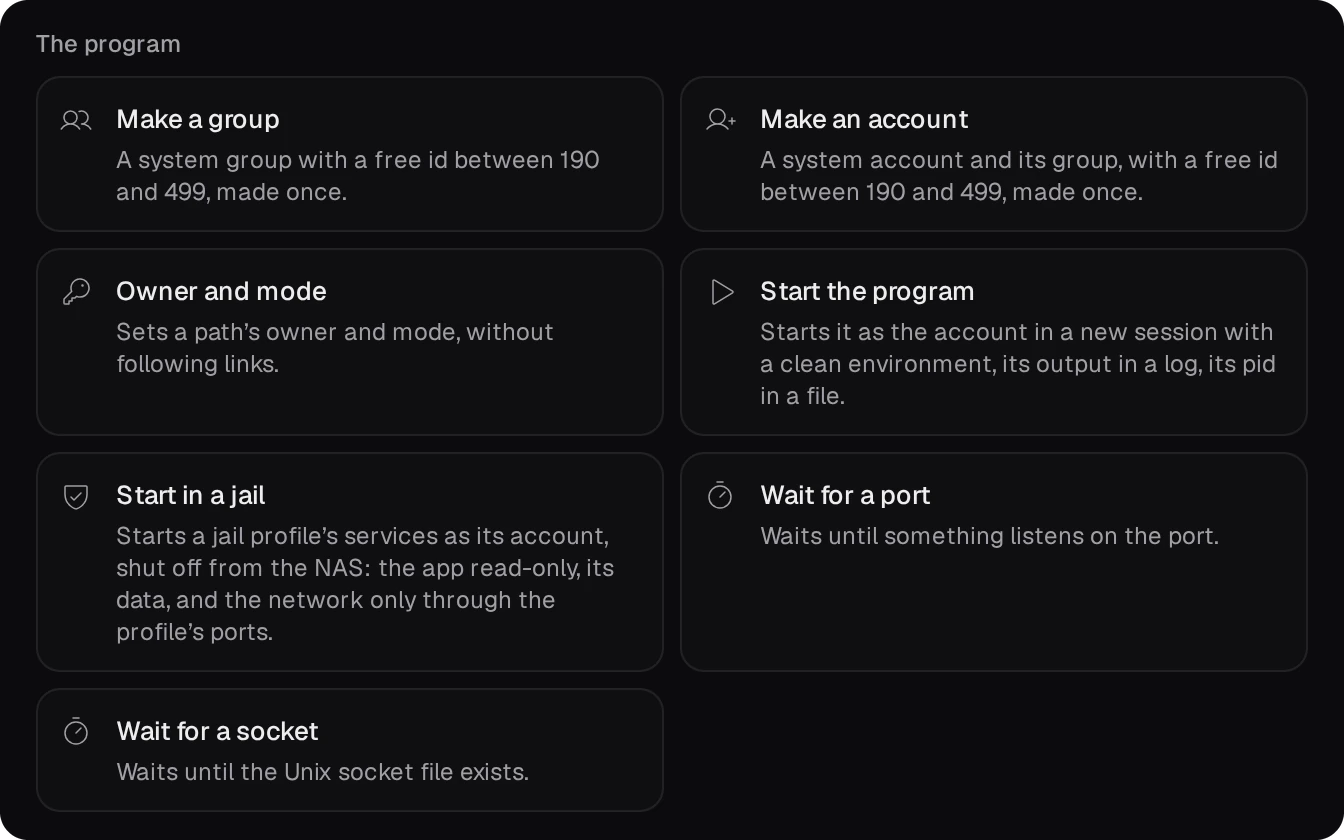
- Data folder on the volume, name
jailbox: the folder$QPKG_DATA. - Create an account, name
jailbox: the account the profile names. - Create a folder,
$QPKG_DATA/www, owned byjailbox:jailbox, mode750: the only folder the services write. - Start in a jail, ID
jailbox, profile$QPKG_ROOT/etc/jail/jailbox.json. Its seconds to wait at stop must be at least the profile'sstop_secondsplus 15; the default 90 is enough here.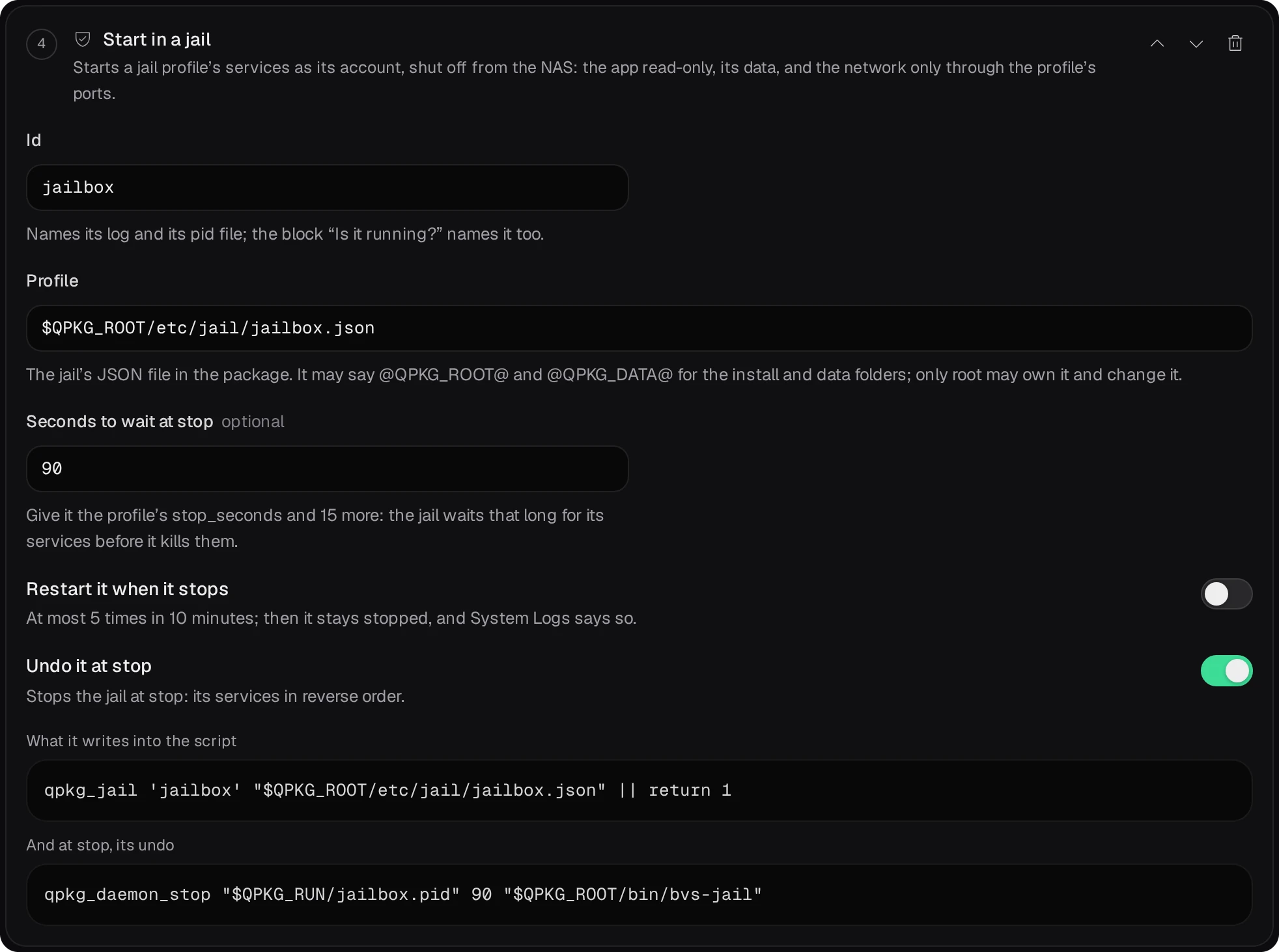
- Wait for a port,
19975: the start ends when the relayed port answers.
Under At a status check, Is it running? with the ID jailbox and Is the port
open? with 19975 make the service script's status verb answer for the jail.
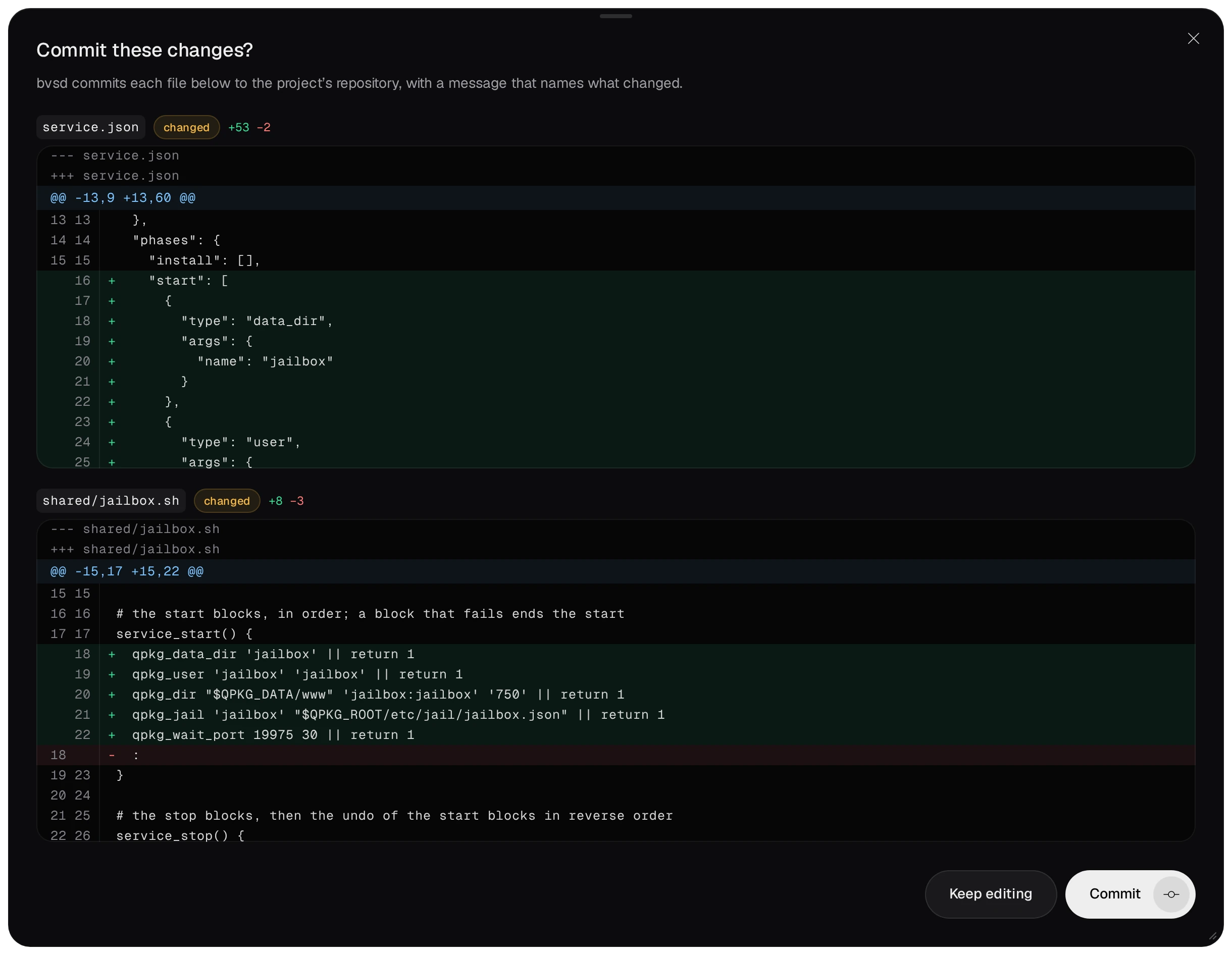
Save shows each file's diff, and Commit writes them to the project's repository.
05Build, sign, install
Build in the project's page runs QDK's qbuild. Its log names what the package carries for the jail.
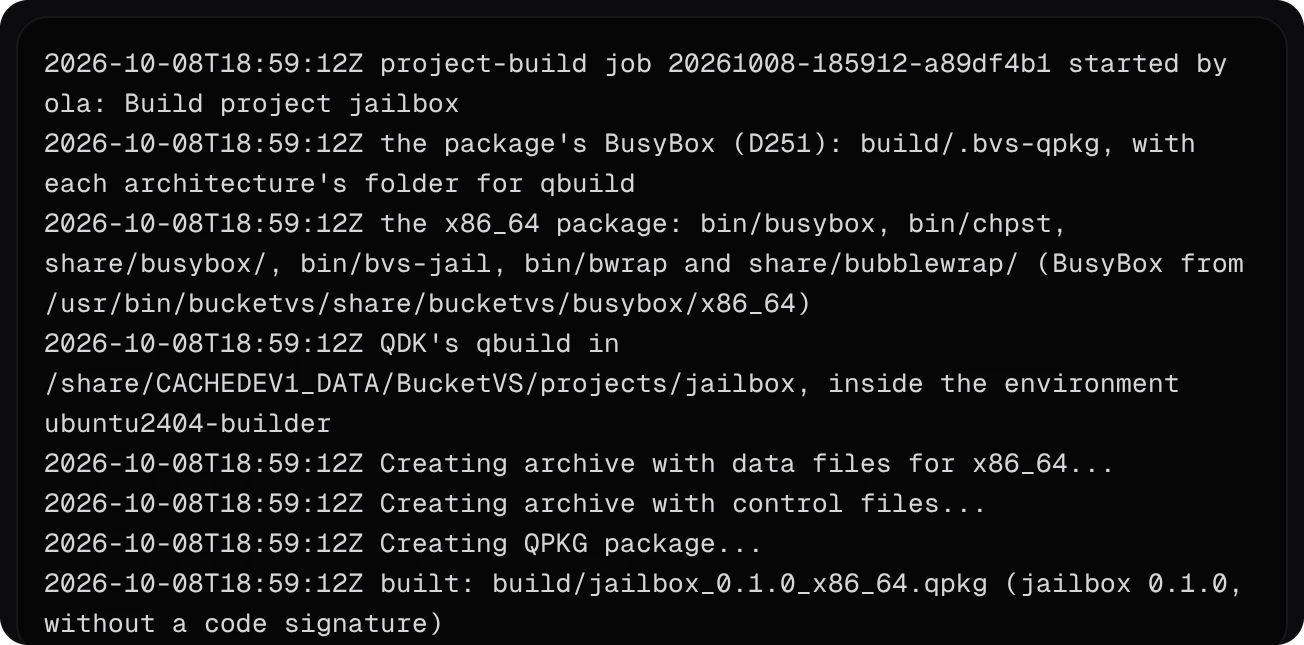
Without a certificate the package is built unsigned, and the project's page says that test deploy and the repository need a signed one.
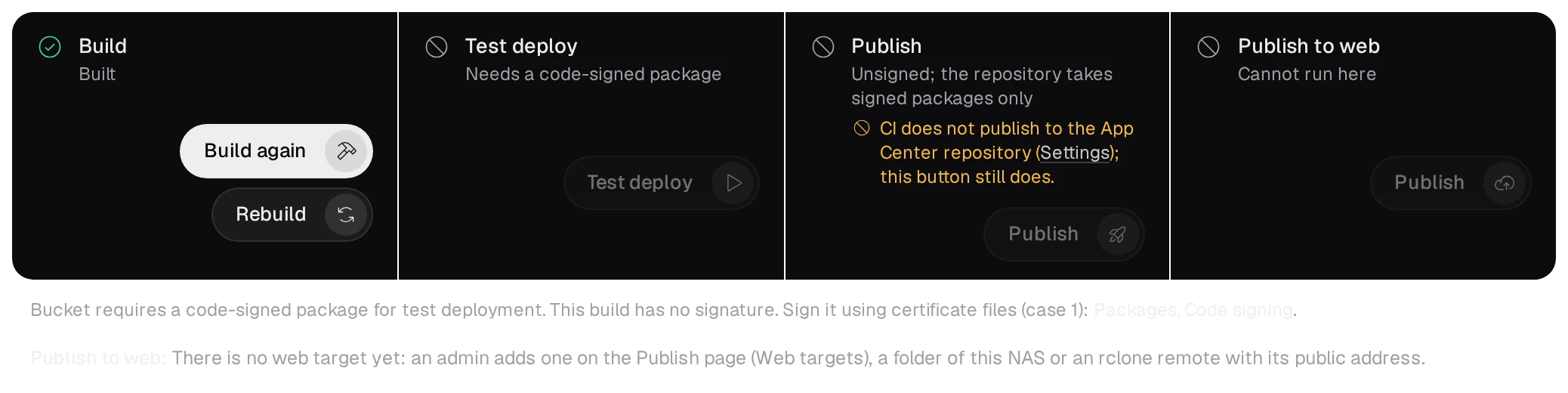
- Put the certificate's files,
certificate,private_keyandca_certs, next toqpkg.cfgin the project folder, and build again: the package comes out signed. The template's.gitignorekeeps the files out of git. In CI they come from the repository's secrets, as Your own App Center shows. - Install the signed package: Test deploy on the project's page (admin), App Center's Install Manually, or your NAS's own App Center repository.
06Check that it is confined
Open http://<NAS address>:19975/: the page says “Served from inside the jail.”, through
the relayed port. checks.txt beside it holds what the first service found:
# http://192.168.1.20:19975/checks.txt
Uid:	222	222	222	222
CapEff:	0000000000000000
NoNewPrivs:	1
Seccomp:	2
write the install folder: refused
read /etc/config: refused
what /share/CACHEDEV1_DATA holds here: .qpkg jailbox
network interfaces: lo
- The volume folder holds only the package's own folders: the install folder under
.qpkgand the data folder. No share, no other package. - From an SSH session as admin,
grep -E '^(Uid|CapEff|NoNewPrivs|Seccomp):' /proc/<pid>/statusof the service shows the same. The two bubblewrap processes that watch the jail from outside have no capabilities andNoNewPrivstoo, without the filter. - The jail's log is
log/jailbox.login the data folder: each service's start, its port, the stop. While the data folder belongs to root, the log notes it; the services write only in the folder the Create a folder block gave the account.
07Stop, remove, and what stays
/etc/init.d/jailbox.sh stop, or App Center's stop, ends the services in reverse order and the jail logsended (0). No process of the account, no cgroup and no listening port stays.- Removing the package stops the jail and removes the install folder and the service script. The account and the data folder stay, because no block removes them: Your own shell lines At removal can take them along.
- The jail's run folder,
/var/run/bvs-jail/jailbox, stays until the next start rewrites it. It is on QTS's memory file system and goes at the next reboot.