Unofficial

Bucket & Code Server IDE

Your NAS already keeps your files. Now it builds your software.

The Workshop for QNAP servers.

Bucket & Code Server IDE is the developer workshop for your QNAP NAS: Git with Forgejo, CI, versioned buckets, VS Code in the browser, and an App Builder that compiles recipes into QPKGs. Installed from App Center, like any other app.

What it does

on the NAS you already own

Bucket & Code Server IDE installs a full development stack on the QNAP NAS you already own, with its own web server, its own accounts and its own tools, and it keeps everything in one data folder on your volume. Write the code in the browser, push it to Forgejo, let the runner on the NAS build it, and publish it into your own App Center repository. The panel that drives it all works like a code editor, and it speaks nine languages.

01 · Workbench

A panel that works like your editor

An activity bar, a side bar, tabs, a command palette, a bottom panel and a status bar. If you live in VS Code, you already know your way around. Every page opens in a tab, Ctrl+Shift+P reaches every command your role may run, and the status bar tells you what the modules are doing, how much space the volume has left and how the certificate stands.

  • Activity bar, side-bar trees, preview tabs and two pages side by side
  • Jobs, Problems and Output in the bottom panel (Ctrl+J), with live progress
  • Dark and light themes, a phone layout and keyboard shortcuts
  • English, Polish, German, French, Italian, Dutch, Swedish, Japanese and Traditional Chinese, with the user guide in the same nine languages
  • Admin, developer and viewer roles, two-factor authentication and API tokens
02 · New project

A new project in one step

Pick a template, give it a name, and press Create project. One job makes the Forgejo repository, commits the template with its CI workflow, pushes it, and leaves a copy in the folder your editor opens. With CI on, the next push builds on the NAS.

  • C, C++ with CMake, Go, Rust, Node, Python and Java
  • A kernel module, the ch341 USB-serial driver, a QPKG package or an App Builder app
  • The first commit is yours, on main, private unless you choose public
  • If anything is missing, nothing is made and the dialog tells you what to do

03 · Git

Git with Forgejo

Forgejo gives you repositories, issues, pull requests, releases, wikis, LFS, mirrors and webhooks, hosted on your own disks. Every panel account is a Forgejo account, so there is no second user list to keep in sync; git over HTTPS takes the panel password, or an access token once two-factor authentication is on.

  • Clone over HTTPS or SSH; the Git page writes both commands for you
  • Forgejo's sign-in is the panel's sign-in, two-factor code included
  • Mirror and import from your own network, allowed out of the box
  • Turn on Public browsing to show public repositories to people without an account

04 · CI

CI that runs where your code lives

Push a workflow and the Forgejo Actions runner on the NAS picks it up. Jobs run on the NAS itself, with the package's tools and your build environments at hand.

  • runs-on: bucketvs, or the labels qnap-x86_64, qnap-aarch64 and self-hosted
  • bvs env run builds inside one of your environments from any job
  • Register external Linux runners (x86_64 or aarch64) from the CI page when you want more machines
  • Jobs run as admin, not in a container, and the CI page says so: let it run only workflows you trust

05 · Editor

VS Code in the browser, with your AI assistant

Every developer gets their own VS Code in the browser (code-server). Its terminal has git, svn, node, npm, rsync and curl on the path, and one command drops you into a full Linux environment. Install Claude Code, Gemini CLI or Codex CLI from the Editor settings page, and every project the wizard makes carries a skill that teaches the assistant how a QNAP NAS works at the shell.

  • One instance per account; it stops when idle, but never while a program in its terminal still runs
  • Extensions from Open VSX
  • The Ports view reaches the development server you just started on the NAS
  • The terminal is a root shell on the NAS, so the developer role is for people you would trust with the admin password

06 · SVN & Bucket

Buckets that remember every save

A bucket is a network drive where every saved file becomes a revision. Open any earlier version, compare it with another, and put it back as a new revision, so nothing is lost. Subversion repositories sit right next to the buckets, with the same accounts.

  • Works with macOS Finder, rclone, davfs2, Cyberduck, WinSCP and curl
  • Permissions per repository: read and write, read, or none, for each account
  • Finder's ._* and .DS_Store files stay out of the history by default
  • An optional read-only web view shows the files, the history and the diffs to people without an account

07 · Toolchains

Real Linux on your NAS

Unpack Debian, Ubuntu or Alpine into an environment on the NAS and work in it like any Linux box. In Debian and Ubuntu, apt install works, and what you install stays. Add the runtimes and compilers you need from a signed catalog, and every download is checked against its sha256 before it is used.

  • Debian 12 and 13, Ubuntu 22.04 and 24.04, Alpine 3.22
  • Python, Go, Node.js, Zig, Rust, CMake, Ninja and Java
  • Bootlin cross toolchains for aarch64, x86-64 and armv7 (on an x86_64 NAS)
  • QNAP's QDK 2.5.0, and bvs qbuild to build a QPKG from any folder with a qpkg.cfg
  • Clone, export or delete an environment; open a shell in it from the panel

08 · App Builder

App Builder: from recipes to a QPKG

Choose programs from 523 recipes, pick how they link, and build. The App Builder compiles everything into one folder inside an environment, then checks every program before the build replaces the last one. Activate the app and its programs run on the NAS, or export it as a QPKG of its own.

  • Libraries, shells, tools and servers: bash, zsh, coreutils, curl, git, jq, rsync, tmux, htop, nginx, redis, openssh, PowerDNS and more
  • Each recipe pins its source by sha256 and proves its result with a check
  • Four link modes; bundle carries its own libraries and needs only the NAS's C library
  • Cross builds for aarch64 and armv7
  • A build that fails leaves the app as it was

09 · Dependencies

See what every binary needs

"Library not found" should not be a surprise on the NAS. The Dependencies tab reads every ELF file of a build without running it and shows what each one needs and where the NAS's loader finds it. A missing library, a version the library does not define, or a RUNPATH that points outside the app becomes a finding with its fix.

  • Fixes with a button where there is one: add a recipe and build, switch the link mode, patch the RUNPATH
  • A graph or a tree of every file, the app's libraries and the NAS's
  • A Patch tool with a before-and-after preview
  • bvs ldd and bvs deps give you the same answers from a shell

10 · Kernels

A kernel workshop for the kernel you run

Need a driver QNAP does not ship? The kernel workshop reads what the running kernel says about itself, prepares a matching kernel tree, and builds your module against it. Every module is checked against the running kernel before it loads, and a module that fails the check is never loaded.

  • The profile: release, compiler, vermagic and the layout of struct module
  • QNAP's GPL tree where QNAP published one, else the tree from kernel.org
  • Build your own module, or a driver from the kernel tree such as the ch341 USB-serial driver
  • Load a module with the modules it depends on; an app can carry its modules

11 · Packages

Your own App Center repository

Publish your QPKGs into the package's App Center repository, add its address in App Center on your other NAS units, and install from it like any other repository. You decide which version App Center sees.

  • Every version stays downloadable; one is listed as the latest
  • Upload from the Packages page, from a CI workflow or with bvs repo publish

12 · Publish

On the internet, without opening a port

The Publish page puts the panel, Forgejo and the package repository on names of your own domain, with its DNS at Cloudflare. cloudflared dials out from the NAS, so no router port is opened, and Cloudflare holds the certificates. Every request still goes through the package's own gate, and only what you made public opens without an account.

  • Everything is checked at Cloudflare first; a failed check changes nothing
  • A main hostname for the panel and Forgejo, and a packages hostname for App Center on other NAS units
  • Optional cache presets for packages and the panel's files
  • Remove from Cloudflare takes back the records, the cache rules and the tunnel it made

13 · Backups

Backups and the daily work

Daily backups of Git, SVN, buckets, settings and VS Code settings keep the last 7 days, 4 weeks and 6 months. Copies go to a folder on the NAS, over rsync and SSH, or anywhere rclone reaches, and every copy that leaves the NAS is encrypted with age.

  • Verify reads a run back completely: every sha256, svnadmin verify, git fsck
  • Restore everything, or one repository while the modules keep running; nothing is replaced before it is checked
  • Cron jobs on the NAS or inside an environment, with time zones, timeouts and a notice when a run fails
  • Logs, notices and a support bundle, all from the panel

14 · Examples

Big projects included

The examples gallery has 63 ready examples you apply with one click. Several of them are whole products. TurboDNS builds PowerDNS Authoritative Server 5.1.4 from recipes, adds a zone panel, and packs both into a QPKG with a CI workflow; MailServerPro does the same for Postfix, Dovecot, Rspamd and Roundcube, and WebHostPro for nginx, Apache httpd, PHP and databases.

A mail server, built from source. Postfix for SMTP, Dovecot with Pigeonhole for IMAP, POP3, Sieve and ManageSieve, Rspamd with Valkey against spam, ClamAV, and fail2ban against password guessing. DKIM signing, SPF, DMARC and ARC, greylisting, MTA-STS, and DANE through its own validating resolver. Roundcube for webmail, CalDAV and CardDAV for calendars and contacts, and Z-Push for Exchange ActiveSync. Several domains, mailboxes with quotas, aliases, a catch-all, forwarding and vacation replies live in one database. An admin panel adds domains, mailboxes and DKIM keys, lists the DNS records each domain needs, shows the queue and logs, and backs up every mailbox. The App Builder compiles its recipes on the NAS; one make target turns the app into a QPKG.

  • A zone panel in nine languages where every change is a dry run first
  • Snapshots, presets, propagation checks and DNSSEC
  • Pushes to Cloudflare and OVH with a dry run and a read-back
  • 18 apps, 9 environments, 6 CI workflows, 5 cron jobs and 25 Editor projects in the gallery

The big projects, on screen

example data

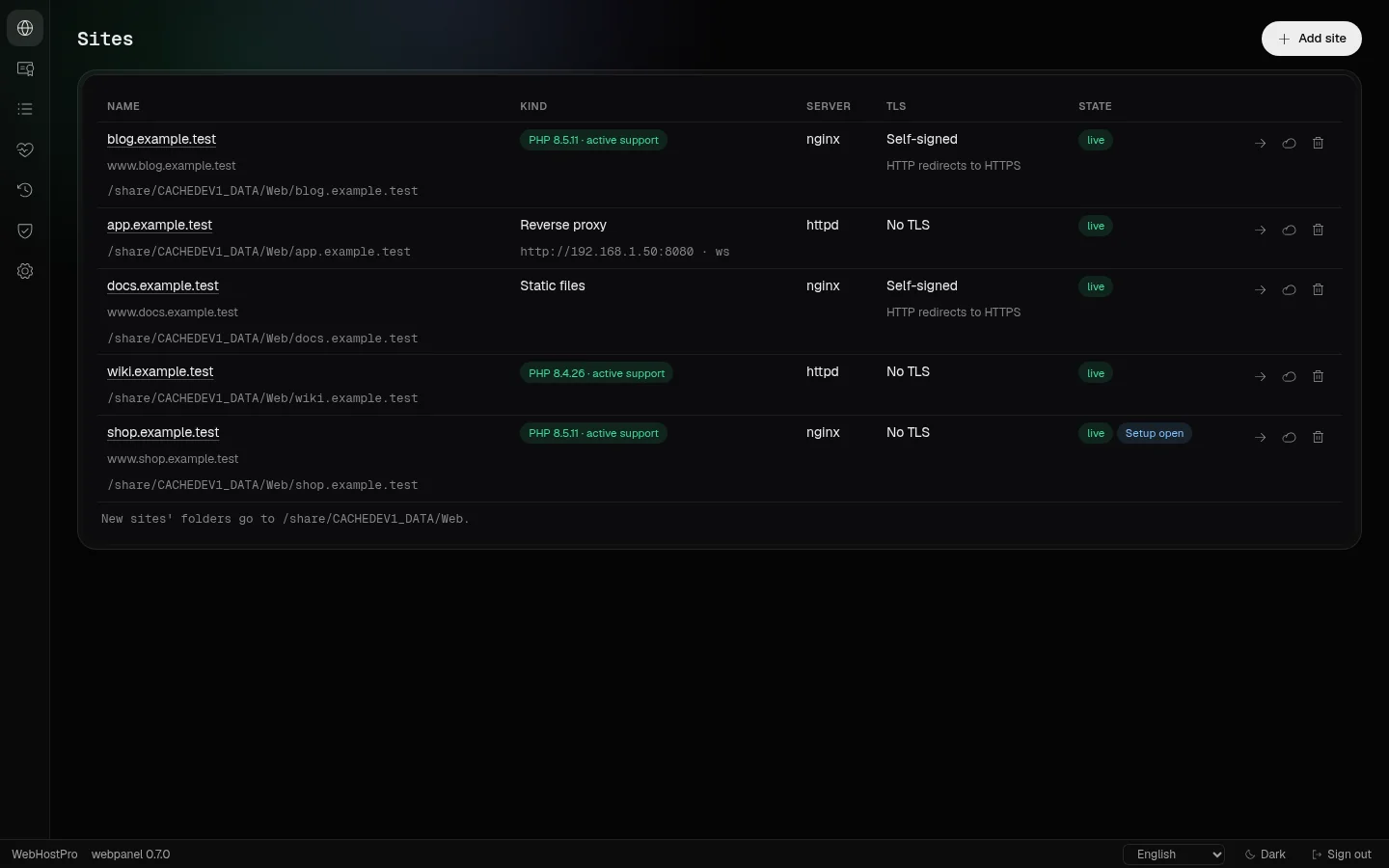
WebHostPro (a web server), TurboDNS (a DNS server) and MailServerPro (a mail server) are Editor projects from the examples gallery, each packed as a QPKG with a panel of its own.

WebHostPro: Sites
WebHostProThe Sites page: each site with its kind, its server, its TLS and its state, and a mark on a site whose domain setup is still open.
WebHostPro: Domain wizard
WebHostProThe domain wizard on its Registrar step: the name servers and the glue records to enter where the domain was bought, each with a copy button, and the router's forwards.
WebHostPro: Domain setup checklist
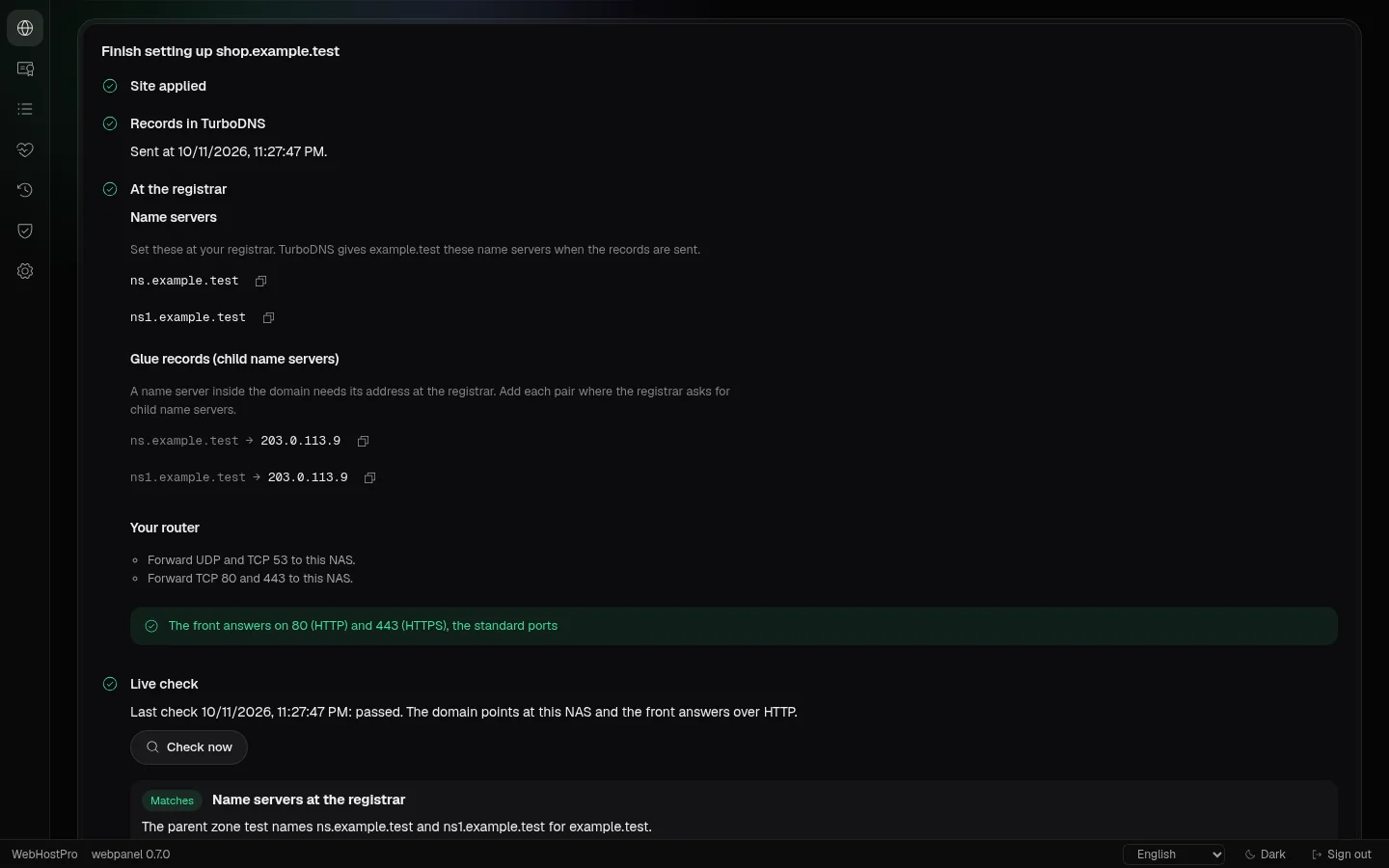
WebHostProThe card "Finish setting up" on a site's Overview: the records sent to TurboDNS, the values for the registrar, and the live check that reads the parent zone's name servers, TurboDNS on this NAS, three public resolvers and the front.
WebHostPro: PHP tab
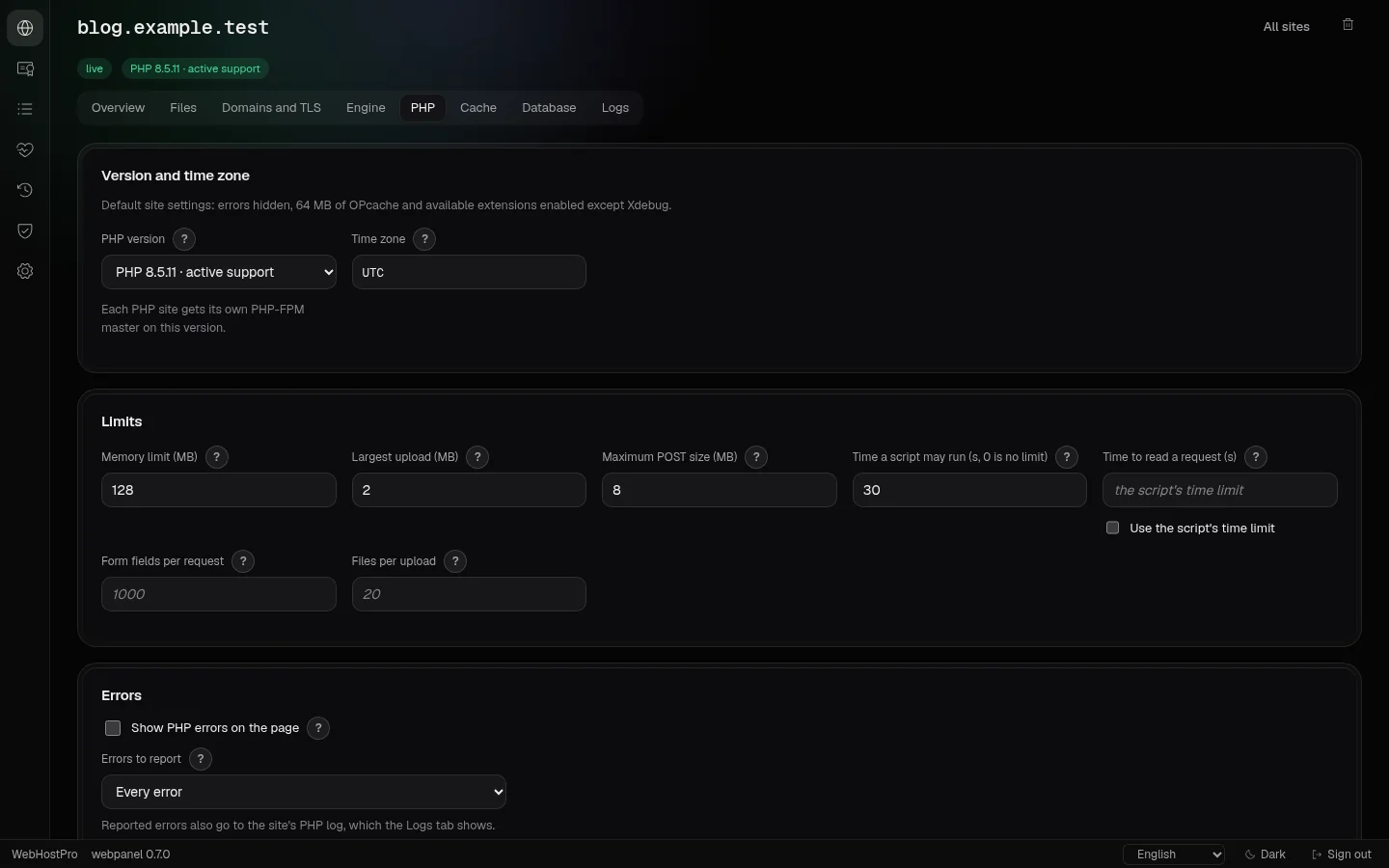
WebHostProA PHP site's PHP tab: the version and time zone, the limits, the errors, the sessions, OPcache and the JIT, APCu, the extensions, more php.ini lines and the PHP workers, each field with a "?" that says what it does.
WebHostPro: Databases
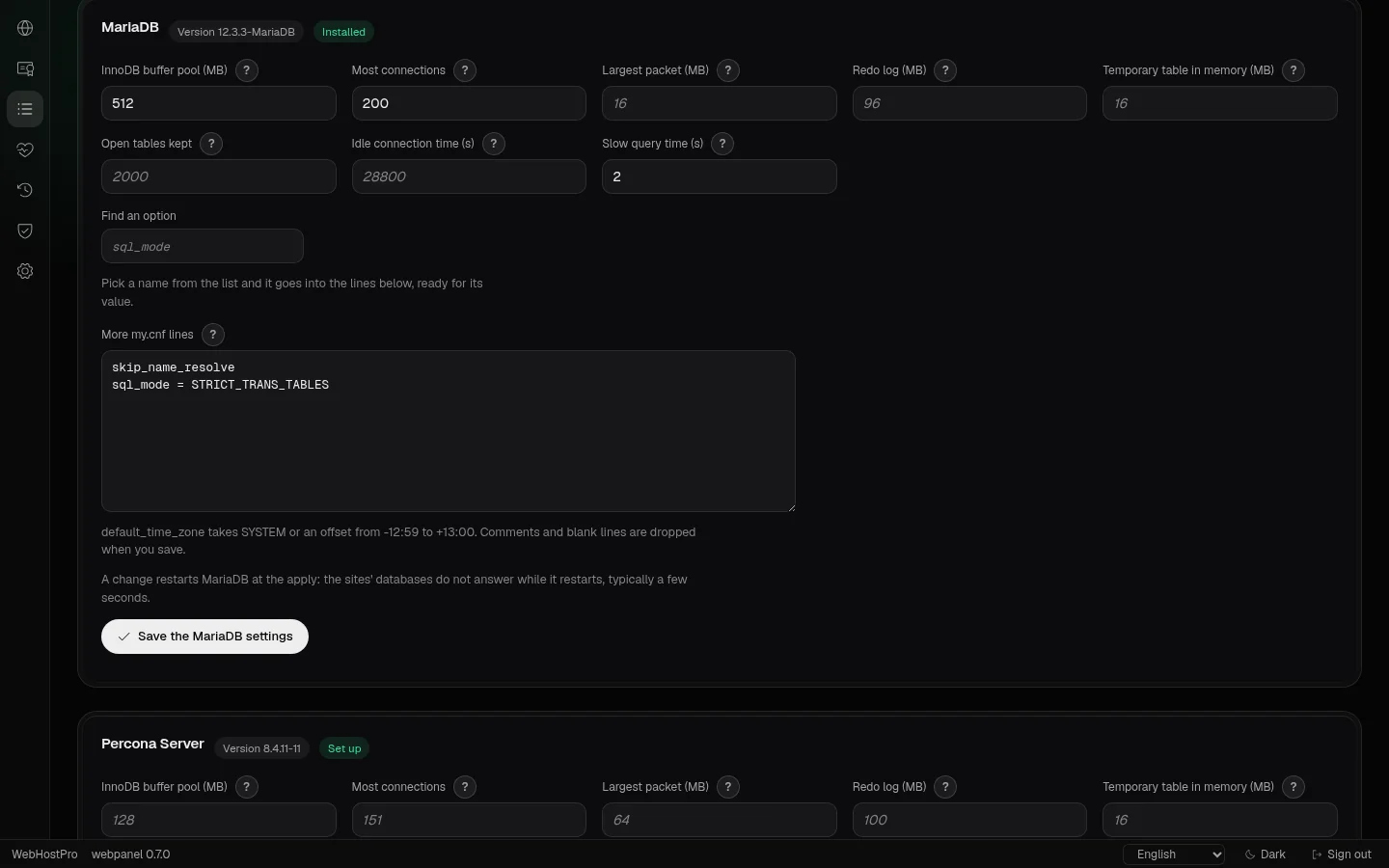
WebHostProThe Databases page: a card for each database server, MariaDB and Percona Server, with the buffer pool, the connections, the slow-query time and more my.cnf lines, checked against the server's own option list; a change is a draft, and the apply restarts the server.
TurboDNS: Zones
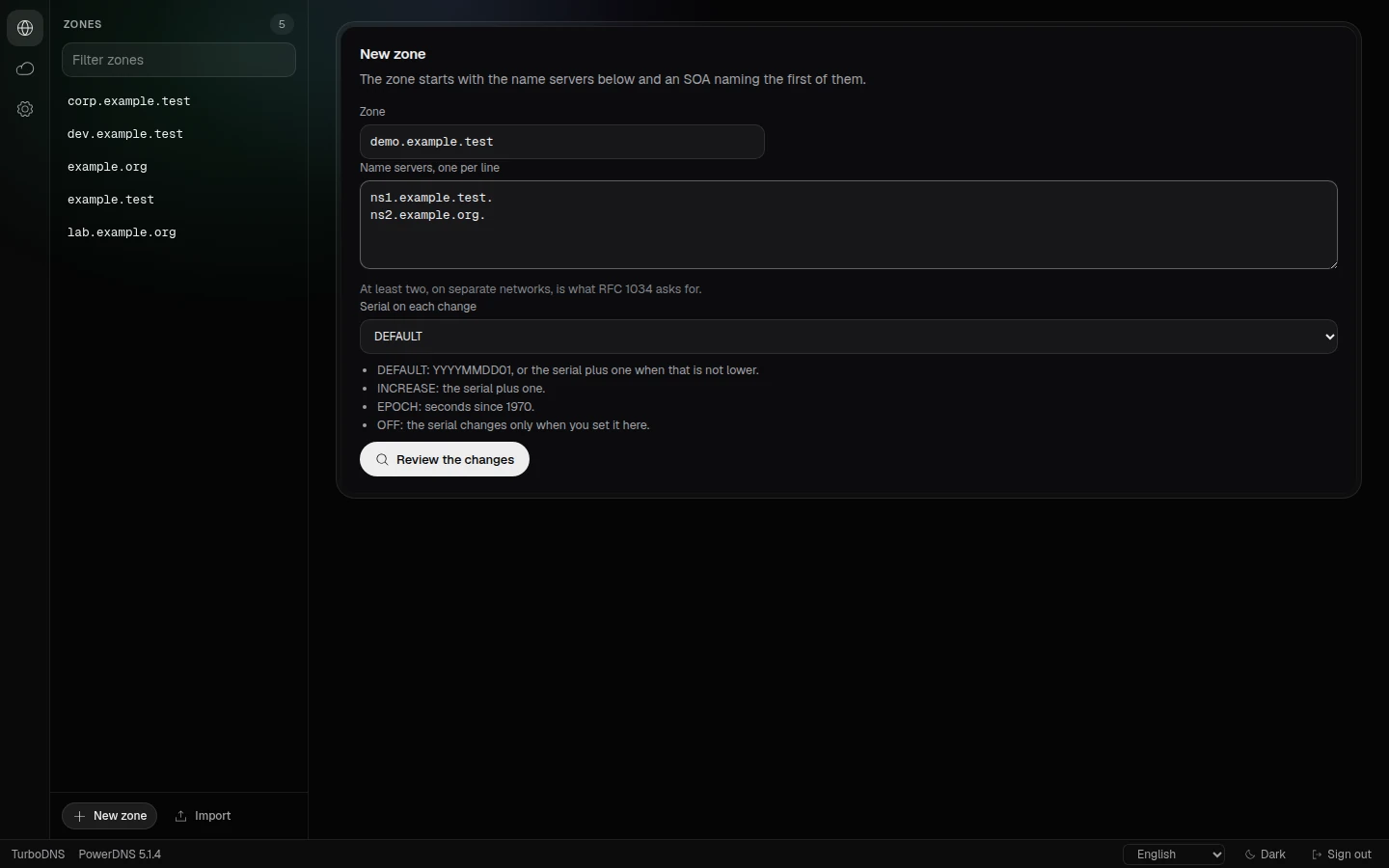
TurboDNSZones: the list of zones, and the form for a new one with its name servers and serial mode.
TurboDNS: Zone records
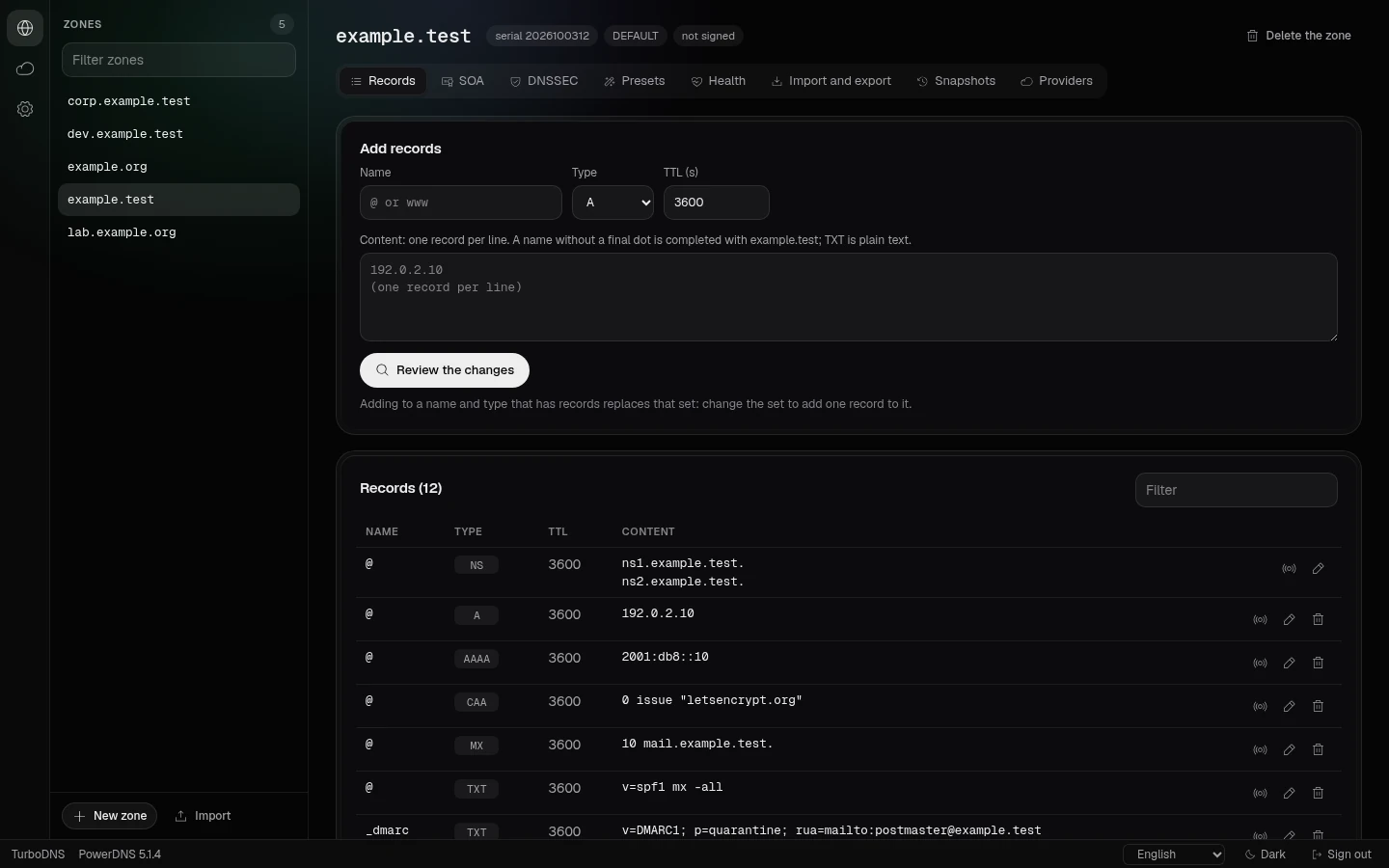
TurboDNSA zone's records: its serial and signing state, the record sets, and the form that adds one.
TurboDNS: Dry run
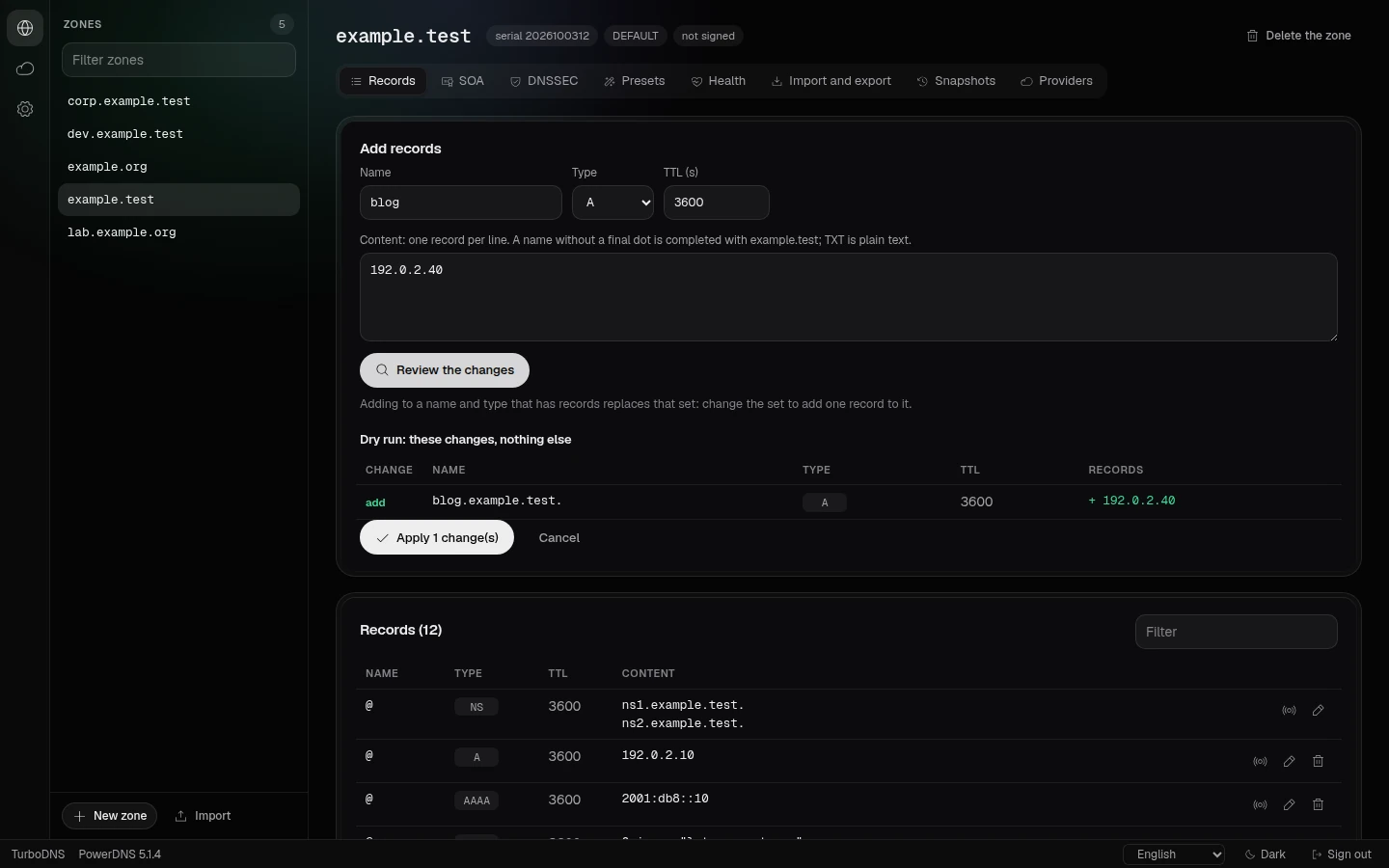
TurboDNSA new record set reviewed as a dry run: what is added, replaced or deleted is listed before anything changes.
MailServerPro: Overview
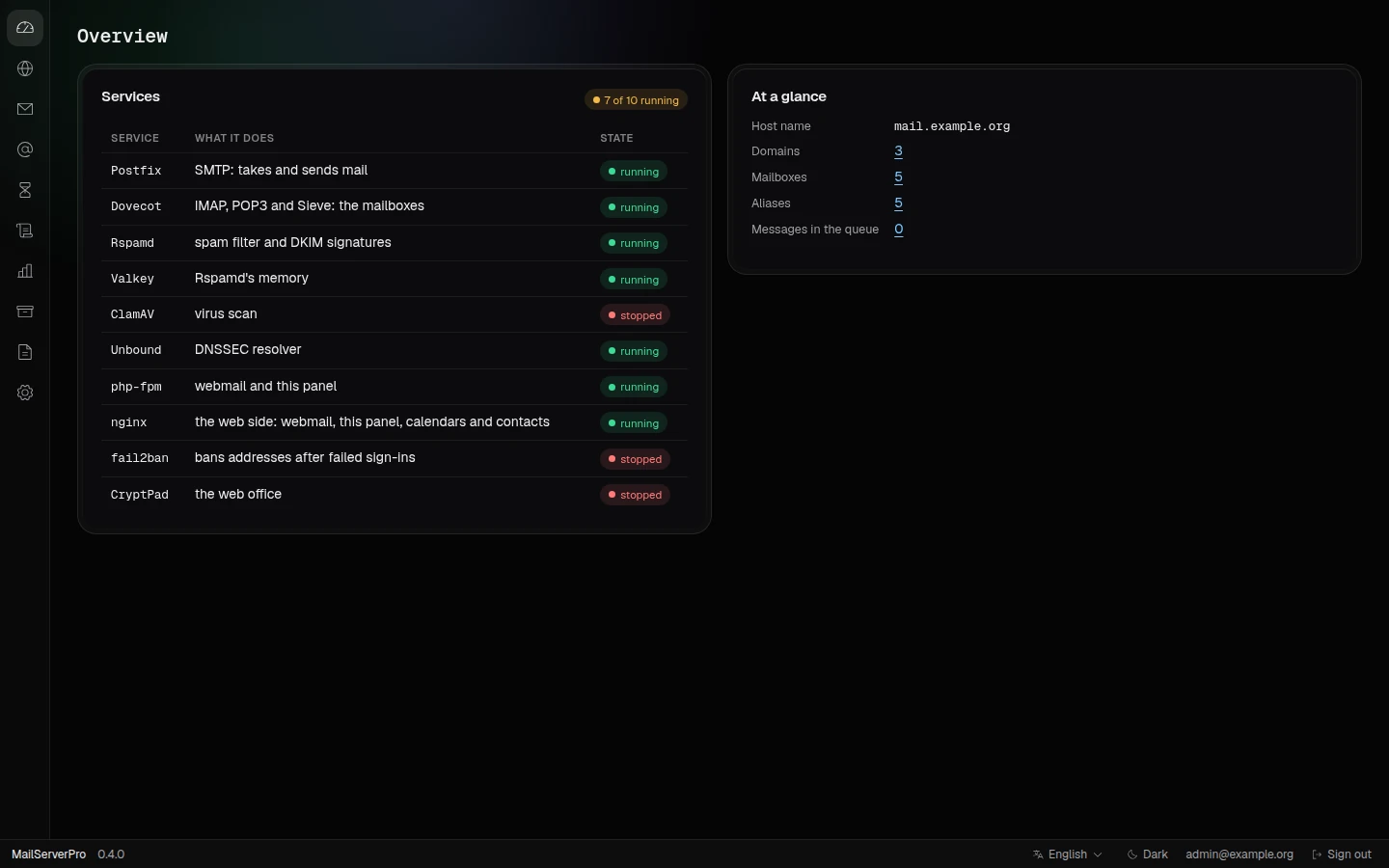
MailServerProOverview: the ten services with their state, and the counts of domains, mailboxes, aliases and queued messages.
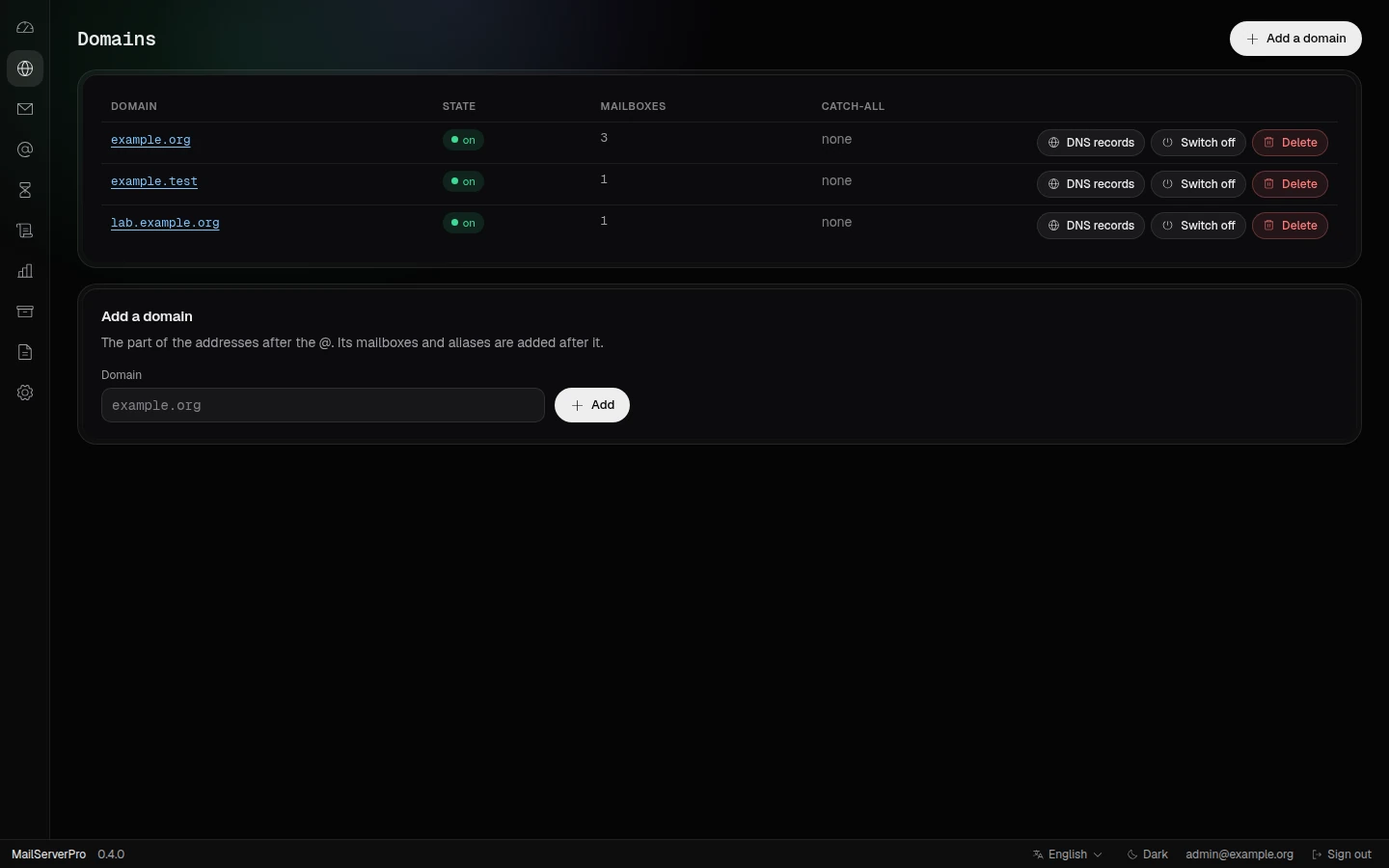
MailServerPro: Domains
MailServerProDomains: each domain with its state, mailboxes and catch-all, and the buttons for its DNS records, switching and deleting.
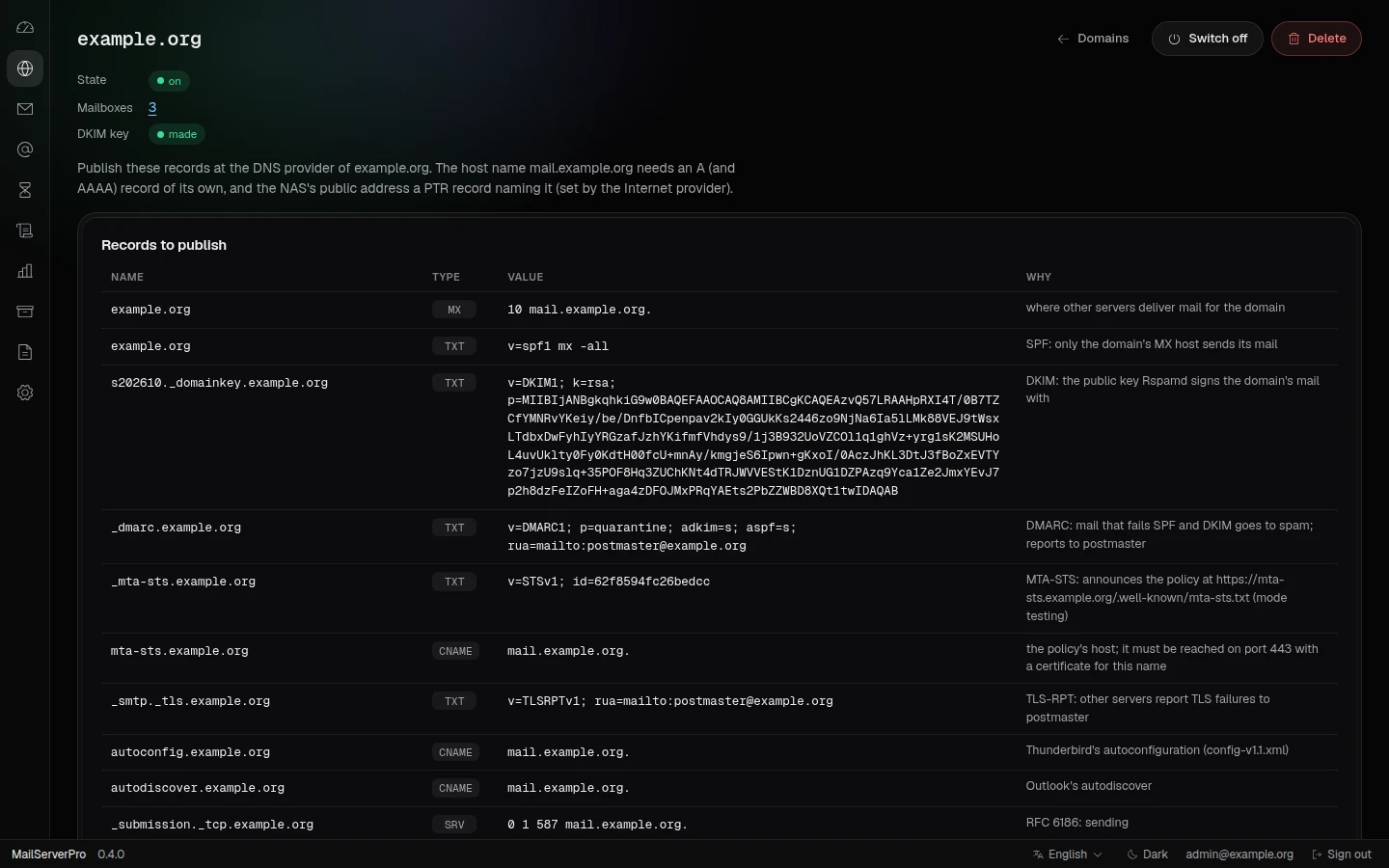
MailServerPro: DNS records of a domain
MailServerProA domain's DNS records to publish: MX, SPF, DKIM, DMARC, MTA-STS, TLS-RPT, autoconfig and SRV records, each with its reason.
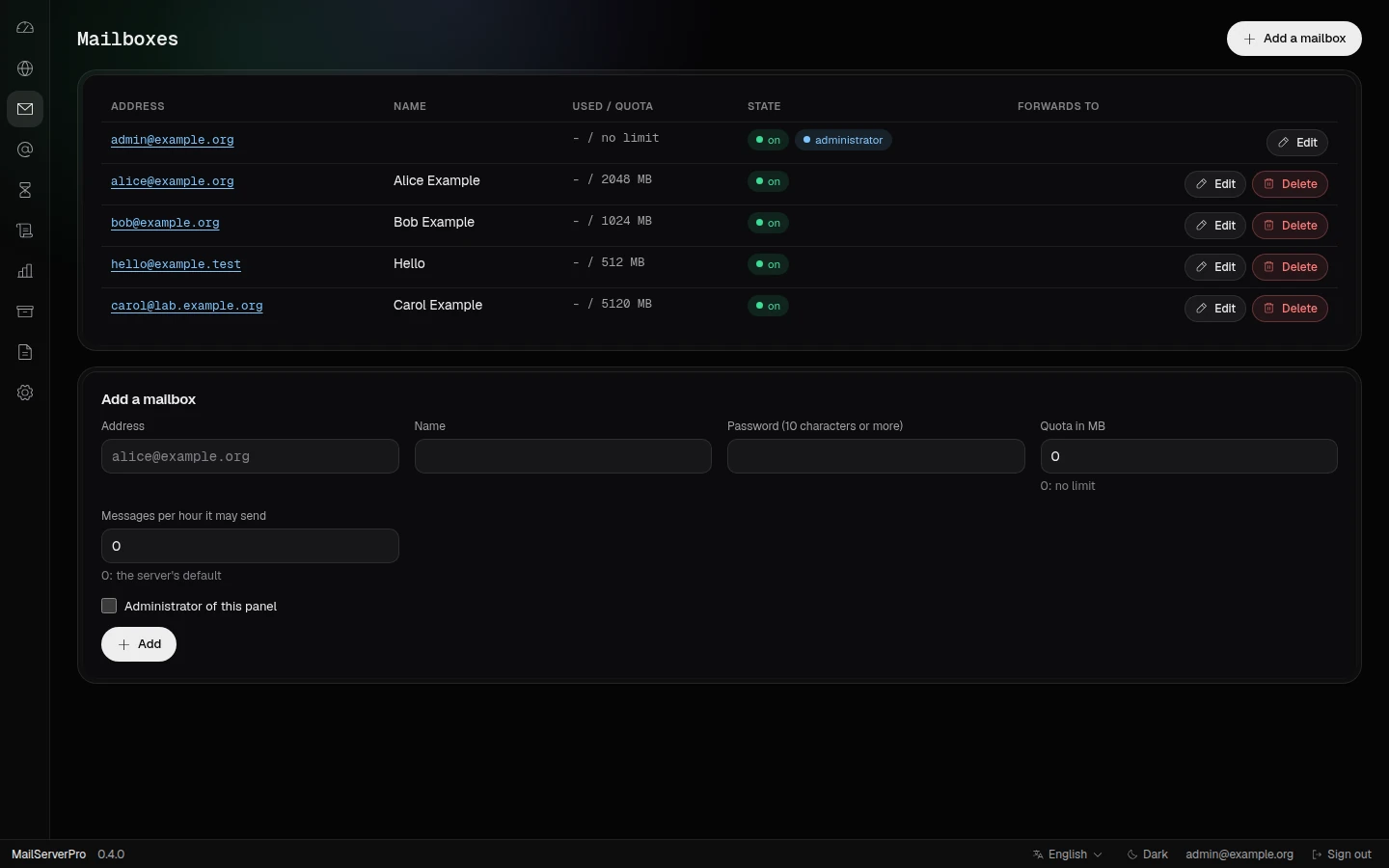
MailServerPro: Mailboxes
MailServerProMailboxes: address, name, use and quota, state and forwards, with the form that adds one below.
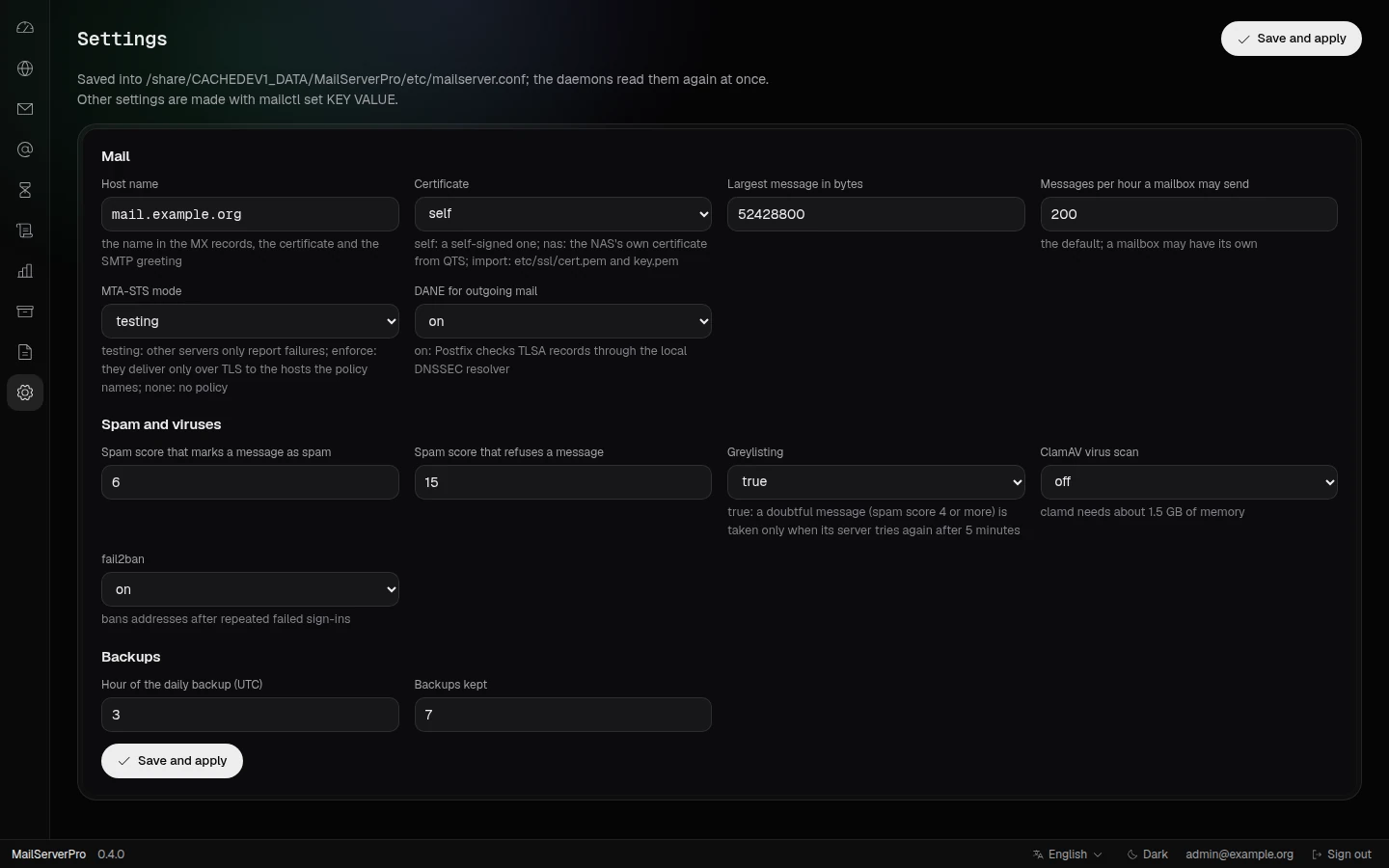
MailServerPro: Settings
MailServerProSettings: host name, certificate, message size and send rate, MTA-STS and DANE, spam thresholds, greylisting, ClamAV, fail2ban and backups.
1 / 13

The panels are real, opened in a browser on a build machine. Their data is made up: names under example.org and example.test, addresses from the documentation ranges and local ones.

Who it's for

  • Developers who want their code, their builds and their CI on hardware they own.
  • QNAP power users who build their own QPKGs, command-line tools and servers for the NAS.
  • Small teams that need private Git, issues and pull requests without a cloud subscription.
  • Tinkerers who need a kernel module QNAP does not ship.
  • Anyone who wants every version of a file on a network drive that Finder, rclone and davfs2 already speak.

Requirements

  • QTS 6.0 or QuTS hero 6.0 or newer
  • An x86_64 or ARM 64-bit QNAP NAS
  • One package per architecture, installed from App Center

Turn your NAS into a workshop.

Install Bucket & Code Server IDE, sign in, and switch on the modules you need.

QNAP is a trademark of QNAP Systems, Inc. Bucket & Code Server IDE is made for QNAP NAS; it is not made or endorsed by QNAP.