WebHostPro: web hosting on your QNAP NAS
WebHostPro runs websites on a QNAP NAS: static sites, PHP sites with their own databases, and proxies to apps on the NAS, each under its own domain with a certificate, all from one panel. It is free and installs from this site's App Center repository.
- Runs on a QNAP NAS with an Intel or AMD processor (x86_64), on QTS 6.0 or QuTS hero 6.0 or newer.
- Installs from App Center as (example) WebHostPro, from the QNAP Utilities repository.
- Panel:
https://<NAS>:9541/; the sites answer on 9542 and 9543 until you move them to 80 and 443. - Built from source with the App Builder of Bucket & Code Server IDE.
01What it is
WebHostPro runs websites on a QNAP NAS. It is a web server stack: nginx in front of every site, Apache httpd behind it for the sites set to use it, PHP 8.1 to 8.5, MariaDB, Percona Server, PostgreSQL, memcached and Valkey, with a panel in nine languages that adds, changes and removes the sites.
02Screens
03First start
App Center’s Open leads to the panel, https://<NAS>:9541/; the plain-HTTP port
9540 redirects there. On a new install the panel shows First sign-in: a password of at least 10 characters,
typed twice. The package sets no password and generates none, and the panel stores only a hash of the one you
set.
The page takes the password only from a computer on the NAS’s own network (a private, loopback or link-local address) and for 60 minutes after the panel starts; until someone sets it, the first person on the network who opens the panel in that hour chooses it. Restart WebHostPro in App Center to open it again. A session lasts 8 hours, and 10 failed sign-ins from one address lock that address out for 15 minutes.
04Sites
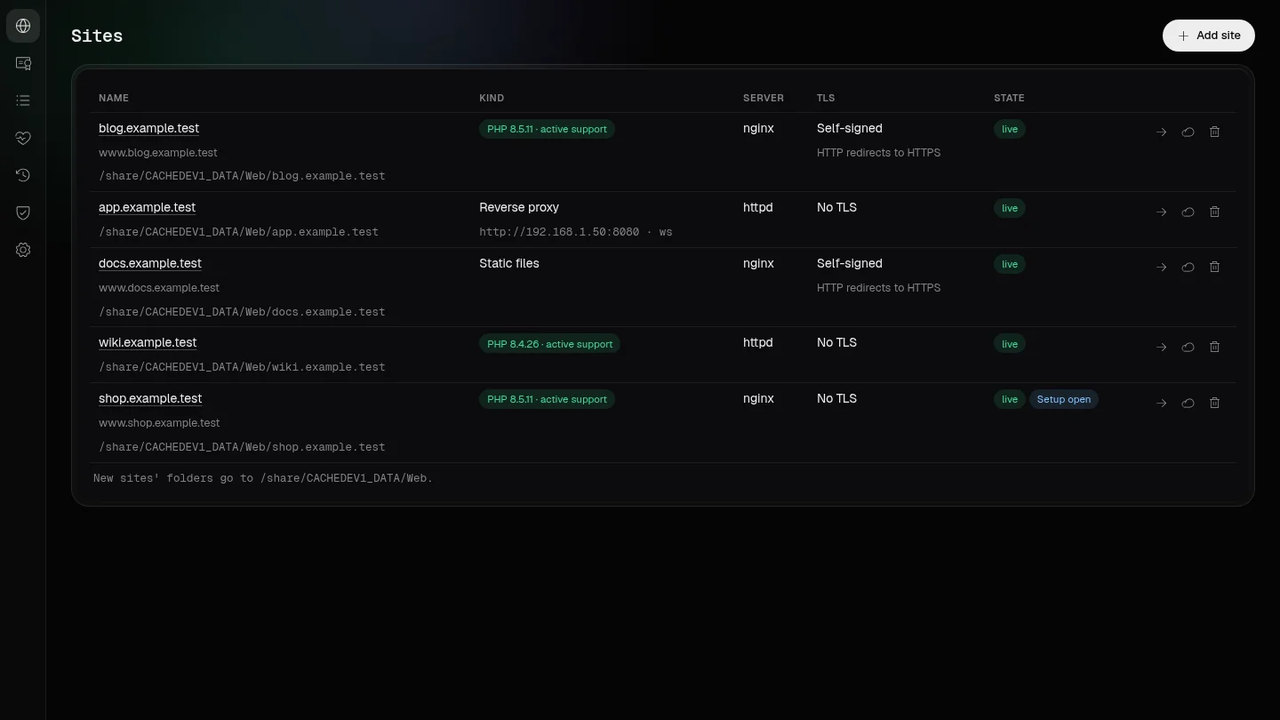
A site is a domain with its aliases, a kind (static files, PHP, or a proxy to a service on the NAS or on the
local network, a container included, with websockets), a web server (nginx or Apache httpd) and, if it needs one, a
database. A proxy target is an address in a private range, not a hostname. Each site has an account of its own,
ws-<ID>, which owns its folder and runs its PHP, so one site’s PHP cannot read another
site’s files. The folder is in a QTS shared folder or in WebHostPro’s data folder, and its
public/ is the document root.
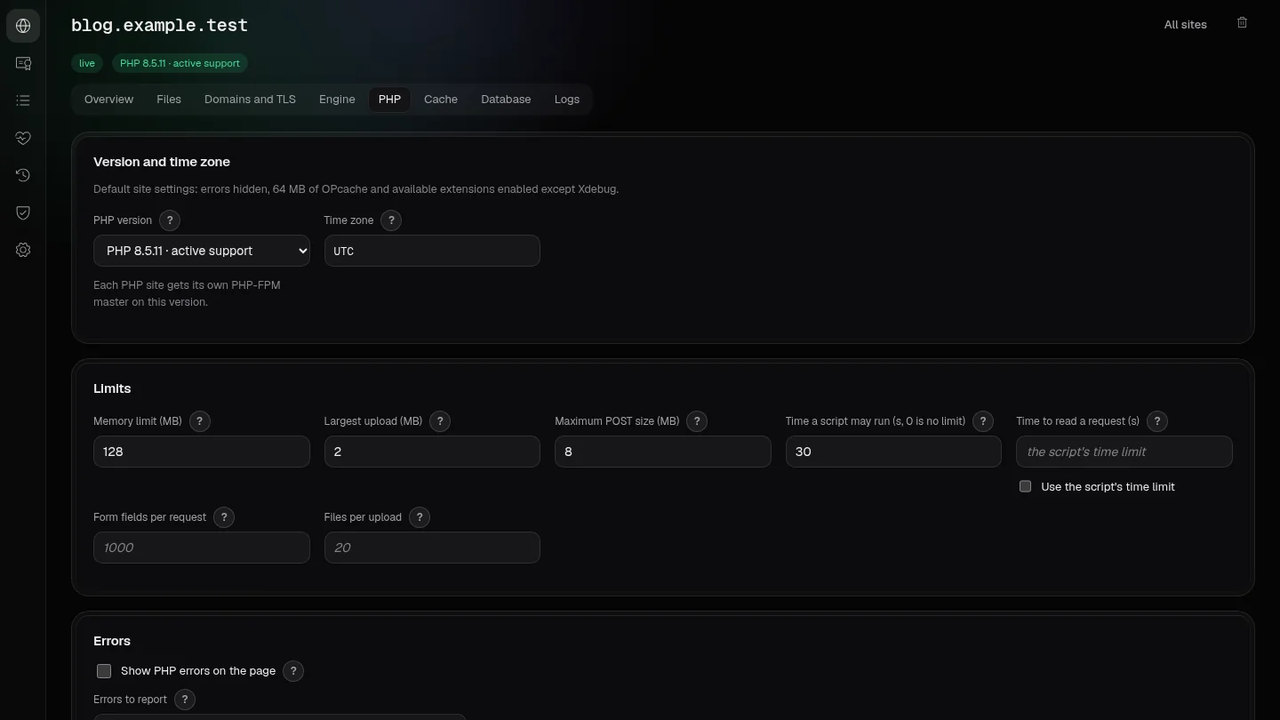
A PHP site runs its own PHP-FPM master, and its PHP tab holds the version (8.1 to 8.5), the time zone, limits,
errors, sessions and security, OPcache and the JIT, APCu, the extensions, more php.ini lines and the PHP workers
(the pool). A php.ini line is checked against the directives that the version’s own PHP lists; a name that
loads code, runs a command, names a file or holds a password is refused. The pool has the process manager (on
demand, dynamic or static), the number of processes (on demand with 5 by default), the idle time, the requests per
process, a request time limit and a log of slow requests, which the Logs tab shows. A crash or a busy PHP on one
site leaves the others running, and a change of one site’s PHP settings restarts that site’s PHP only. A
master that exits is started again and stays down after five exits within a minute;
logs/php8.N-ID.log says so.
Each site can run scheduled tasks as its own account with its own PHP: a PHP file, a command or the site’s own address, every minute or on any cron schedule. The site’s page shows each run’s result and output, and MailServerPro mails a report when a task starts failing.
Every PHP site has its own Valkey (it speaks Redis’s protocol) and its own memcached, each on a socket in a folder that only that site can open, so neither needs a password or a network port; the site’s Cache tab shows both sockets. Each keeps up to 64 MB, and a restart empties both. Every PHP version has imagick, with ImageMagick reading and writing JPEG, PNG, WebP, GIF and AVIF and reading HEIC. Its policy refuses the formats that read other files or run programs, such as SVG and MSL.
Apache sites’ .htaccess files can also use Digest authentication, groups from a group file, Substitute to rewrite text in a page, and the RATE_LIMIT filter to cap a download’s speed.
A PHP site can also have PECL extensions of its own: its PHP tab builds one as the site’s own account, with no network, in Bucket & Code Server IDE’s builder environment, and only that site’s PHP loads it.
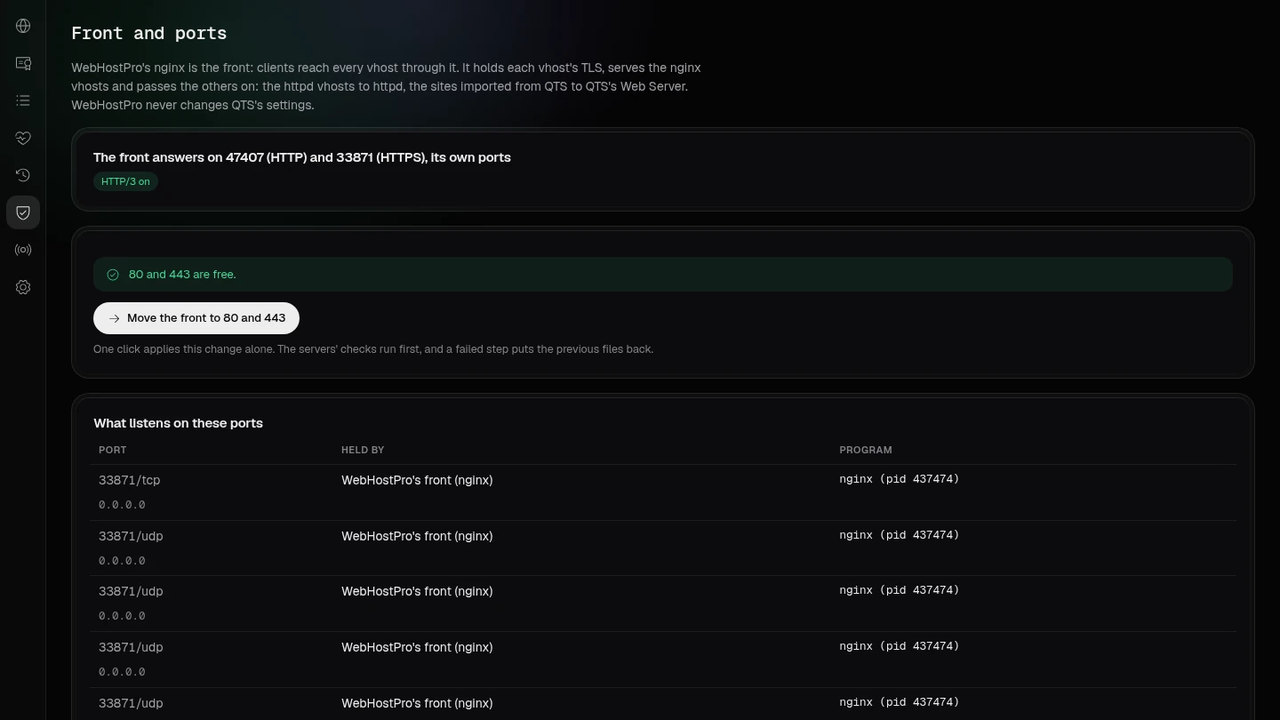
WebHostPro can take over the NAS’s web server role in one click, and a fresh install asks once: QTS’s administration moves from port 443 to 44443 and its Web Server from 80 to 8880, each step checked before the next, QTS’s sites come in behind WebHostPro, and one click on the Front and ports page gives 80 and 443 back.
A guided tour leads from standard ports and TurboDNS to your first site, then suggests sharing the DNS server address through the router’s DHCP after checking the DNS configuration.
A PHP or static site that nginx serves has a Cache tab. nginx compresses text answers with Brotli and zstd as
well as gzip. A PHP site can turn on a page cache, off by default: visitors with a sign-in cookie always get a
fresh page, the X-Cache header says HIT, MISS, STALE, UPDATING or BYPASS, and Purge the cache
empties it. Static files can be kept by browsers for 1, 7, 30 or 365 days. nginx takes a request body up to the
site’s largest request (the PHP tab’s post_max_size) and answers 413 above it; a proxy
site has no body limit at the front.
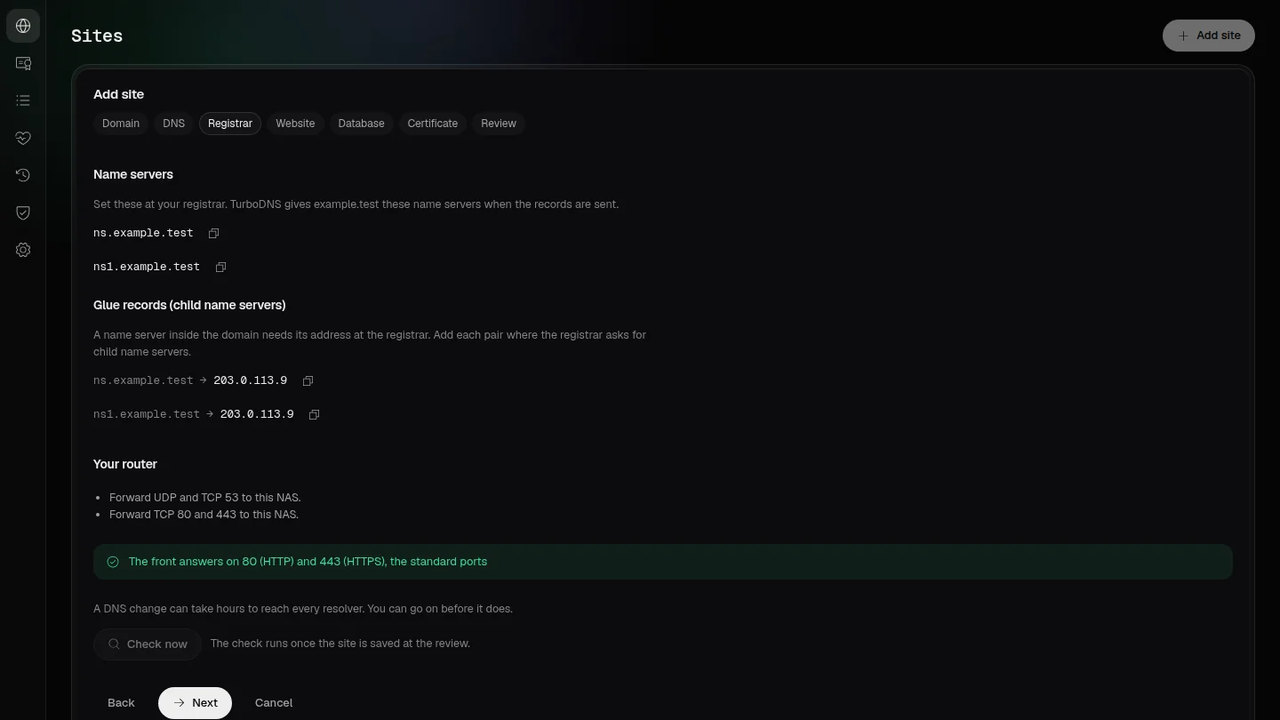
Add site is a domain wizard: Domain, DNS, Registrar, Website, Database (for a PHP site), Certificate and Review. DNS asks who answers for the zone (TurboDNS on this NAS; the servers of the registrar or a DNS provider; or Cloudflare or OVHcloud, from the zone TurboDNS keeps on this NAS) and which public addresses this NAS has. Registrar lists what to enter where the domain was bought, each value with a copy button, with the router’s forwards and the state of the front under it. The Review’s dry run shows the site’s plan and TurboDNS’s plan together, and one apply sends both. The certificate comes from Let’s Encrypt (HTTP-01, where the front serves the file on port 80, or DNS-01 through TurboDNS or Cloudflare; WebHostPro renews it when 30 days or less are left), or it is an uploaded one, the NAS’s own or a self-signed one.
After the apply, the site’s Overview has the card Finish setting up <name>: Site applied, Records in TurboDNS, At the registrar, Live check, Certificate and Finish. Check now reads the parent zone’s name servers, this NAS’s TurboDNS, three public resolvers and the front, and says that it cannot see whether ports 53, 80 and 443 reach the NAS from the internet; the Certificate row asks Let’s Encrypt for the certificate. Records in TurboDNS is done once TurboDNS’s plan for the domain finds nothing to change, from the wizard’s dry run, from the row’s Send records or from a repeated send alike, and then reads In TurboDNS since <time>; a site whose records are in the zone already gets it from the dry run.
Every change is a draft first. The dry run renders the whole web tier into a scratch folder, runs
nginx -t, httpd -t and php-fpm -t on it and shows the files added, changed
and removed with their diffs. The apply carries out exactly that plan, keeps a snapshot of the live files first,
reloads gracefully and puts the snapshot back if a step fails. Deleting a site needs its name typed; its folder and
databases stay.
For a proxy site, App on this NAS lists the installed apps WebHostPro has a template for: Rtorrent 16 and
its add-ons, Radarr, Sonarr, Prowlarr, Lidarr, Bazarr, Seerr, Tautulli, qBittorrent, Transmission, TunerHub,
Weblate, Tolgee, Bucket & Code Server IDE, Plex Media Server and Jellyfin. Picking one fills in the target
with the port the app’s package uses and turns the websocket switch on for apps that need websockets. The
front then sends the app X-Forwarded-Host and X-Real-IP, gives an app with long requests
up to an hour to answer, and streams media and events without buffering for the apps that send them. A setting
only the app itself can change, such as an *arr app’s URL Base, is shown in one line under the choice.
05Default site
A request for a name no site has, such as the NAS’s address or its name, goes to the default site:
QTS’s Web shared folder when the NAS has one WebHostPro can use, otherwise a start page in
WebHostPro’s data folder. Apache httpd serves it, so the folder’s .htaccess files work,
except Options lines, which httpd ignores. Its PHP runs under an account of its own. After the
install or the upgrade it is on as a draft: the next dry run and apply put it live. It answers on the
front’s ports: 80 once the front has moved there on the Front and ports page, otherwise 9542. While
QTS’s Web Server holds port 80, its page in WebHostPro says what to switch off in QTS. It never serves other
sites’ folders inside the Web folder, files and folders whose names start with a dot (except
.well-known), or QTS’s @ folders, and it shows no folder listing. WebHostPro does
not change the folder’s permissions.
Folders of the Web shared folder that are links to other shared folders or volumes work as they did
with QTS’s Web Server, PHP included.
Over HTTPS it answers with the NAS’s own certificate, the one QTS uses for its own pages; while that is QNAP’s self-signed certificate, browsers show a warning. A TLS request for a site without TLS is refused.
WebHostPro rotates its own logs: a log is rotated at 10 MiB or after a week, five copies are kept compressed with gzip, and nginx and httpd open their logs again without dropping a request.
06Databases
A site gets a MariaDB, Percona Server or PostgreSQL database and user on the Databases page or on its Database tab. Percona Server 8.4 is set up when the first Percona database is made and listens on 127.0.0.1:9555 and on a socket; a NAS that never uses it never starts it. The Databases page has a card for MariaDB and one for Percona Server, with eight settings (the buffer pool, connections, the largest packet, the redo log, temporary tables, the table cache, the idle time, the slow-query time) and more my.cnf lines, checked against the server’s own option list. A change is a draft; the apply restarts the server, so its databases do not answer for a few seconds.
07With the other apps on the NAS
When TurboDNS runs on the NAS, the wizard’s DNS step offers it the zone, and the apply sends the records.
Without MailServerPro they carry no mail records: a new zone gets the name servers ns and
ns1, both this NAS unless you name a second name server, and the A and AAAA records of the
site’s names, of ns and of ns1; a zone TurboDNS already serves keeps its own name
servers. With MailServerPro installed, the zone gets TurboDNS’s hosting template with the NAS’s public
addresses that you confirm, the A and AAAA records of the site’s own names (the template covers the domain,
www, ns, ns1 and the mail names, so a second site such as
shop.example.com gets its own) and MailServerPro’s DKIM, MTA-STS, TLS-RPT and TLSA records.
Nothing is written to TurboDNS before the apply, and the Review shows every record first.
The DNS step’s third answer, Cloudflare or OVHcloud, from the zone TurboDNS keeps on this NAS, gives TurboDNS the same records as the first answer, and a DNS provider answers for the domain. TurboDNS pushes the zone through the provider’s API, and only when you ask: open the zone in TurboDNS, its Cloudflare and OVH tab, Review the changes, then Push the changes. The Registrar step then lists no name servers, glue records or port 53: the registrar keeps the provider’s name servers, and the zone needs no port 53 forward on the router. The live check then passes on the public resolvers and the front, with the rows Name servers at the registrar and Glue records skipped.
With Bucket & Code Server IDE installed, a site’s Files tab opens its folder in the editor.
08Without a public address
A NAS behind CGNAT, or behind a router that forwards no ports, can serve chosen sites on the internet through a Cloudflare Tunnel. The card Reach the sites from the internet through Cloudflare on the Front and ports page takes an API token of your Cloudflare account and a zone whose name servers are Cloudflare’s. WebHostPro then makes a tunnel of its own and runs cloudflared, which connects out to Cloudflare. Each applied site gets a switch that gives its names in the zone a proxied CNAME to the tunnel; WebHostPro refuses a name that already has an A, AAAA or CNAME record it did not make. Turning the tunnel off deletes the records WebHostPro made and the tunnel. Cloudflare ends TLS and sees the traffic, and on its free plan one request can upload at most 100 MB.
09Installation
Recommended — from App Center. Add this site’s repository once; after that the package installs and updates from App Center like any other app.
- App Center → ⚙ Settings → App Repository → Add.
- Name it
QNAP Utilities, pastehttps://www.qnaputilities.com/repo.xml, Add. - Open QNAP Utilities in the left rail and install (example) WebHostPro.
10What it needs
A QNAP NAS with an x86_64 processor (Intel or AMD) on QTS 6.0 or QuTS hero 6.0 or newer.
The panel is on port 9541 (HTTPS; 9540 redirects there), the front (nginx) on 9542 (HTTP) and 9543 (HTTPS, and UDP for HTTP/3 when nginx has it), and httpd on 127.0.0.1:9544 behind it. The databases, caches and optional services listen on 127.0.0.1 only. The front moves to ports 80 and 443 only when you click it on the Front and ports page, which lists the steps in QTS that free those ports and what each breaks; WebHostPro never changes QTS’s settings itself.
On QuTS hero, a shared folder with Advanced Folder Permissions cannot hold sites: the apply stops, names the folder and asks again. WebHostPro 0.14.4 was tried on QTS 6.1.0 and QuTS hero 6.1.0.
11Related pages
- How-to: your domain on your NAS, website, DNS and mail →
- How-to: three apps on WebHostPro (FreshRSS, Heimdall, FileRise) →
- MailServerPro: the mail server for the same domains →
- Bucket & Code Server IDE, the workshop that builds it →
- Add this site's repository to App Center →
- Versions, licenses and the package file: the app's panel in App Center →