| ||||||||||||||||||||||||||||||||||||||||||||
| ||||||||||||||||||||||||||||||||||||||||||||
A green light
| ||||||||||||||||||||||||||||||||||||||||||||
 | ||||||||||||||||||||||||||||||||||||||||||||
 | ||||||||||||||||||||||||||||||||||||||||||||
|
From the publisher · Silas Mariusz Hello, QNAP fans! In the October issue I ran an ad straight from the back page of an old computer magazine: testers wanted. Rtorrent 16 for Android needed twelve people to stay opted in to its Google Play test for fourteen days in a row. You signed up and you stayed. And the answer is in: Google accepted the application to release the app for everyone. Until now this newsletter described packages from App Center. Now I also publish an app in Google Play, and anyone can find it there as Rtorrent 16. I start with the phone and then look at the NAS: the Media studio, where you make a remux and a film with a voice-over, LinkDrop, WebPortico, and StorageDiag, which labels disks with their bay numbers.
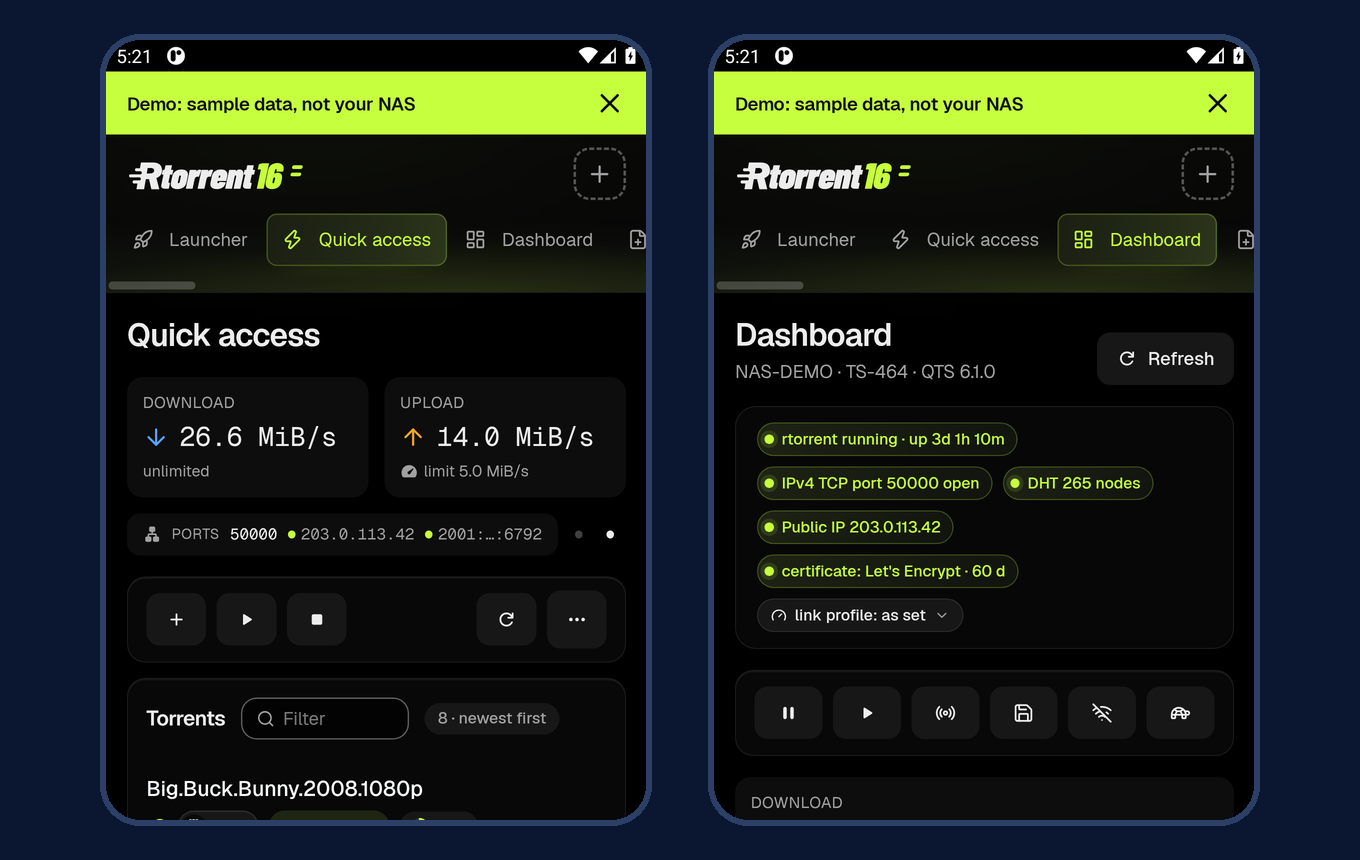
We could ask for a release for everyone only once at least 12 testers had stayed in the closed test for 14 days without a break. Play Console counted them from 31 October. The fourteen days were up on 13 November, and a day later Google accepted the application. What do you get? The app opens your NAS's Rtorrent 16 panel on the phone: Quick access, the Dashboard, Search and the other pages. A .torrent file from Chrome or Edge, a magnet link or a file shared from another app goes straight to the NAS. Notifications tell you about added and finished downloads, errors and an almost full disk. A download's notification has Pause and Open buttons, and a poster when the NAS has one. You pair the phone once, with a QR code from the panel's "Phone app" page. The app has no ads and no analytics, and needs no extra account. Version 1.2.5 added "App settings": Light, Dark or Follow system for the app's own screens, a short guide, "Share the app" and "Send feedback". You open it with a long press on the app's icon. With version 1.2.6, a magnet link opened while the screen says the NAS is not responding makes the app connect again and open the Add page. Rtorrent 16 has been on Google Play since 14 November. Already have the APK from our site? The Play version carries the same signature, so you can update the APK install with it and the phone stays paired with the NAS. The announcement is on the forum, and questions about the app go to the Rtorrent 16 section. And the iPhone? There we wait for Apple. The test build waits for review in TestFlight and version 1.2.1 for review in the App Store. The public test does not accept new testers right now. You will find the publication status in the Rtorrent 16 section of the forum. Requirements: Android 8.0 or newer and Rtorrent 16 16.25-08Y or newer with HTTPS on. Away from home: Android 10 or newer, Rtorrent 16 16.25-09L or newer, "Remote access for the phone apps" switched on and its port forwarded on the router.
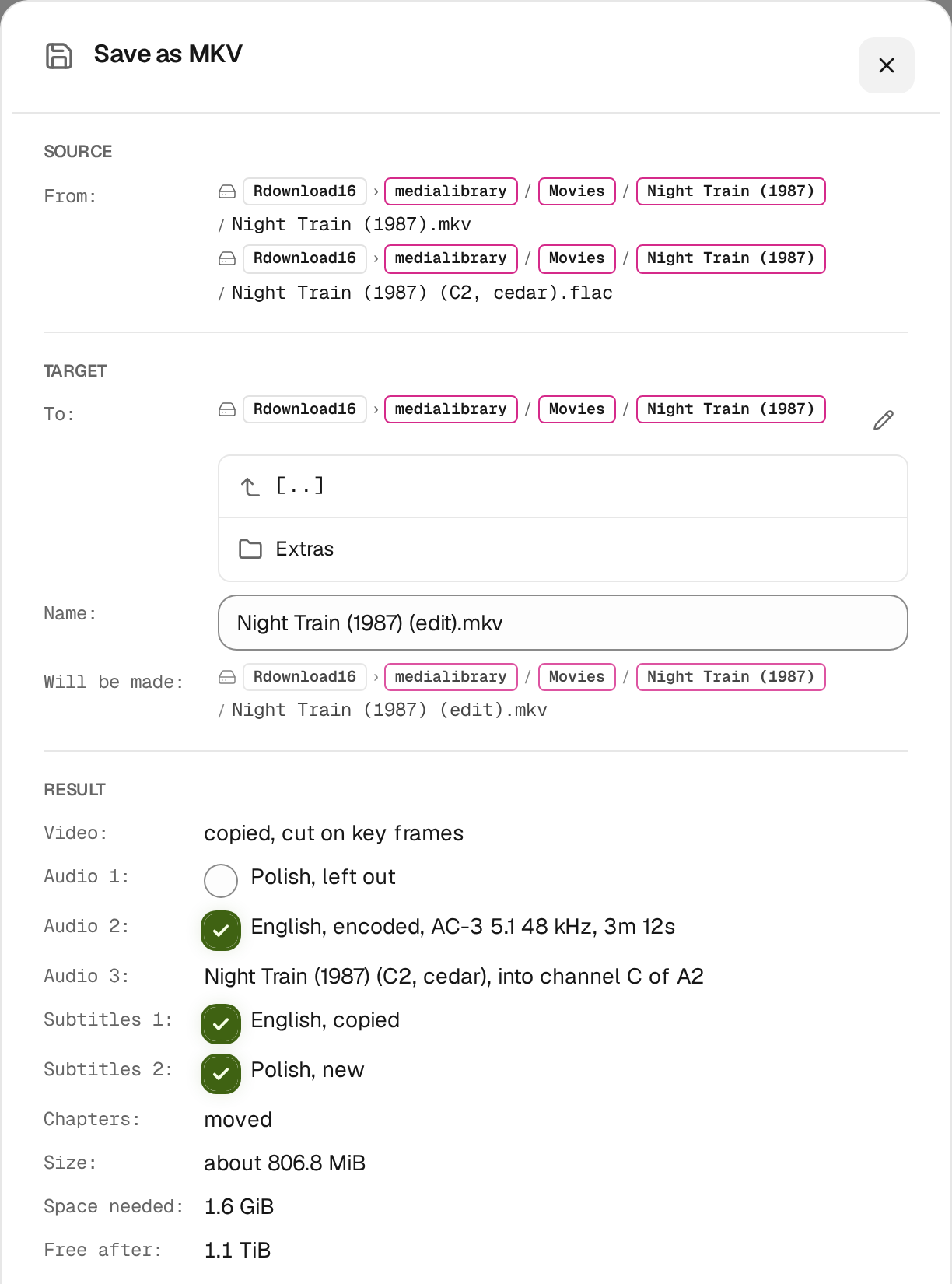
New in Rtorrent 16 is the Media studio. It is for people who make remuxes and their own "muxes": a film with the sound and subtitle tracks they choose, with a voice-over, with subtitles fitted to the speech. You open it from a film's menu in Files, in the Tools group. The studio cuts and moves picture and sound on a timeline and adds a sound track from another file. "Match to Film" compares that track's sound with the film, moves it into place and adds stretch markers. That is how a voice-over taken from a PAL tape, which plays about 4 % fast, lands on the picture. You edit a 5.1 track channel by channel, and you download, translate and fit subtitles to the speech. "Save as MKV" makes a new file and leaves the source film as it was. The save window shows every track, the chapters and the space needed, and after the save the job measures the loudness of every changed sound track. For a plain remux, "MKV tools" in the film's menu is enough: the tracks you keep in your order, with names, languages and flags, plus tracks, subtitles and fonts from other files. The picture is copied, never encoded again.
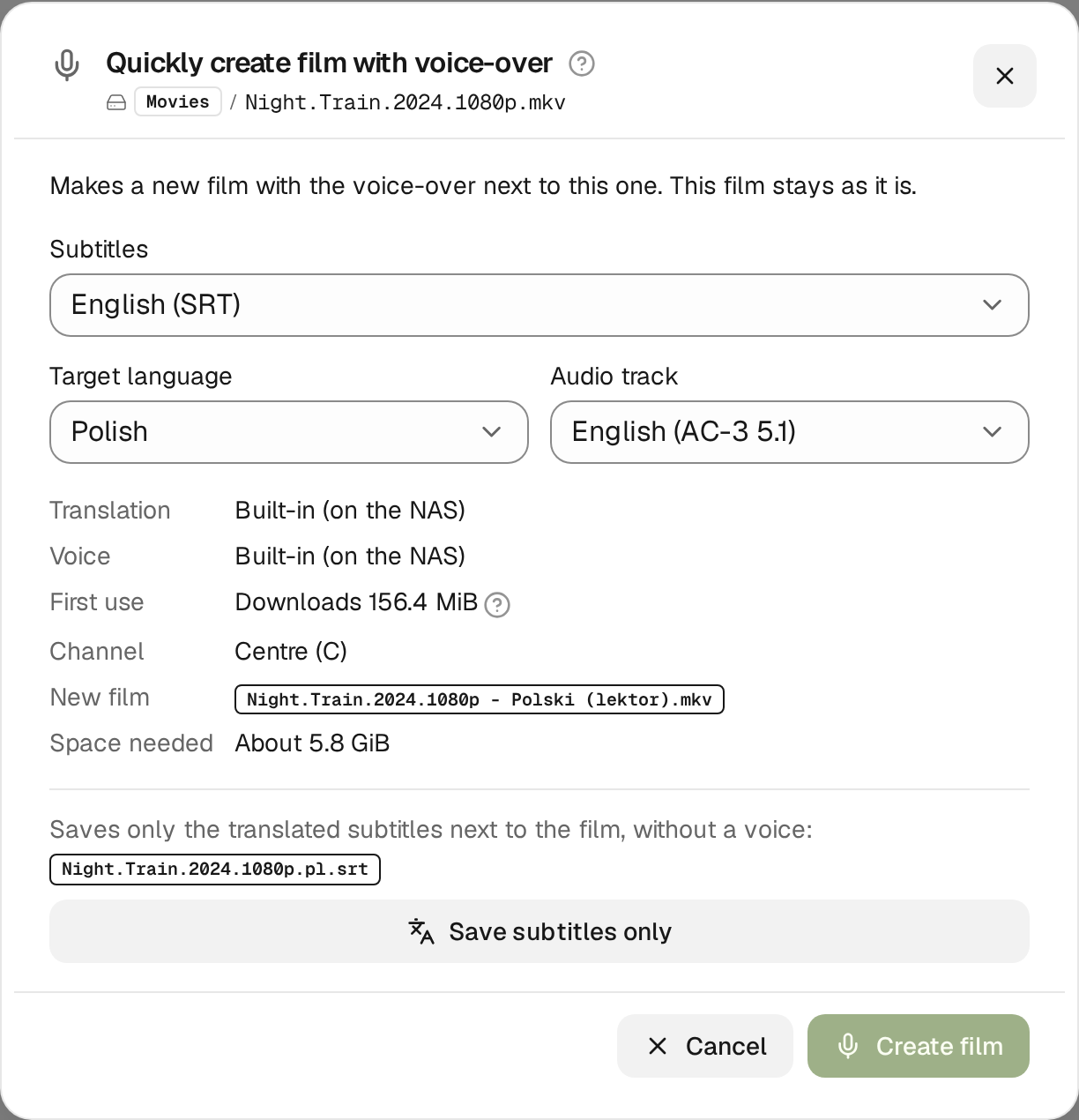
And the voice-over? It is like pressing record on a VHS deck. "Quickly create film with voice-over" translates the subtitles, reads them and, with one click on "Create film", saves a new film with the voice-over beside the original. In a 5.1 film the voice goes into the centre channel, and the film is turned down by a profile measured on real Polish lektor tracks: the default, "Classic voice-over", keeps it 6.5 dB lower. In a stereo film the voice goes to L and R; choose "Extract from stereo (3.0)" under "Centre channel" and the voice-over pulls the dialogue into a centre channel and saves the new track as 5.1, with the voice in C. The original stays as it was. Quality? Someone will say: a bootleg recorded in a stadium. I say it is a matter of the voice. The built-in voice runs on the NAS and costs nothing, and with your own key you can pick an OpenAI or ElevenLabs voice.
LinkDrop sends a file or a folder from your NAS straight to someone else: to their Rtorrent 16, their browser or a download manager. In Files you choose "Share", set how long the link works and a password if you like, then "Create link" and "Copy". The service at link.qnaputilities.com only puts the two ends in touch. The files travel directly between them and never pass through it, and the name of what you share never reaches the service. There is nothing to set on the router: LinkDrop works behind a carrier's NAT too, as both ends open a path through their routers at once. When there is no direct path, the page says so, and the service never carries the file instead. Another NAS with Rtorrent 16 pastes the link on its LinkDrop page and downloads into the folder it picks. Every 4 MiB part is checked before it reaches the disk, and in Rtorrent 16 "Resume" goes on from the last checked part, days later too. In a browser the link shows the list of files with a "Download" button, and the page fetches missing parts after a dropped connection while it stays open.
WebPortico is hosting for harder times. Some can earn with it by reselling hosting, others build their homelab on it. It replaces QTS's built-in Web Server: it can take over ports 80 and 443, and the Web folder keeps working as the default site, with PHP and .htaccess files. Every site has its own account and its own PHP version, from 8.1 to 8.5, and its PHP runs isolated from the rest of the NAS. The databases are MariaDB, Percona Server and PostgreSQL, and "Open in Adminer" opens a site's database in the browser. Backups are made every day, you restore them from the site's page, and copies of them can go to another volume or to a server off the NAS. Mail from PHP sites can go out through MailServerPro, and DNS records go to TurboDNS on the same NAS. Let's Encrypt certificates renew by themselves, and WebPortico retries a failed renewal. The reverse proxy leads to the NAS's apps, virtual machines and containers, with templates for Home Assistant among others. WebPortico sees the domains of OVHcloud and Cloudflare accounts by API key, and "Import from Plesk" moves sites, databases, mail and DNS zones from a Plesk server. A watchdog looks after the services every 20 seconds, a disk guard turns the databases read-only when space runs out, and the "Port forwarding on the router" card opens ports with UPnP, NAT-PMP and PCP or through a UniFi gateway's API. The current version is getting its final polish and your reports before Release Candidate 1.00. Send your reports to the WebPortico thread on the forum.
StorageDiag reads QNAP's diagnostic bundles. In version 1.6.10047 the Kernel Log and Dr. Trace put a pill with the bay number beside every disk name. A disk that failed and was removed keeps its pill, greyed and marked removed. A partition gets a small pill with its number, and the boot device a DOM pill. Session Overview shows the fullest pool and the fullest volume at the top: orange from 80 %, red from 95 %. Uploaded bundles are kept for 14 days after the upload or the last opening, where it used to be 24 hours, and the Session Manager shows that date. Focus hides far more routine lines: on one bundle 951 of 8113 remain. Every call trace carries a line on what kind it is and what that kind means. DriveTime › Disk Map says plainly whether fragmentation needs any action. You install the NAS packages from App Center, and the Android app from Google Play or the APK. You add the repository once: Settings › App Repository › Add, name QNAP Utilities, address
An editorial office used to celebrate the day an issue went to the printer. This time I celebrate Rtorrent 16 on Google Play, and I thank twelve testers for fourteen days of patience. If you use the app, try sending .torrent files and magnet links from the phone. Make your first film with a voice-over in the Media studio, and hand someone a file straight from your NAS with LinkDrop. Write about Rtorrent 16 in the Rtorrent 16 section of the forum, with the app's version and what the screen showed. I Love QNAP rtorrent16 rulez!
| ||||||||||||||||||||||||||||||||||||||||||||
|